Fixed the issue by removing the iColor printer plugin. Name of plugin is Publish to ICLRPRO2. This immediately solved the issue. In your finder window type the address C:/Program Files/Adobe. Then go into Illustrator 2022 (or your current version), then Plug-ins and then find the ICLRPRO2 plugin and move it anywhere else. Try to open Illustrator again and the issue should be solved.
Fixed the issue by removing the iColor printer plugin. Name of plugin is Publish to ICLRPRO2. This immediately solved the issue. In your finder window type the address C:/Program Files/Adobe. Then go into Illustrator 2022 (or your current version), then Plug-ins and then find the ICLRPRO2 plugin and move it anywhere else. Try to open Illustrator again and the issue should be solved.
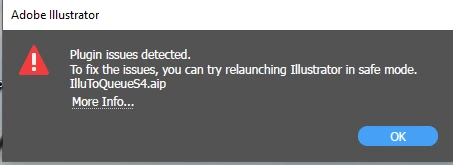
We are sorry to hear about your trouble. We have consolidated the most popular solutions that help in fixing this issue in this help article (https://helpx.adobe.com/illustrator/kb/plugin-missing-issue.html). Would you mind trying those and let us know how it goes?
If that doesn't help, would you mind sharing a few details along with the ones asked above:
The exact version of Illustrator and Windows
When did this start happening? Are there any recent changes made to your system? For example, any antivirus, system updates, plugins, or extensions installed recently.
Kindly update the discussion if you still need assistance with it. We'd be happy to help.
What operating system and what version of Illustrator are you using? Is this problem happening with just a single file or with all files? Are you using third party plugins? Have you tried quitting the program or restarting the computer and trying again?



 AdChoices