Participant
September 30, 2019
Answered

Image blending

  • September 30, 2019
  • 3 replies
  • 646 views

Hi friends!


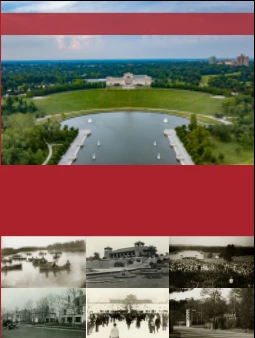
I am struggling to achieve a blended effect with collage images on the bottom of this document (left). I've tried feathering each image, but I'm unable to create a smooth transition between two images. I'm looking for something similar to the background images on this book cover (right).


Thanks for the help!
 

This topic has been closed for replies.
Correct answer Ton Frederiks

That looks like a job for Photoshop, blending image.

3 replies

Legend
September 30, 2019

In Illustrator had a Mask (Transparency panel) to a selected image. Then play with applying some gradients black to white, or using brushes on that (clipping) mask to learn and find out what can get achieved in your job.

Participant
October 1, 2019
I didn't think about applying a gradient with a mask. I'll have to mess around with it! Thanks, Federico.
John Mensinger
Community Expert
Community Expert
September 30, 2019

+1 on Ton's advice.


While it's possible to do some of this with opacity masking in Illustrator, Photoshop layer masking is the correct tool.

Participant
October 1, 2019
Thanks, John! I appreciate the support.
Ton Frederiks
Community Expert
Ton FrederiksCommunity ExpertCorrect answer
Community Expert
September 30, 2019

That looks like a job for Photoshop, blending image.

Participant
October 1, 2019
I dislike Photoshop, but I guess it will have to do! Thanks, Ton.
Ton Frederiks
Community Expert
Community Expert
October 1, 2019
Claire, as others mentioned, there are ways of doing it in Illustrator, but your life will be easier when doing this in Photoshop.