

defaultuls5w2ldwfhp
Participant
October 2, 2021
Answered

image Processor

  • October 2, 2021
  • 2 replies
  • 954 views

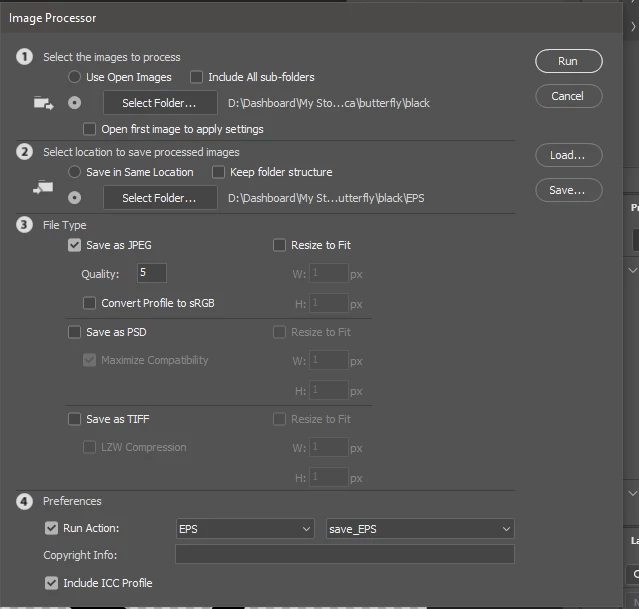
hi, everyone, I need help please, I work in photoshop a lot with the  Image Processor tool from the file menu, now my work lead me to work on illustrator, and the Image processor makes my work go easier, but can't find it, can anyone please show me how to get to it, working without it its very heavy work 😞

thank you so much
 

This topic has been closed for replies.
Correct answer Ton Frederiks

In Illustrator there is Batch in the Actions panel which allows you to apply an action to files in a folder and save them in another one.

2 replies

Ton Frederiks
Community Expert
Ton FrederiksCommunity ExpertCorrect answer
Community Expert
October 2, 2021

In Illustrator there is Batch in the Actions panel which allows you to apply an action to files in a folder and save them in another one.

defaultuls5w2ldwfhp
Participant
October 3, 2021

thank you Sir, Batch Option in Action Panel is the right tool I am looking for, you gave big help,

thank you so to all of you 

Ton Frederiks
Community Expert
Community Expert
October 3, 2021

Good to hear that helped.

Monika Gause
Community Expert
Community Expert
October 2, 2021

Try File > Export > Save for screens respectively the Export Asset panel.

defaultuls5w2ldwfhp
Participant
October 2, 2021

thank you for the quick response, I tried to use this save for screen,  not what I need, do you know the beauty of the Image Processor how its works? what I need is to repeat the same Action I early recorded on files in a folder and save them in another folder. 

Monika Gause
Community Expert
Community Expert
October 2, 2021

There is no Image Processor in Illustrator.