




Image Trace 2.0 - Trace images with more accuracy and control

Tired of dealing with large, complex files after tracing images in Illustrator? Struggling to edit traced objects or getting strange results when tracing gradients? If so, we’ve got the solution for you.
With Enhanced Image Trace in Illustrator 29.0, you can effortlessly convert raster images like JPEG, PNG, and PSD into high-quality vector artwork, offering greater precision and control. This upgraded feature allows you to create accurate traces with smoother curves that better reflect the original image.
Transform Complexity into Clarity: Experience Effortless Vectorization with Enhanced Image Trace in Illustrator 29.0.

|
|
Note: |
All these features are only available for Illustrator version 29.0 or later. |

Key features and highlights
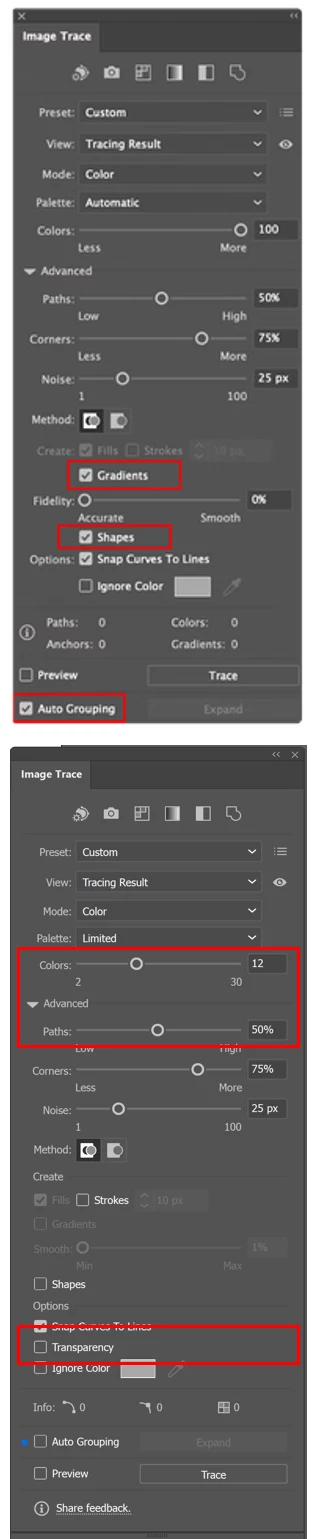
Gradient Detection:
Detect and trace linear gradients in Color or Grayscale mode.
To use this feature:
- Set the Mode to Color or Grayscale.
- Set Palette to Automatic or Full Tone.
- Use the Smooth slider to adjust the detection strength.
- After tracing, refine gradients with the Gradient tool.
Live Shape Detection:
Shapes like circles, squares, and rectangles are traced as live shapes, making them easier to edit.
Auto Grouping:
The Auto Grouping option organizes paths into logical groups making the traced result easier to edit. To view these groups in the Layers panel, you need to select Expand.
Transparency Support:
Transparent areas in images will no longer be traced as white. This feature is only available in Color Mode with a minimum of 4 colors and is not supported in Grayscale or Black and White modes.
Reduced Anchor Points:
Significant reduction in anchor points and paths, leading to more efficient outputs.
This update makes Tracing Images in Illustrator much more versatile and user-friendly. For more details & FAQs about this new feature, please click here.
We’d love to hear from you!
Try out the new "Enhanced Image Trace" feature and share your feedback by completing this survey. Feel free to reach out if you have any questions or need more tips!
Have questions? Click 'Reply' below to ask.
Click 'Follow' below to bookmark this post for easy reference.
 AdChoices