
Participant
July 10, 2024
Question

Images Desaturated When Imported to Illustrator

  • July 10, 2024
  • 1 reply
  • 1087 views

Hi there,


I hope someone can give me a hand with this.


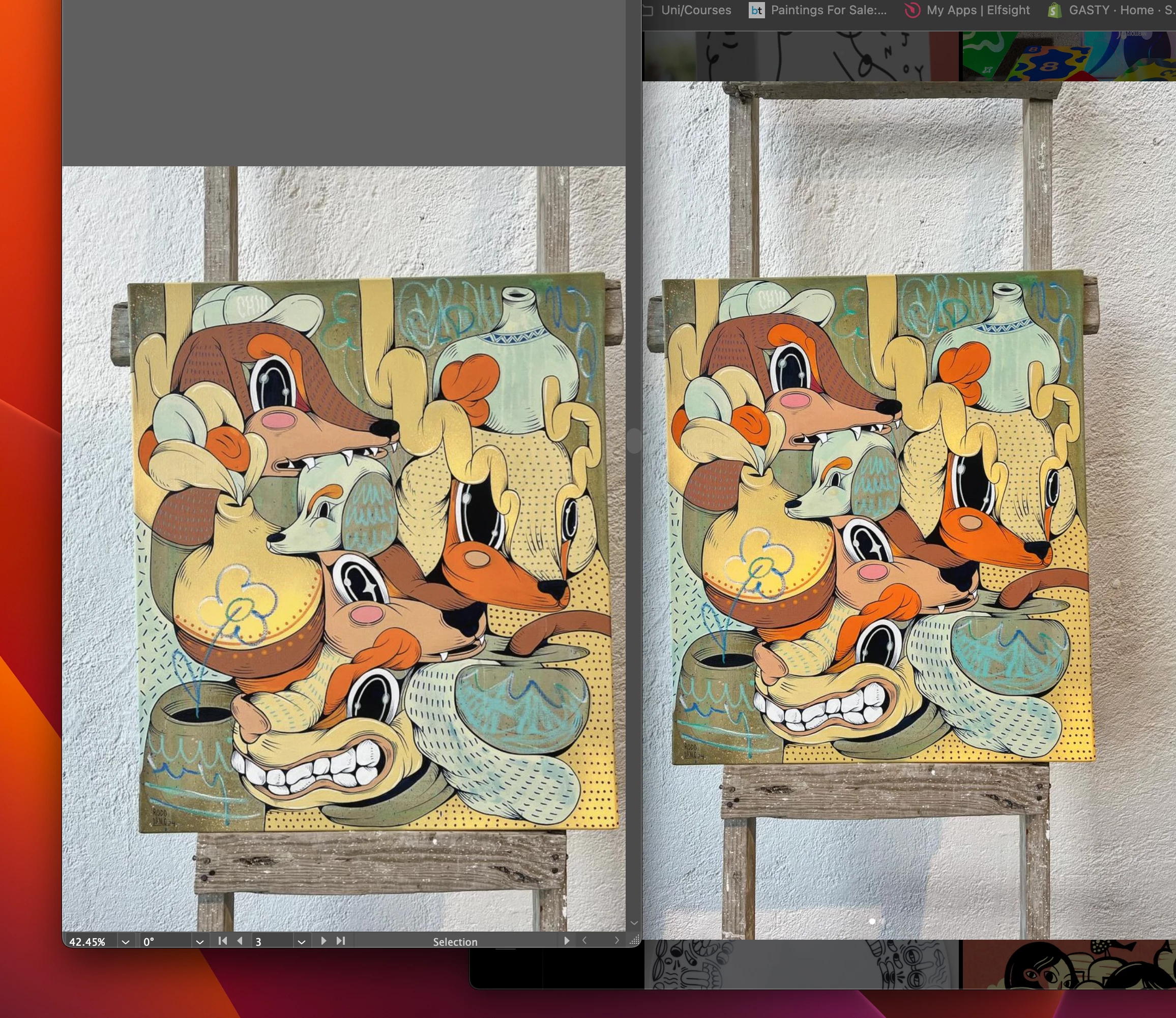
I'm using Illustrator, and when importing images, whether they are screenshots from my MacBook or JPEGs from Procreate, they always look desaturated in comparison with the original.


  • Illustrator file is set to RGB
  • Preserve Embedded Color Profile is enabled
  • sRGB working color profile is selected
  • Images are either screenshots on Mac (RGB) or Procreate JPEGs (RGB)
  • There’s no CMYK involved (clarifying this because it seems like an RGB to CMYK issue, but it’s not)


Screenshot attached, left is illustrator, right is Chrome browser window.
This topic has been closed for replies.

1 reply

Ton Frederiks
Community Expert
Community Expert
July 10, 2024

Can you check the document color profile in Illustrator, at the bottom of your window where it now says "Selection"?

GASTY.ArtAuthor
Participant
July 10, 2024

Hi Ton, yes its srgb.  Screenshot attached.


  • Illustrator file is set to RGB
  • Preserve Embedded Color Profile is enabled
  • sRGB working color profile is selected
  • Images are either screenshots on Mac (RGB) or Procreate JPEGs (RGB)
  • There’s no CMYK involved (clarifying this because it seems like an RGB to CMYK issue, but it’s not)
Ton Frederiks
Community Expert
Community Expert
July 10, 2024

Gaston, you may also check if something happens when you place the images.

In your Color Settings, check the warnings for mismatch/missing profiles. They will give you more control when placing images.