Екатерина29728302k0z3
Participant
July 13, 2023
Answered

images not inserting into illustrator

  • July 13, 2023
  • 3 replies
  • 788 views

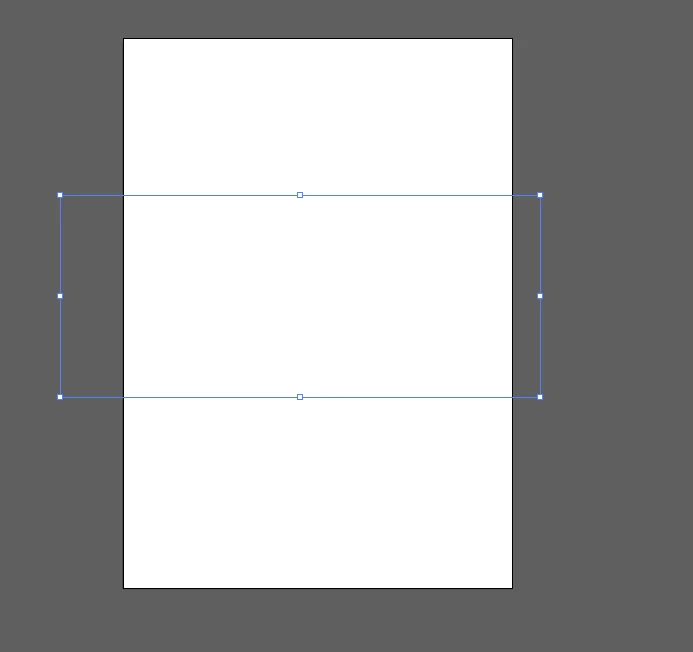
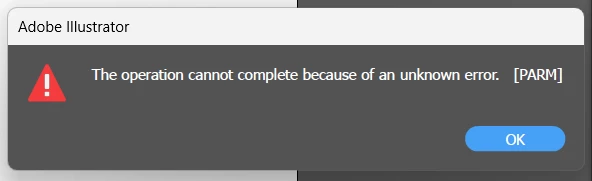
When I'm inserting an image into Illustrator by any possible way (copy-paste, place, open) just an empty frame or an unknown error appears
 

This topic has been closed for replies.
Correct answer Екатерина29728302k0z3

Hello, thanks for your reply!
I tried jpg and png images. Illustrator 2023 (the last update). The last reboot of computer was just now, I tried to paste image after that, but this action didn't help 😞
My boyfriend tried to uninstal illustrator and delete all the files and registry entries related to illustrator from my computer. It helped to solve the problem, but only for onece image pasting... After this problem returned 😞

3 replies

Anubhav M
Community Manager
Community Manager
July 18, 2023

Hello @Екатерина29728302k0z3,


We understand how frustrating it can be to encounter technical issues when working in Illustrator. I hope the suggestions shared by Monika helped resolve the problem. If not, kindly share more details, like the exact version of the OS/Illustrator, system config (CPU/GPU/Memory), and a sample file (https://community.adobe.com/t5/illustrator-discussions/share-your-files-in-6-simple-steps/td-p/12967531), so we can investigate this further.


Looking forward to hearing from you.


Thanks,

Anubhav

Екатерина29728302k0z3
Participant
July 25, 2023

Hello 🙂
Monika's suggestion to use the Cleaner tool helped me!
Thanks for your interest in my problem ♥

Monika Gause
Community Expert
Community Expert
July 13, 2023

What kind of image is it? You might need to open it in Photoshop and then resave.

Which version of Illustrator is it?

When was the last time you rebooted the computer?

Екатерина29728302k0z3
Екатерина29728302k0z3AuthorCorrect answer
Participant
July 18, 2023

Hello, thanks for your reply!
I tried jpg and png images. Illustrator 2023 (the last update). The last reboot of computer was just now, I tried to paste image after that, but this action didn't help 😞
My boyfriend tried to uninstal illustrator and delete all the files and registry entries related to illustrator from my computer. It helped to solve the problem, but only for onece image pasting... After this problem returned 😞

Monika Gause
Community Expert
Community Expert
July 18, 2023

You should not do that manually.

There is the Cleaner tool to do it: https://helpx.adobe.com/creative-cloud/kb/cc-cleaner-tool-installation-problems.html


And also you might want to contact Customer Care so they can take a look at it:

https://helpx.adobe.com/contact.html

Huzefa Pithawala
Participating Frequently
July 13, 2023

Hi,

There is another solution for this:

- open the image in any photo viewer. (don't copy-paste without open)

- copy the image from options.

- then go to illustrator and paste it (cntl/cmd+v).


Another method is drag and drop the image from folder to illustrator.

Екатерина29728302k0z3
Participant
July 18, 2023

Hello! Thanks for your reply 🙂
Just now tested your theories. Unfortunately they both don't work(
An empty frame appeares as before ((
