Participant
February 25, 2017
Answered

Import names from Excel to an array

  • February 25, 2017
  • 2 replies
  • 4622 views

I'm sure this has been asked and answered before, but I can't find the right search terms to get an answer.

I have an Excel file with names in a column. I need to import those names into Illustrator and place each name on an object. If there are more names than objects, I need it to create another identical artboard for the additional names. I don't know anything about scripting. Can someone help please?
    This topic has been closed for replies.
    Correct answer CarlosCanto

    it could be scripted, but it will take some time. It's not hard to do it manually.

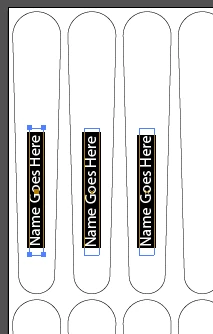
    1. duplicate your text frames, one per object

    2. select all text frames

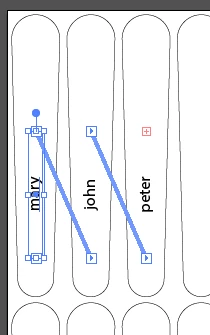
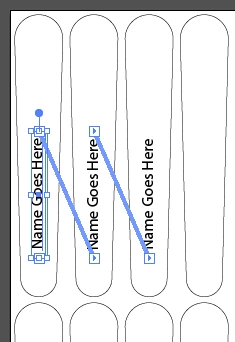
    3. go to Type->Threaded Text->Create

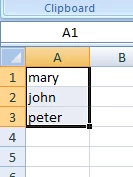
    4. copy you names from Excel

    5. back to Illustrator, get the Type Tool and select the first Text Frame, then Ctrl+A to select all Frames

    6. Ctrl+V to paste data from Excel

    2 replies

    CarlosCanto
    Community Expert
    Community Expert
    February 25, 2017

    can you post a sample of your objects and how you want the names "placed" in them?

    Participant
    February 25, 2017

    I'm not sure how to attach a file here, but you can download it from my Dropbox with https://www.dropbox.com/s/q0gi5e5wnjzi1a5/Names.ai?dl=0

    I need it to populate a name inside every object (and adjust font size to fit) automagically. Then they'll be laser engraved.

    CarlosCanto
    Community Expert
    CarlosCantoCommunity ExpertCorrect answer
    Community Expert
    February 26, 2017

    it could be scripted, but it will take some time. It's not hard to do it manually.

    1. duplicate your text frames, one per object

    2. select all text frames

    3. go to Type->Threaded Text->Create

    4. copy you names from Excel

    5. back to Illustrator, get the Type Tool and select the first Text Frame, then Ctrl+A to select all Frames

    6. Ctrl+V to paste data from Excel

    rcraighead
    Legend
    February 25, 2017

    Unless something has changed the Excel file needs to be saved as an xml file for use with Illustrator.

    I may not understand your need, but based on my experience I would create a single artboard with the variable(s) then run a batch Action that would save out multiple unique files (such as PDF) for output. The unique files can be named based on the variable data info.

    Edit:

    A search found this nifty page that will convert your Excel data to an XML compatible with AI. Excel(CSV) – Illustrator XML Converter

    The "XML" export does not work directly from Excel.

    Once you've loaded the variable library and verified the objects are updating properly in the file, you can simply create an action to "Save As" then select "Batch" from the Action panel menu. It will give you an option to save files based on the Data Set.