

stevebrig
Inspiring
July 6, 2022
Answered

Imported PNGs are huge on the canvas

  • July 6, 2022
  • 4 replies
  • 1250 views

They import but do not come in at the native file size instead are huge and kicks an error of cannot move the objects. I need to select it and manually change the size abck to the expected size to use.


More PNG issues with Adobe what gives?
 

This topic has been closed for replies.
Correct answer Ton Frederiks

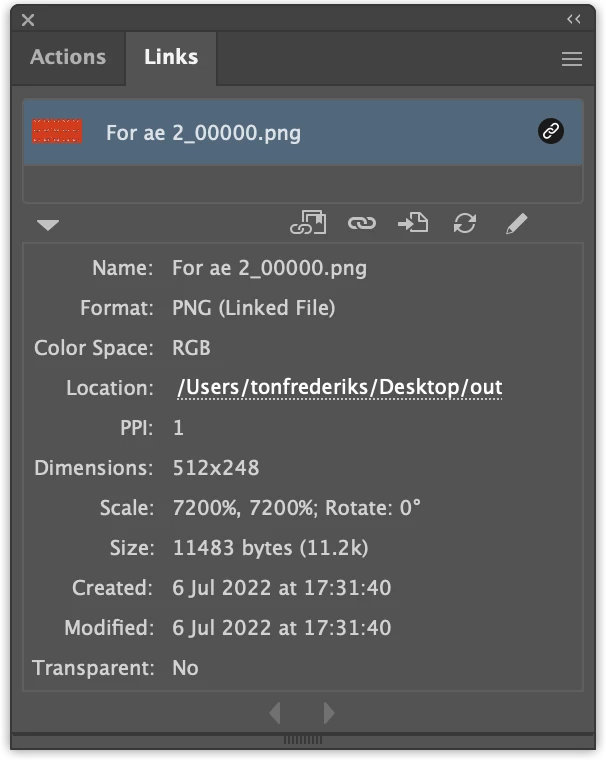
The PNG from After Effects problem is back.

The exported PNG is seen by Illustrator as having a resolution of 1 ppi.

4 replies

Ton Frederiks
Community Expert
Community Expert
July 6, 2022
Ton Frederiks
Community Expert
Ton FrederiksCommunity ExpertCorrect answer
Community Expert
July 6, 2022

The PNG from After Effects problem is back.

The exported PNG is seen by Illustrator as having a resolution of 1 ppi.

Ton Frederiks
Community Expert
Community Expert
July 6, 2022

What is the resolution of these files and where do they come from?

stevebrig
stevebrigAuthor
Inspiring
July 6, 2022

It doesn't matter what the resolution is.

The PNG files are rendered from After Effects.


Example: this artboard is 600px by 600px in illustrator. The PNG file is 512px x 245px.


When I place it in the file it comes in at 16383 px x 16383 px!

So I manually have to define the size for it to work. I remeber this happened with PNGs in a few version back but was fixed. Now it's broke again.


BTW: I am running the latest version of the applications on the latest version of Mac OS


Jacob Bugge
Community Expert
Community Expert
July 6, 2022

Steve,


As a curiosity, 16383 px x 16383 px is the size of the entire (normal) Workspace, also known as Canvas (taken from PS speak).


Sometimes, (certain) things may fail or stop working for no apparent reason.


The following is a general list of things you may try when:


A) The issue is not in a specific file,
B) You have a printer correctly installed, connected, and turned on if it is physical printer. Or you may use Adobe PDF/Acrobat Distiller as the default printer instead.
C) It is not caused by issues with opening a file from external media.
D) It is not caused by other applications (you may close down/disable everything else running, including browsers and antivirus, then try again). There are quite a few usual suspects that may disturb and confuse Illy (job description Adobe Illustrator), and they can make her move in mysterious ways (even more than usual, some would say).


You may have tried/done some of them already; 1) and 2) and 3) are the easy ones for temporary strangenesses, 4), 5) and 6), are specifically aimed at possibly corrupt preferences.


If possible/applicable, you should save current artwork first, of course.


1) Close down Illy and open again;
2) Restart the computer (you may need to do it at least 5 times);
3) Log out of your Adobe account and log back in;

4) Close down Illy and press Ctrl+Alt+Shift/Cmd+Option+Shift during startup (easy but irreversible)

5) Follow the instructions here, you can preserve the preferences as described:
https://helpx.adobe.com/illustrator/using/setting-preferences.html


KShinabery212
Community Expert
Community Expert
July 6, 2022

Try using FILE > PLACE... then you can drag the PNG to be any size you like on the canvas.


Let's connect on LinkedIn. https://www.linkedin.com/in/kshinabery/