
Silly-V
Legend
March 2, 2015
Answered

Importing dataSet XML <p>whitespace</p> to create blank line

  • March 2, 2015
  • 2 replies
  • 990 views

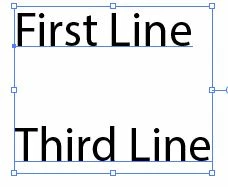
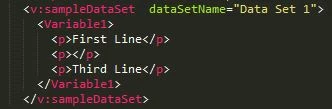
I would like to import a dataset which contains a text-content data which has several <p>text</p> elements in it, one of them being a separating blank 'paragraph' designed to put a simple carriage-return into the bound text-area.
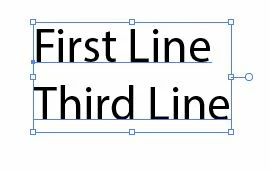
What happens is that when I import such an XML file, the empty <p> tag has its whitespace ignored, and the blank line does not get produced.  Even when exporting a dataset with a variable which was produced from a textframe which has a blank line in between a topmost and bottom-most line, when importing back, the line disappears. Simply put, is there any way to make my desired blank line with any kind of setting or XML trickery? I already tried putting a nextline in CDATA in the 'empty' <p>, and setting the attribute 'xml:space="preserve"' on the empty <p>.
This topic has been closed for replies.
Correct answer majorLaser

well , yea, I was thinking in case of last resort, they could put a special character in front of whitespace, or where there's an empty <p>, and have an after-script or find & replace to change the character into an empty string.


The only way I've found to do this is to use the non-breaking space entity number, however in the result you do get a space character as well as a line-break:

<p>First Line</p>

<p>&#160;</p>

<p>Third Line</p>

Note for whatever reason you must use the entity number and not the entity name (ampersand nbsp; - it won't let me type the actual entity).

2 replies

Silly-V
Silly-VAuthor
Legend
March 4, 2015

However, I do still want to see if there's a way to preserve the whitespace if needed.

CarlosCanto
Community Expert
Community Expert
March 5, 2015

in case there's no solution, you can always add the empty paragraphs after Importing the xml, right?

Silly-V
Silly-VAuthor
Legend
March 5, 2015

well , yea, I was thinking in case of last resort, they could put a special character in front of whitespace, or where there's an empty <p>, and have an after-script or find & replace to change the character into an empty string.

Silly-V
Silly-VAuthor
Legend
March 3, 2015

Actually, I don't think this is an issue, as a wise person who is knowledgeable in the mysteries of publishing workflows and guidelines has stated the following when I asked the above:

“Best practice” when entering raw text for use in “typesetting” is to only use a single hard return to separate paragraphs. The layout will then use space before/after/indents to visually separate the paragraphs.

The problem is, many “authors” will use an extra return space to visually separate paragraphs, not understanding that the layout artist is going to be using space before/after styles etc. This then creates more work for the person importing the raw text, as they have to find and delete all cases of double returns etc.