

Sosebot
Participating Frequently
July 26, 2022
Answered

Importing user defined color swatches from alias files consistently crashes Illustrator.

  • July 26, 2022
  • 2 replies
  • 345 views

I keep and alias of my ASE files with Illustrator's Presets > Swatches folder for easy access. I use an alias because I ofetn have to adjust the color pallettes, and having to chnage multiple files can result in mistakes.


Just switched to a new MBP M1 Max running Monterey 12.4 — and now when I try to load my ASE files from the presets folder, Illustrator cashes every time. But if I load the same files NOT from an alias, they load correctly. Before I switched machines, using the same version of Illustrator, I could load swatches from teh alias in the presets folder with no problem.

Anyone else experiencing this?
This topic has been closed for replies.
Correct answer Anubhav M

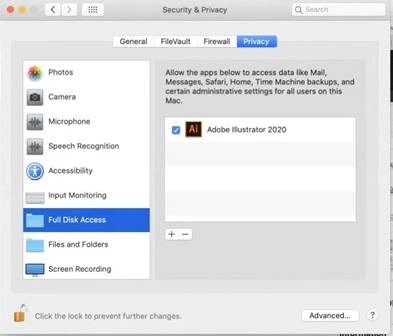
Hello @Sosebot, sorry to hear about this experience. As pointed out by Monika, newer versions of macOS have several checks in place to avoid issues. You may try the following steps to grant Illustrator Full Disk Access and share your observations:

  • Add Illustrator to Full Disk Access under System Preferences

    Go to System Preferences > Security and Privacy > Full Disk Access > Check Adobe Illustrator. It will ask you to quit Illustrator and relaunch it again.


Also, try running Illustrator under the root user account and let us know how it goes.


Looking forward to your response.


Thanks,

Anubhav

2 replies

Anubhav M
Community Manager
Anubhav MCommunity ManagerCorrect answer
Community Manager
July 26, 2022

Hello @Sosebot, sorry to hear about this experience. As pointed out by Monika, newer versions of macOS have several checks in place to avoid issues. You may try the following steps to grant Illustrator Full Disk Access and share your observations:

  • Add Illustrator to Full Disk Access under System Preferences

    Go to System Preferences > Security and Privacy > Full Disk Access > Check Adobe Illustrator. It will ask you to quit Illustrator and relaunch it again.


Also, try running Illustrator under the root user account and let us know how it goes.


Looking forward to your response.


Thanks,

Anubhav

Sosebot
SosebotAuthor
Participating Frequently
July 26, 2022

This worked — thank you!

Monika Gause
Community Expert
Community Expert
July 26, 2022

Newer macOS have locked up everything. Does Illustrator have full disk access? Are these folders unlocked?