


Ezmash
Participant
June 14, 2026
Answered

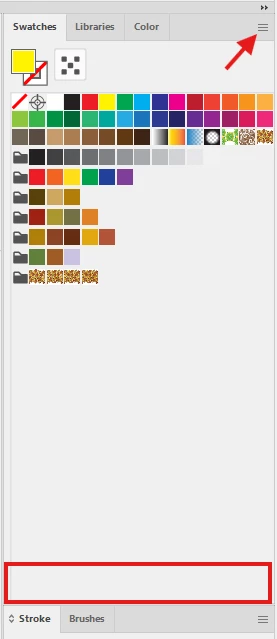
In Illustrator 30.5.1 the tools at the bottom of the swatch window have disappeared

  • June 14, 2026
  • 1 reply
  • 29 views

I’ve just installed the latest version today, and the icons for swatch libraries, add/delete swatches/groups are no longer showing at the bottom of the swatches window.  I can get to them via the hamburger menu but I’d prefer to have them back at the bottom.

Is there some way I can get them to show, or have they been removed?
 

    Correct answer Ton Frederiks

    @Ezmash Did you try to restart Illustrator, restart your computer? If that does not help, reset Preferences?

    https://helpx.adobe.com/illustrator/using/video/setting-preferences-video.html

    1 reply

    Ton Frederiks
    Community Expert
    Ton FrederiksCommunity ExpertCorrect answer
    Community Expert
    June 14, 2026

    @Ezmash Did you try to restart Illustrator, restart your computer? If that does not help, reset Preferences?

    https://helpx.adobe.com/illustrator/using/video/setting-preferences-video.html

    Ezmash
    EzmashAuthor
    Participant
    June 14, 2026

    I don’t remember if I had restarted Illustrator more than once since the update, but I’ve just opened it today, and the icons are back.

    Ton Frederiks
    Community Expert
    Community Expert
    June 14, 2026

    Good to hear you’ve got it working.
