Denise5F95
Participant
Nov 7, 2022 8:46 PM UTC
Answered

In my Swatch Panel there is an option of User Defined but it is grayed out & I can't find it

In my swatch Panel there is a User Defined option but mine is grayed out. How do I locate it or access it?

 

This topic is closed to new replies. Start a new post to keep the conversation going.
CarlosCanto
CarlosCantoCorrect answer
Community Expert
Nov 7, 2022 10:24 PM UTC

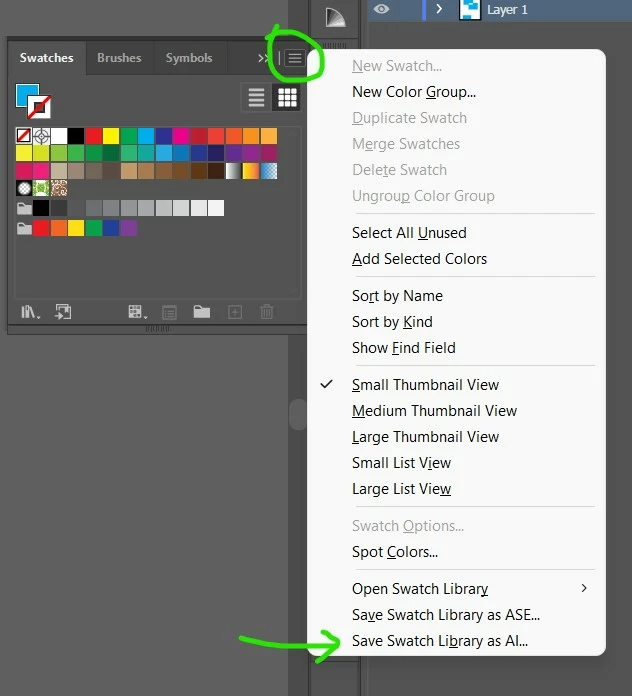
as Monika mentioned, you need to save your user defined swatches first, then the button will be available


9 replies

Participating Frequently
Dec 24, 2024 3:46 PM UTC

It's been years but I hope you found a solution because it is not here

Translate
Participating Frequently
Dec 24, 2024 3:51 PM UTC

My problem was that I had fill selected instead of stroke, once I switched to stroke I was allowed to save. Without saving a seperate file for the swatches to live in btw. You only need to do that if you would like to bring up a swatch library later, not for simply making them in a file.

Translate
Participating Frequently
Dec 24, 2024 3:54 PM UTC

After that I could save from either the fill or stroke, seems like a simple bug on my end.

Translate
Monika Gause
Community Expert
Community Expert
Nov 7, 2022 9:18 PM UTC

You mean the option in the menu?

It will be active once you have saved a custom swatches library into the default location in your user folder.

Translate
Denise5F95
Participant
Nov 7, 2022 9:24 PM UTC
If you go to Swatches when it opens down at the bottom left corner there is
an icon that looks like books If you open it & go to the bottom of the list
there is a user Define option. I have saved all my swatches in there but it
has disappeared/grayed out & can't be opened. How do re-activate it or
locate it?
Translate
Monika Gause
Community Expert
Community Expert
Nov 7, 2022 9:49 PM UTC

Has there been an Illustrator update?

And you didn't migrate your settings?

In that case you could search for the swatches in your folders. Here are the locations: https://www.vektorgarten.de/illustrator-settings.html 

Translate