

Yura Timoshenko
Inspiring
December 12, 2019
Question

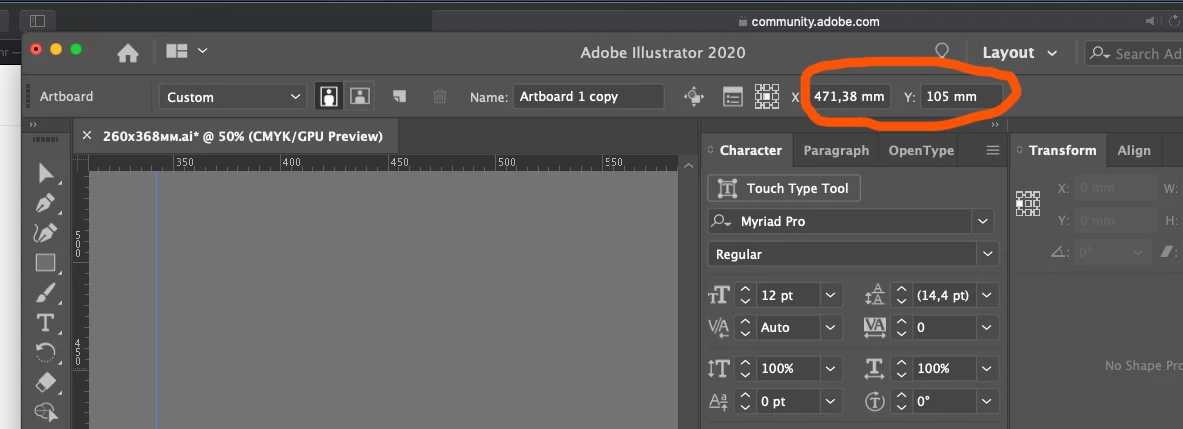
In the new Illustrator 2020 suddently in document properties artboard dimensions disappeared

  • December 12, 2019
  • 2 replies
  • 681 views

In the new Illustrator 2020 suddently in document properties artboard dimensions disappeared!

Instead it shows diameter or something. Now instead of straight artboard dimension it shows something else, and I cannot even find where to see actual artboard dimensions, looks very messed up... Is it a glitch or a fancy new feature of 2020 version which I cannot comprehend in backward 2019?
This topic has been closed for replies.

2 replies

Ton Frederiks
Community Expert
Community Expert
December 12, 2019

Click the Artboard Options (to the left of your red marked X Y coordinates.

Or double click the Artboard tool.

Or double click the artboard in the Artboard panel.

Monika Gause
Community Expert
Community Expert
December 12, 2019

Are you referring to the fact that there is no Width/Height shown? Or to the fact that there is millimetres, a unit used a round the world?

As for the W/H, you could check the control panel menu if something is hidden deliberately.

As for the millimetres, just right-click the rulers to select some other unit.