


Known Participant
August 6, 2026
Question

Inconsistent outline thickness after expanding artwork

  • August 6, 2026
  • 6 replies
  • 34 views

Hi,

I have a problem in Illustrator.

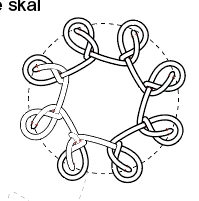
I made this pattern from the same object repeated around a circle. All strokes originally had the same thickness.

The artwork is now expanded, and all shapes have been united/merged. There are no live strokes anymore, only filled vector shapes.

The black color is the same everywhere: 100% K (C0 M0 Y0 K100).

The strange thing is that the artwork looks correct in Illustrator, but some outlines appear thicker than others:

  • in exported PDFs
  • when the PDF is placed in InDesign
  • in print

Has anyone seen this before or know what could cause it?

I've attached a screenshot.

Thanks for any help!

Ellen
 

    6 replies

    Monika Gause
    Community Expert
    Community Expert
    August 6, 2026

    How do you print the files? With a high resolution PostScript enabled device? That could possibly make a difference.


    With the SVGs that could happen when the Decimals is not set high enough

    ellenstaAuthor
    Known Participant
    August 7, 2026

    Thanks.

    The issue is visible both on screen and in print. I've printed the files on a Canon home printer and on a large office laser printer, and I can see the same difference on both.

    My main concern is whether this will also be visible in the final printed book. The PDF is placed in an InDesign document, and the book will be going to press soon.

    Monika Gause
    Community Expert
    Community Expert
    August 7, 2026

    It’s really difficult to say without even seeing the prints. The best thing you can do is contact the printer about this. Have them print a Proof. 

    Ton Frederiks
    Community Expert
    Community Expert
    August 6, 2026

    @ellensta thanks for sharing. I cannot see much difference between those files (but that could be me).

    The explanation I gave for thickening (hinting) is not working for your file since the objects use pattern brushes that do not contain stroked objects but filled shapes.

    Ton Frederiks
    Community Expert
    Community Expert
    August 6, 2026

    @ellensta Can you share a vector example, preferable with an unexpanded/expanded version?

    Outlining strokes removes the hinting that makes small lines look consistent on low resolution devices like desktop printers and displays.

    ellenstaAuthor
    Known Participant
    August 6, 2026

    Hi,

    Thanks for the explanation. I've attached the AI file in its current, unexpanded state. 

    Ellen