
Participant
February 25, 2024
Answered

Inconsistent Pixel Size Display Issue in Adobe Illustrator

  • February 25, 2024
  • 2 replies
  • 590 views

I am using Adobe Illustrator v28.2 on Windows 11 Version 10.0.22631 Build 22631. Today (25/02/2024), I encountered an issue where the pixel size displayed after inputting does not match what I entered when adjusting the shape size. Is this a bug or do I need to adjust certain settings?
This topic has been closed for replies.
Correct answer Mike_Gondek10189183

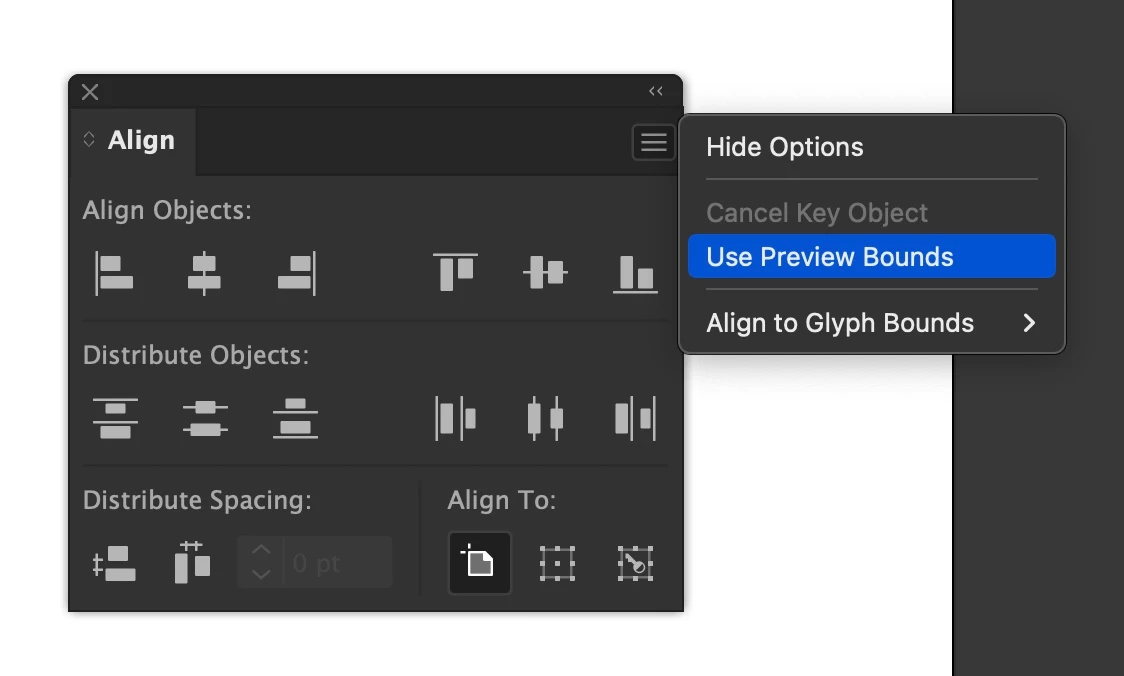
You can find that in the align aplette flyout menu. It adds the thickness of the stroke to the transform value after you hit enter. So uncheck that.


2 replies

Mike_Gondek10189183
Community Expert
Mike_Gondek10189183Community ExpertCorrect answer
Community Expert
February 25, 2024

You can find that in the align aplette flyout menu. It adds the thickness of the stroke to the transform value after you hit enter. So uncheck that.


Participant
February 25, 2024

ah i see, thankyou for the answer!

Ton Frederiks
Community Expert
Community Expert
February 25, 2024

Good to hear that helped. You have also Scale Strokes and Effects turned on, which also adds to the fractions.

Ton Frederiks
Community Expert
Community Expert
February 25, 2024

Do you have Use Preview Bounds checked in your Preferences?