Incorrect size of SVG symbol
Hi, I have an SVG file that I need to open in Ilustrator and where exact size of the shapes is crucial. There is a symbol that I reference. The source code of the SVG is following:
<?xml version="1.0" encoding="UTF-8"?>
<!DOCTYPE svg PUBLIC "-//W3C//DTD SVG 1.1//EN" "http://www.w3.org/Graphics/SVG/1.1/DTD/svg11.dtd">
<svg id="SvgjsSvg1000" xmlns="http://www.w3.org/2000/svg" version="1.1" xmlns:xlink="http://www.w3.org/1999/xlink" xmlns:svgjs="http://svgjs.com/svgjs" width="210mm" height="297mm" viewBox="0 0 210 297" viewbox="0 0 210 297"><defs id="SvgjsDefs1001"><symbol id="shape_id2" fill="none" preserveAspectRatio="none" overflow="visible" style="overflow: visible;" viewBox="0 0 10 10"><rect id="SvgjsRect1172" width="10" height="10" x="0" y="0" rx="0.3" ry="0.3" stroke="#000000" stroke-width="0.3" vector-effect="non-scaling-stroke"></rect></symbol></defs><rect id="SvgjsRect1007" width="210" height="297" fill="none" stroke="#000000" stroke-width="0.3" vector-effect="non-scaling-stroke"></rect><g id="workSheet"><g id="layout_4d8a39c2-a80f-4ba9-81d9-674ada94197f" transform="matrix(1,0,0,1,55,47.5)"><g id="SvgjsG1174"><use id="SvgjsUse1175" xlink:href="#shape_id2" x="0" y="0" width="100" height="100"></use></g><g id="SvgjsG1178"><use id="SvgjsUse1179" xlink:href="#shape_id2" x="0" y="102" width="100" height="100"></use></g></g></g><line id="control-line" x1="0" y1="0" x2="10" y2="0" fill="none" stroke="#000000" stroke-width="0.3"></line></svg>
But even though the size in the <use /> elements is set to 100. The size in Ilustrator is 99,807mm.
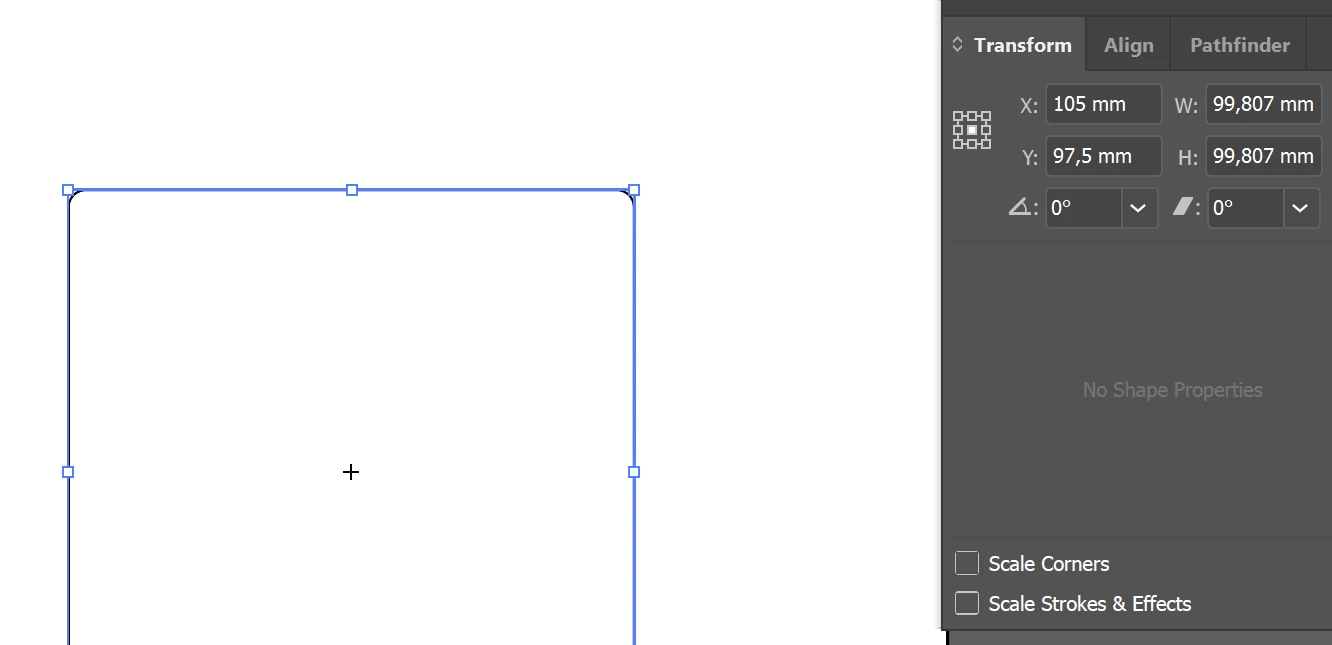
If I open the same file in Corel Draw, the size is correc (100mm).
I noticed when I remove the stroke attributes from the <symbol> element: stroke="#000000" stroke-width="0.3" vector-effect="non-scaling-stroke" and open the file in Illustrator, the size is correct. But I really need the line to be there and also, when it comes to more complicated shapes. The size is not correct even without lines. For example this svg.
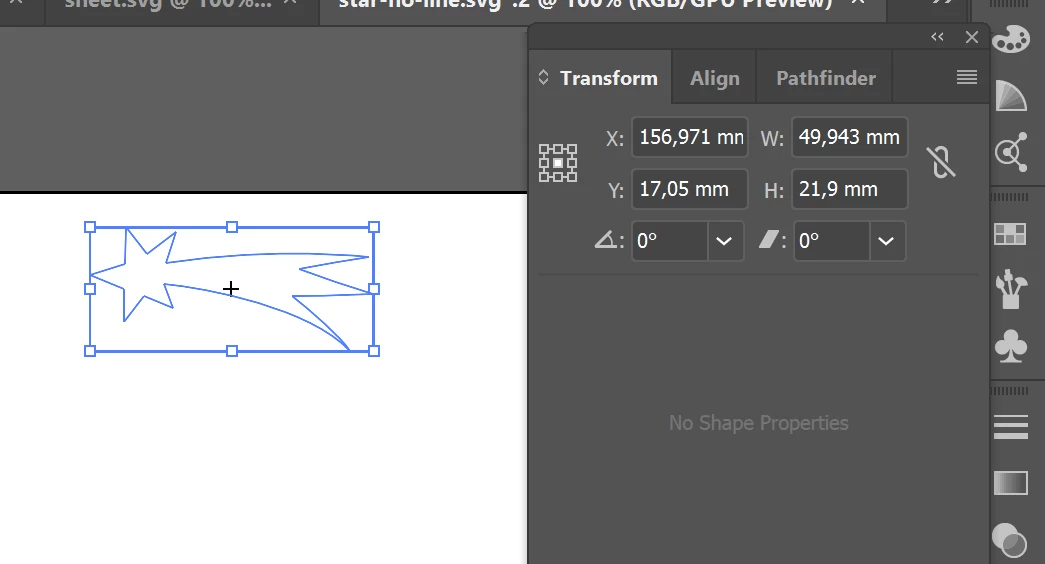
It's a shape of a comet that is supposed to be 50mm wide. But is only 49,943. I know it isn't a huge difference but I need this to be really exact size.
This is the source code:
<?xml version="1.0" encoding="UTF-8"?>
<!DOCTYPE svg PUBLIC "-//W3C//DTD SVG 1.1//EN" "http://www.w3.org/Graphics/SVG/1.1/DTD/svg11.dtd">
<svg id="SvgjsSvg1000" xmlns="http://www.w3.org/2000/svg" version="1.1" xmlns:xlink="http://www.w3.org/1999/xlink" xmlns:svgjs="http://svgjs.com/svgjs" width="210mm" height="297mm" viewBox="0 0 210 297" viewbox="0 0 210 297"><defs id="SvgjsDefs1001"><symbol id="shape_id70" fill="#000" preserveAspectRatio="xMinYMin meet" overflow="visible" style="overflow: visible;" viewBox="0.897911012172699 0.8586990237236023 27.841039657592773 12.2083101272583"><path id="SvgjsPath1030" d="M26.4405 13.067C25.685728 11.72066 22.49458 8.90142 20.73442 7.678030000000001C22.99088 7.6388854 23.85819 7.6146637 28.738950000000003 7.456081C26.298620000000003 6.628644 23.737080000000002 5.904501 21.418080000000003 4.973881C23.937200000000004 4.5081560000000005 26.519460000000002 4.085806000000001 28.376120000000004 3.7947010000000008C28.376120000000004 3.7946453179000006 19.370760000000004 2.7013810000000005 8.358420000000002 4.414499000000001L9.412540000000002 1.364679000000001L6.497860000000001 3.520859000000001L4.442800000000001 0.858699000000001L4.324531000000001 4.464059000000001L0.897911000000001 5.542179000000001L4.249861000000001 6.913239000000001L4.236664300000001 10.198599000000002L6.192894300000001 7.622079000000001L9.099554300000001 8.802649L8.143547300000002 6.432539C12.463087300000002 6.813516 22.5756473 8.818239 26.440547300000002 13.067009Z "></path></symbol></defs><rect id="SvgjsRect1007" width="210" height="297" fill="none" stroke="#000000" stroke-width="0.3" vector-effect="non-scaling-stroke"></rect><g id="workSheet"><g id="layout_57484796-69d7-463f-b860-049229724c43" transform="matrix(1,0,0,1,28.085609436035156,6.100006103515625)"><g id="SvgjsG1033"><use id="SvgjsUse1034" xlink:href="#shape_id70" x="0" y="0" width="50" height="21.9"></use></g><g id="SvgjsG1035"><use id="SvgjsUse1036" xlink:href="#shape_id70" x="51.942928314208984" y="0" width="50" height="21.9"></use></g><g id="SvgjsG1037"><use id="SvgjsUse1038" xlink:href="#shape_id70" x="103.88585662841797" y="0" width="50" height="21.9"></use></g><g id="SvgjsG1041"><use id="SvgjsUse1042" xlink:href="#shape_id70" x="0" y="23.899999618530273" width="50" height="21.9"></use></g><g id="SvgjsG1043"><use id="SvgjsUse1044" xlink:href="#shape_id70" x="51.942928314208984" y="23.899999618530273" width="50" height="21.9"></use></g><g id="SvgjsG1045"><use id="SvgjsUse1046" xlink:href="#shape_id70" x="103.88585662841797" y="23.899999618530273" width="50" height="21.9"></use></g><g id="SvgjsG1049"><use id="SvgjsUse1050" xlink:href="#shape_id70" x="0" y="47.79999923706055" width="50" height="21.9"></use></g><g id="SvgjsG1051"><use id="SvgjsUse1052" xlink:href="#shape_id70" x="51.942928314208984" y="47.79999923706055" width="50" height="21.9"></use></g><g id="SvgjsG1053"><use id="SvgjsUse1054" xlink:href="#shape_id70" x="103.88585662841797" y="47.79999923706055" width="50" height="21.9"></use></g><g id="SvgjsG1057"><use id="SvgjsUse1058" xlink:href="#shape_id70" x="0" y="71.69999885559082" width="50" height="21.9"></use></g><g id="SvgjsG1059"><use id="SvgjsUse1060" xlink:href="#shape_id70" x="51.942928314208984" y="71.69999885559082" width="50" height="21.9"></use></g><g id="SvgjsG1061"><use id="SvgjsUse1062" xlink:href="#shape_id70" x="103.88585662841797" y="71.69999885559082" width="50" height="21.9"></use></g><g id="SvgjsG1065"><use id="SvgjsUse1066" xlink:href="#shape_id70" x="0" y="95.5999984741211" width="50" height="21.9"></use></g><g id="SvgjsG1067"><use id="SvgjsUse1068" xlink:href="#shape_id70" x="51.942928314208984" y="95.5999984741211" width="50" height="21.9"></use></g><g id="SvgjsG1069"><use id="SvgjsUse1070" xlink:href="#shape_id70" x="103.88585662841797" y="95.5999984741211" width="50" height="21.9"></use></g><g id="SvgjsG1073"><use id="SvgjsUse1074" xlink:href="#shape_id70" x="0" y="119.49999809265137" width="50" height="21.9"></use></g><g id="SvgjsG1075"><use id="SvgjsUse1076" xlink:href="#shape_id70" x="51.942928314208984" y="119.49999809265137" width="50" height="21.9"></use></g><g id="SvgjsG1077"><use id="SvgjsUse1078" xlink:href="#shape_id70" x="103.88585662841797" y="119.49999809265137" width="50" height="21.9"></use></g><g id="SvgjsG1081"><use id="SvgjsUse1082" xlink:href="#shape_id70" x="0" y="143.39999771118164" width="50" height="21.9"></use></g><g id="SvgjsG1083"><use id="SvgjsUse1084" xlink:href="#shape_id70" x="51.942928314208984" y="143.39999771118164" width="50" height="21.9"></use></g><g id="SvgjsG1085"><use id="SvgjsUse1086" xlink:href="#shape_id70" x="103.88585662841797" y="143.39999771118164" width="50" height="21.9"></use></g><g id="SvgjsG1089"><use id="SvgjsUse1090" xlink:href="#shape_id70" x="0" y="167.2999973297119" width="50" height="21.9"></use></g><g id="SvgjsG1091"><use id="SvgjsUse1092" xlink:href="#shape_id70" x="51.942928314208984" y="167.2999973297119" width="50" height="21.9"></use></g><g id="SvgjsG1093"><use id="SvgjsUse1094" xlink:href="#shape_id70" x="103.88585662841797" y="167.2999973297119" width="50" height="21.9"></use></g><g id="SvgjsG1097"><use id="SvgjsUse1098" xlink:href="#shape_id70" x="0" y="191.1999969482422" width="50" height="21.9"></use></g><g id="SvgjsG1099"><use id="SvgjsUse1100" xlink:href="#shape_id70" x="51.942928314208984" y="191.1999969482422" width="50" height="21.9"></use></g><g id="SvgjsG1101"><use id="SvgjsUse1102" xlink:href="#shape_id70" x="103.88585662841797" y="191.1999969482422" width="50" height="21.9"></use></g><g id="SvgjsG1105"><use id="SvgjsUse1106" xlink:href="#shape_id70" x="0" y="215.09999656677246" width="50" height="21.9"></use></g><g id="SvgjsG1107"><use id="SvgjsUse1108" xlink:href="#shape_id70" x="51.942928314208984" y="215.09999656677246" width="50" height="21.9"></use></g><g id="SvgjsG1109"><use id="SvgjsUse1110" xlink:href="#shape_id70" x="103.88585662841797" y="215.09999656677246" width="50" height="21.9"></use></g><g id="SvgjsG1113"><use id="SvgjsUse1114" xlink:href="#shape_id70" x="0" y="238.99999618530273" width="50" height="21.9"></use></g><g id="SvgjsG1115"><use id="SvgjsUse1116" xlink:href="#shape_id70" x="51.942928314208984" y="238.99999618530273" width="50" height="21.9"></use></g><g id="SvgjsG1117"><use id="SvgjsUse1118" xlink:href="#shape_id70" x="103.88585662841797" y="238.99999618530273" width="50" height="21.9"></use></g><g id="SvgjsG1121"><use id="SvgjsUse1122" xlink:href="#shape_id70" x="0" y="262.899995803833" width="50" height="21.9"></use></g><g id="SvgjsG1123"><use id="SvgjsUse1124" xlink:href="#shape_id70" x="51.942928314208984" y="262.899995803833" width="50" height="21.9"></use></g><g id="SvgjsG1125"><use id="SvgjsUse1126" xlink:href="#shape_id70" x="103.88585662841797" y="262.899995803833" width="50" height="21.9"></use></g></g></g><line id="control-line" x1="0" y1="0" x2="10" y2="0" fill="none" stroke="#000000" stroke-width="0.3"></line></svg>
Can somebody please advice, if I can add some attributes to the svg file or do anything else to make sure it renders correctly in Ilustrator?
Thank you,
Ivana
 AdChoices