Participant
March 23, 2023
Answered

Inicializando o Illustrator
  • March 23, 2023
  • 2 replies
  • 368 views

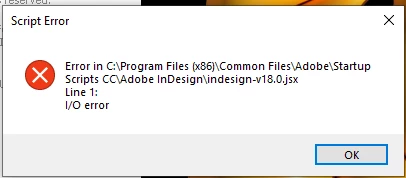
Toda vez que vou inicializar o Illustrato ele ta aparecendo essa mensagem, alguem sabe informar como proceder?

This topic has been closed for replies.
Correct answer Anubhav M

Hello @Rafael5EC1,


Sorry to hear about this experience. I hope the suggestions shared by Carlos helped resolve the problem. If not, kindly share a few details like:

  • The exact version of OS and its built number
  • The exact version of Illustrator you have installed in which you faced this issue.
  • When did this start happening? Are there any recent changes made to your system? For example, any antivirus, system updates, plugins, or web extensions installed recently.
  • Would it be possible for you to compress the Startup Script folder in the Zip file from the location mentioned in error and upload it to Creative Cloud/ Dropbox or any other similar service and share the download link here with us?


Also, kindly move the "Startup Scripts CC" folder to the Desktop or delete it from the following locations and share your observations:

C:\Program Files (x86)\Common Files\Adobe
C:\Program Files\Common Files\Adobe


Looking forward to your response.


Thanks,

Anubhav


Note: Marking correct for visibility.

2 replies

Anubhav M
Community Manager
Anubhav MCommunity ManagerCorrect answer
Community Manager
March 24, 2023

Hello @Rafael5EC1,


Sorry to hear about this experience. I hope the suggestions shared by Carlos helped resolve the problem. If not, kindly share a few details like:

  • The exact version of OS and its built number
  • The exact version of Illustrator you have installed in which you faced this issue.
  • When did this start happening? Are there any recent changes made to your system? For example, any antivirus, system updates, plugins, or web extensions installed recently.
  • Would it be possible for you to compress the Startup Script folder in the Zip file from the location mentioned in error and upload it to Creative Cloud/ Dropbox or any other similar service and share the download link here with us?


Also, kindly move the "Startup Scripts CC" folder to the Desktop or delete it from the following locations and share your observations:

C:\Program Files (x86)\Common Files\Adobe
C:\Program Files\Common Files\Adobe


Looking forward to your response.


Thanks,

Anubhav


Note: Marking correct for visibility.

CarlosCanto
Community Expert
Community Expert
March 23, 2023
Participant
March 23, 2023

Thanks!