
Participant
April 26, 2022
Answered

Inserting variable-length lines using ExtendScript ScriptUI

  • April 26, 2022
  • 1 reply
  • 341 views

Hi community,


I'm using ScriptUI as the GUI to insert user-defined artwork onto Illustrator. And one of the items I want to insert are simple lines (which can be inserted as a pathItem).

However, in this case, I'd like the user to define:

1. the length of this line and 

2. the start point of this line. 

The below concept graphic should give you an idea of what I'm thinking
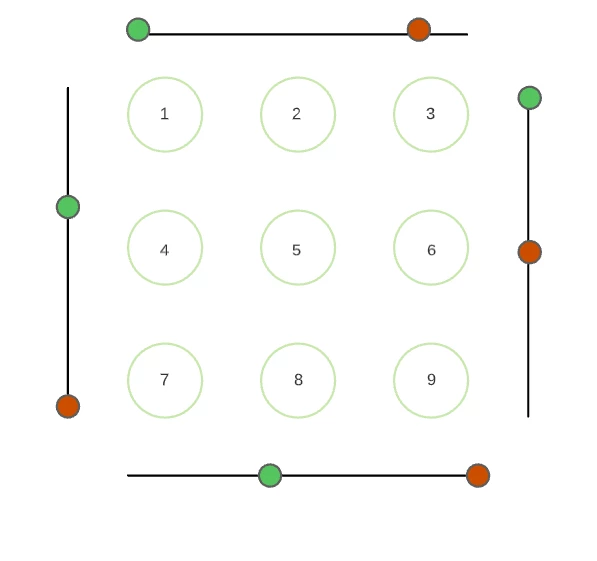
Here, the green circle is the start point of the line and red circle indicates the end point of the line. This is a slider of sorts with two slider points instead of one.

Any ideas of how I can insert this custom "slider" into ScriptUI (including vertical sliders on Windows)? 

This topic has been closed for replies.
Correct answer femkeblanco

A slider can't have more than one indicator.  A workaround is to create two horizontally adjacent sliders, as in the example below.  The JavaScript Tools Guide always refers to sliders as "horizontal".  Peter Kahrel's book says that vertical sliders are possible "on Macs, but not on Windows".  I can confirm that vertical sliders do not work on CS6 in windows. 


var w = new Window("dialog");
    w.orientation = "row";
    w.alignChildren = ["center","top"];
var group1 = w.add("group");
    group1.orientation = "column";
    group1.alignChildren = ["center", "center"];
var edittext1 = group1.add("edittext", undefined, 50);
var slider1 = group1.add("slider", undefined, 50, 0, 100);
    slider1.preferredSize.width = 100;
    slider1.onChanging = function () {edittext1.text = slider1.value;}
var group2 = w.add("group");
    group2.orientation = "column";
    group2.alignChildren = ["center", "center"];
var edittext2 = group2.add("edittext", undefined, 50);
var slider2 = group2.add("slider", undefined, 50, 0, 100);
    slider2.preferredSize.width = 100;
    slider2.onChanging = function () {edittext2.text = slider2.value;}
w.show();


1 reply

femkeblanco
femkeblancoCorrect answer
Legend
April 26, 2022

A slider can't have more than one indicator.  A workaround is to create two horizontally adjacent sliders, as in the example below.  The JavaScript Tools Guide always refers to sliders as "horizontal".  Peter Kahrel's book says that vertical sliders are possible "on Macs, but not on Windows".  I can confirm that vertical sliders do not work on CS6 in windows. 


var w = new Window("dialog");
    w.orientation = "row";
    w.alignChildren = ["center","top"];
var group1 = w.add("group");
    group1.orientation = "column";
    group1.alignChildren = ["center", "center"];
var edittext1 = group1.add("edittext", undefined, 50);
var slider1 = group1.add("slider", undefined, 50, 0, 100);
    slider1.preferredSize.width = 100;
    slider1.onChanging = function () {edittext1.text = slider1.value;}
var group2 = w.add("group");
    group2.orientation = "column";
    group2.alignChildren = ["center", "center"];
var edittext2 = group2.add("edittext", undefined, 50);
var slider2 = group2.add("slider", undefined, 50, 0, 100);
    slider2.preferredSize.width = 100;
    slider2.onChanging = function () {edittext2.text = slider2.value;}
w.show();