
PrepressPro1
Legend
October 29, 2020
Answered

Install scripts Mac Illustrator 2020

  • October 29, 2020
  • 2 replies
  • 13008 views

I have been trying to install a script used on my previous Mac in Illustrator. Everytime I move the .jsx file into the scripts folder it creates an alias of the file and when I restart Illustrator the script does not show in the File>Scripts menu. I know I can use Other Scripts… to use the script as a one shot, but I would like to be able to install the scripts I need for production work in the program menu. The default scripts are showing and are not alised in the Scripts folder.
Correct answer Ton Frederiks

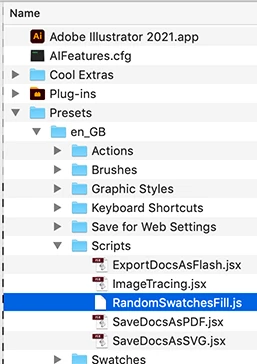
I can copy them to this location in the Illustrator apllication folder.

Need to enter an Admin password, but they show up in the app.

2 replies

CarlosCanto
Community Expert
Community Expert
October 30, 2020

are you dragging the file to the scripts folder? Maybe the default action is to create an alias on mac?


On Windows we press Shift while dragging to Move a file, we press Alt to make an Alias, perhaps there's something similar on Mac? 

Ton Frederiks
Community Expert
Ton FrederiksCommunity ExpertCorrect answer
Community Expert
October 29, 2020

I can copy them to this location in the Illustrator apllication folder.

Need to enter an Admin password, but they show up in the app.