Tony Krentzien
Participating Frequently
January 26, 2021
Question

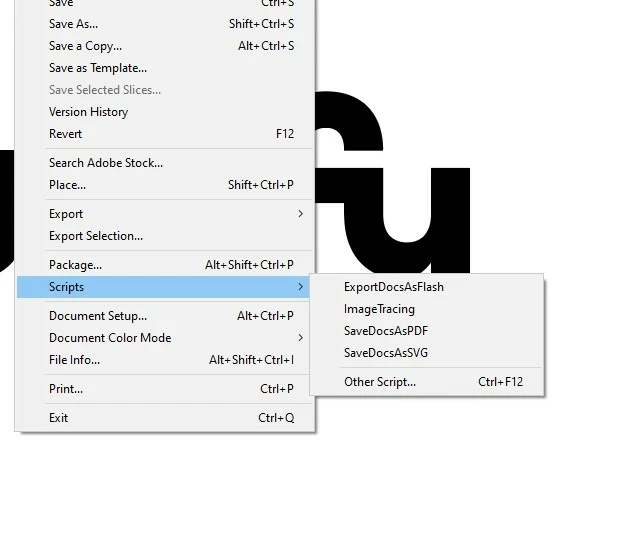
Installed Illustrator Scripts don't appear in the dropdown menu

  • January 26, 2021
  • 7 replies
  • 1576 views

Hi there,


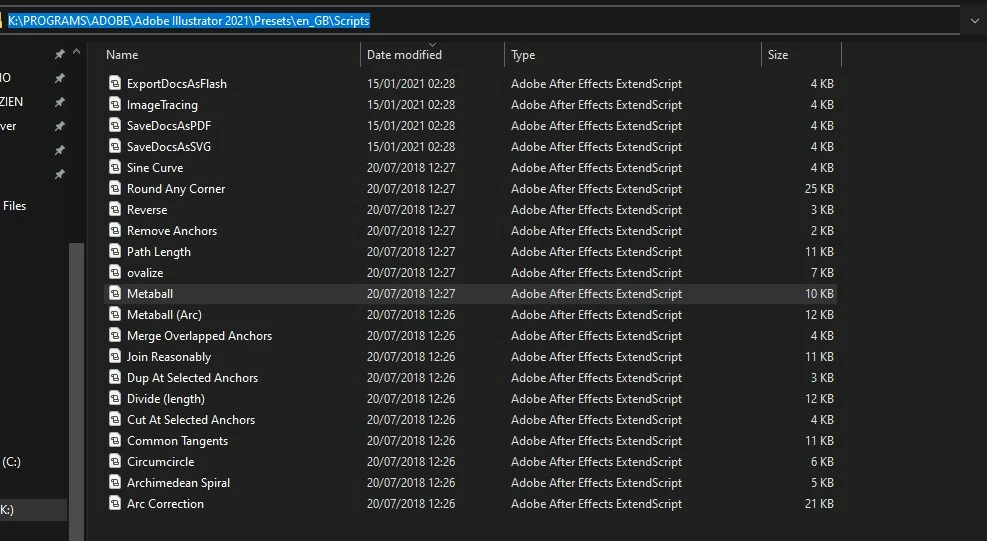
As you can see I installed the scripts on:


K:\PROGRAMS\ADOBE\Adobe Illustrator 2021\Presets\en_GB\Scripts


Despite doing so they won't show up in my dropdown menu in Ai


Any thoughts? Im using last CC version.


7 replies

Participating Frequently
October 10, 2023

A little late to the game... However, this has been an issue for me for years.   I just solved it, though not properly.

In the "Adobe Illustrator 2023/Scripting" any scripts put here do not auto load into the app.  However, if you put them in the wrong place. "Adobe Illustrator 2023/Presets/en_US/Scripts"  This works.

None of Adobes Sample scripts work in their original location either.

I am on a Mac. 

CarlosCanto
Community Expert
Community Expert
January 26, 2021

Hi Tony, can you remove one or more of the 4 default scripts from the Scripts folder, to see if they disappear from the Scripts Menu?

pixxxelschubser
Community Expert
Community Expert
January 26, 2021

I wonder:

Why are the files displayed as "Adobe After Effects ExtendScript" - and not as "Adobe JavaScript file"?


Strange

Tony Krentzien
Participating Frequently
January 26, 2021

Weird, isn't it? Since actually default scripts share the same extension as the ones I downloaded.

pixxxelschubser
Community Expert
Community Expert
January 26, 2021

Hmmh?

You didn't show us the extension of these files.


Are these files *.js or *.jsx files?

Tony Krentzien
Participating Frequently
January 26, 2021

My bad, they are .jsx files.

pixxxelschubser
Community Expert
Community Expert
January 26, 2021
  1. Was this folder defined by you or did it already exist?
  2. Where is your Illustrator installed?
Tony Krentzien
Participating Frequently
January 26, 2021

I changed the folder where my CC apps are stored directly from CC thus reinstalling all my apps on one of my drives.

The folder was then created by adobe itself.


Ton Frederiks
Community Expert
Community Expert
January 26, 2021

Did you restart Illustrator?

Tony Krentzien
Participating Frequently
January 26, 2021

Yes. I already tried it twice.

Tony Krentzien
Participating Frequently
January 26, 2021

Sorry, last version is: 25.1