CarlosCanto
Community Expert
Community Expert
March 3, 2013
Question

Introducing: Font List Script

  • March 3, 2013
  • 2 replies
  • 46915 views

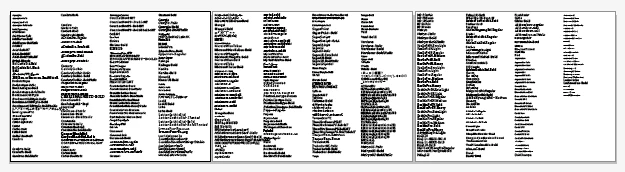
este script simplesmente cria lista de todas as fontes visto pelo Illustrator
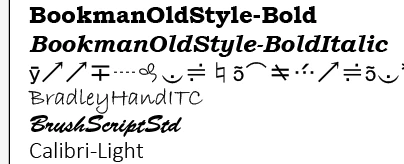
Espero que alguém acha útil, se você tiver comentários ou perguntas, deixe-me saber

download

http://pastebin.com/LVMGK6Qe

    This topic has been closed for replies.

    2 replies

    Known Participant
    March 9, 2013

    Hi,Carlos

    Now I can't visit

    http://pastebin.com/LVMGK6Qe

    and download it. Would you like post it in this thread. Thank you!

    CarlosCanto
    Community Expert
    Community Expert
    March 10, 2013

    why can't you? just curious

    here's the script

    // script.name = fontList.jsx;

    // script.description = creates a document and makes a list of all fonts seen by Illustrator;

    // script.requirements = none; // runs on CS4 and newer;

    // script.parent = CarlosCanto // 02/17/2013;

    // script.elegant = false;

    #target illustrator

    var edgeSpacing = 10;

    var columnSpacing = 195;

    var docPreset = new DocumentPreset;

    docPreset.width = 800;

    docPreset.height = 600;

    var idoc = documents.addDocument(DocumentColorSpace.CMYK, docPreset);

    var x = edgeSpacing;

    var yyy = (idoc.height - edgeSpacing);

    var fontCount = textFonts.length;

    var col = 1;

    var ABcount = 1;

    for(var i=0; i<fontCount; i++) {

        sFontName = textFonts.name;

        var itext = idoc.textFrames.add();

        itext.textRange.characterAttributes.size = 12;

        itext.contents = sFontName;

        //$.writeln(yyy);

        itext.top = yyy;

        itext.left = x;

        itext.textRange.characterAttributes.textFont = textFonts.getByName(textFonts.name);

        // check wether the text frame will go off the bottom edge of the document

        if( (yyy-=(itext.height)) <= 20 ) {

            yyy = (idoc.height - edgeSpacing);

            x += columnSpacing;

            col++;

            if (col>4) {

                var ab = idoc.artboards[ABcount-1].artboardRect;

                var abtop = ab[1];

                var ableft = ab[0];

                var abright = ab[2];

                var abbottom = ab[3];

                var ntop = abtop;

                var nleft = abright+edgeSpacing;

                var nbottom = abbottom;

                var nright = abright-ableft+nleft;

                var abRect = [nleft, ntop, nright, nbottom];

                var newAb = idoc.artboards.add(abRect);

                x = nleft+edgeSpacing;

                ABcount++;

                col=1;

           }

        }

        //else yyy-=(itext.height);

    }

    Known Participant
    March 11, 2013

    Carlos, Thanks.you are so nice.

    Half a year ago, I can visit it, but recently I can't success. Frankly,I Don't know why.

    Inspiring
    March 4, 2013

    Hey Carlos

    Congratulations. It´s a great script (as ever).

    Do you allow me to give you a suggestion? Please display a simple

    progressbar or just a dialog with a message "Wait, work in progress". This

    will make users calmer and prevents from thinking Illustrator is not

    responding

    Best Regards

    CarlosCanto
    Community Expert
    Community Expert
    March 5, 2013

    thanks for the suggestion Gustavo...were you getting a little desperate? why? do you have a Million Fonts?

    Inspiring
    March 5, 2013

    Hi Carlos

    Yes haha. I have too much fonts...then..when running the

    script...Illustrator looks not responding!

    Best Regards

    Gustavo