



CarlosCanto
Community Expert
Community Expert
May 29, 2012
Question

Introducing: Insert Page Numbers v 2

  • May 29, 2012
  • 22 replies
  • 45047 views

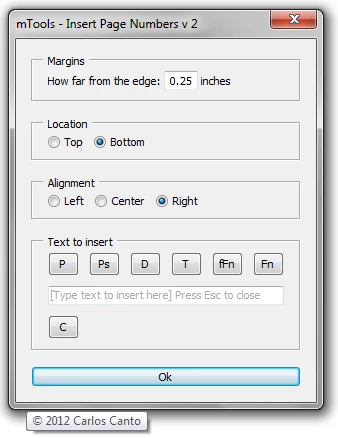
Hi Everyone, back by popular demand, here's version 2. It now has options for inserting Date, Time, Full Name, and Document Name.

tip: you don't have to click on the "insert" buttons, you can type directly in the input box, for example, type:

Page *page* of *pages* to get Page 1 of 3
download

questions/comments? let me know

enjoy,

CarlosCanto

22 replies

Participant
September 6, 2025

Thanks Carlos! I made some improvements based on this script. It can be found here:
https://github.com/bedroomcult/Page-Numbers-Illustrator

CarlosCanto
Community Expert
Community Expert
September 6, 2025

awesome, thanks sharing cult 🙂

Participant
January 21, 2025

Thank you, really helpful and saved me a lot of time on a project.


Participant
September 6, 2025

Thanks Carlos. I made some improvements based from this script and can be found here:
https://github.com/bedroomcult/Page-Numbers-Illustrator


Participant
November 6, 2024

How can I start fron another page. like from 152(start the secnd part of the book) 

CarlosCanto
Community Expert
Community Expert
November 7, 2024

@BELECH2022 I didn't think about that when I wrote the script, I'll add that functionality when I have a chance


thanks

Participating Frequently
January 28, 2024

Thanku so much for your efforts

Participant
April 6, 2023

Any idea this numbering script can be modified in such a way that it prints two page number in one artboard?

I have a3 artboard where it is split to two pages.

I tried modifying the script all I get as result is p1 p2 

p2 p3 

p3 p4

in respective artboard.

Participating Frequently
April 7, 2023

Is it possible to split the artboard into two artboards for your project? 

Participant
March 29, 2023

Hey Carlos,


This Script has been a game changer! Thanks for putting it together all those years back and making it public.

I was wondering though,

Is there any way to utilize the tool only on specifically selected artboards?


Thanks!

CarlosCanto
Community Expert
Community Expert
April 8, 2023
quote

Is there any way to utilize the tool only on specifically selected artboards?


Thanks!


By @ELi Tully


It's not possible to know which artboards are selected in the Artboards panel, but I think a workaround would be to ask the user to provide a list of artboards the same way we print pages, ie 1, 3, 8, 10-12, etc


I know I've been saying I'll get to it when I have a chance, so I'll get to it when I have a chance.

Participant
February 8, 2023

Thank you....


Participant
March 24, 2019

Hi Carlos. First of all, your work is great.

I´m making a limited edition "secret things", and i´m searching for a feature to number automatically a limited edition badges.So, will be great if you can choose between "1 / 200" and "001 / 200" formats, filling with 0 on the left, and if you can choose to start in 0, or in 101...

Great job again.

CarlosCanto
Community Expert
Community Expert
March 26, 2019

hi niord, it sounds doable. I'll get to it as soon as I have a chance.

Participating Frequently
August 6, 2019

Carlos, I just discovered your script and it's amazing.

I have a little bit of experience coding myself so I've made modifications to it, but the one thing I can't figure out is editing the text. I've seen a bunch of people before ask to be able to modify font, color and size. I understand that you could just select the text boxes after generating them and style them the way you want, but for me I only need one thing.

Instead of the generic text being RGB, I need to default it to the "registration" color. I'm not seeing the string in the script that would allow me to modify that, probably because it's easier just to have it default-- Can you offer any guidance as to how I could modify your script to make the default text color [Registration]? Thank you in advance!!!!

fredrikj36572715
Participant
November 7, 2018

Thanks a lot for this great script!

I'm wondering two things though.

1. Is it possible to change the script so I can decide different X and Y coordinates for the placement?

2. Is it possible to change the font size of the text? (I would still like to keep my Illustrator default font size)

Any help would be greatly appreciated!

/Kind regards, Fredrik

fredrikj36572715
Participant
November 7, 2018

Ok, I found the answer to 1 by editing this line:

var fontSize = itext.textRange.characterAttributes.size = 5;

fredrikj36572715
Participant
November 7, 2018

Ok, I found a bit of an alternative solution for the 2nd one as well by experimenting and editing the row below:

var abright = iartBounds[2]-margins+120;

I believe writing as I did (fe 120) it sets it off by 120 pts. Not sure, but it works

Participant
August 10, 2017

Great script! Thank you so much!

I have some question: how can I change the color of text? Sometimes I got a dark background and I need light text on it! and how can I change the size of the text?

Monika Gause
Community Expert
Community Expert
August 10, 2017

THose are just default text objects. Style them to your desire.