dublove
Legend
June 5, 2026
Answered

Is it possible to automatically create a text frame of the same size in the original location?

  • June 5, 2026
  • 2 replies
  • 21 views

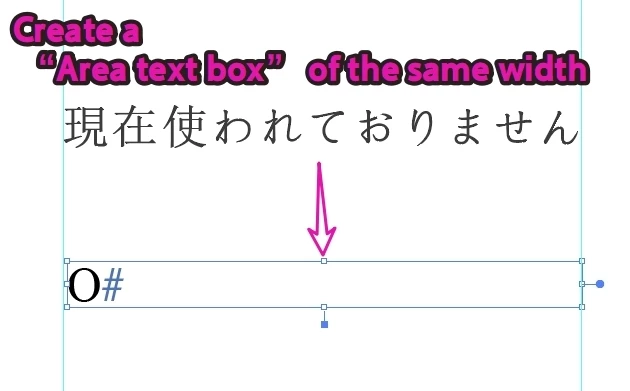
I want to translate the old text into English, but the original text may have been converted to curves. I need to create a text frame of the same size (the exact height might be difficult to achieve, so the same width would work as well).
I’d like the script to move the selected objects to the “old layer,” hide that layer, create a “area text box” of the same size in the original position, and move that text box to the “Text layer.”

If possible, please pre-fill it with the letter “O”


    Correct answer jduncan

    Try this out and let me know if it works for you. This will iterate over all selected object and create matching text frames no matter the type.

    /*
    Adobe Community Forum Question - https://community.adobe.com/questions-652/is-it-possible-to-automatically-create-a-text-frame-of-the-same-size-in-the-original-location-1626610

    I want to translate the old text into English, but the original text may have been converted to curves. I need to create a text frame of the same size (the exact height might be difficult to achieve, so the same width would work as well).

    I’d like the script to move the selected objects to the “old layer,” hide that layer, create a “area text box” of the same size in the original position, and move that text box to the “Text layer.”

    If possible, please pre-fill it with the letter “O”

    Related Docs:
    Working with text frames - https://ai-scripting.docsforadobe.dev/scriptingJavascript/workingWithTextFrames/?h=area+text
    */

    //@target illustrator
    (function () {
    ////////////////////////////
    // MAIN SCRIPT OPERATIONS //
    ////////////////////////////

    // no need to continue if there is no active document
    if (!app.documents.length) {
    alert("No active document.");
    return;
    }

    // grab document
    var doc = app.activeDocument;

    // get the current selection
    var sel = doc.selection;

    // no need to continue if there is no active selection
    if (!sel.length) {
    alert("No active selection.");
    return;
    }

    /**
    * Get layer by `name` or create if not found.
    */
    function getOrCreateLayer(name) {
    var layer;
    try {
    layer = doc.layers.getByName(name);
    layer.visible = true;
    layer.locked = false;
    } catch (e) {
    $.writeln('Layer "' + name + '" not found. Creating it.', e);
    layer = doc.layers.add();
    layer.name = name;
    }
    return layer;
    }

    // setup layers
    var oldLayer = getOrCreateLayer("OLD");
    var textLayer = getOrCreateLayer("TEXT");

    var rect, tf, font;
    for (var i = 0; i < sel.length; i++) {
    // move selected item to "OLD" layer
    sel[i].moveToEnd(oldLayer);

    // create new text frame on "TEXT" layer
    rect = textLayer.pathItems.rectangle(
    sel[i].top,
    sel[i].left,
    sel[i].width,
    sel[i].height
    );
    tf = textLayer.textFrames.areaText(rect);
    tf.textRange.characterAttributes.size = 6;

    // if you want to use a specific font update the name here
    try {
    font = app.textFonts.getByName("TimesNewRomanPSMT");
    tf.textRange.characterAttributes.textFont = font;
    } catch (e) {
    $.writeln("Times New Roman font not found. Using default font.", e);
    }

    tf.contents = "O";
    }

    // lastly, make the "OLD" layer hidden
    oldLayer.visible = false;
    })();

     

    2 replies

    dublove
    dubloveAuthor
    Legend
    June 5, 2026

    Hi jduncan

    That's great.
    Thank you so much.

    jduncan
    Community Expert
    jduncanCommunity ExpertCorrect answer
    Community Expert
    June 5, 2026

    Try this out and let me know if it works for you. This will iterate over all selected object and create matching text frames no matter the type.

    /*
    Adobe Community Forum Question - https://community.adobe.com/questions-652/is-it-possible-to-automatically-create-a-text-frame-of-the-same-size-in-the-original-location-1626610

    I want to translate the old text into English, but the original text may have been converted to curves. I need to create a text frame of the same size (the exact height might be difficult to achieve, so the same width would work as well).

    I’d like the script to move the selected objects to the “old layer,” hide that layer, create a “area text box” of the same size in the original position, and move that text box to the “Text layer.”

    If possible, please pre-fill it with the letter “O”

    Related Docs:
    Working with text frames - https://ai-scripting.docsforadobe.dev/scriptingJavascript/workingWithTextFrames/?h=area+text
    */

    //@target illustrator
    (function () {
    ////////////////////////////
    // MAIN SCRIPT OPERATIONS //
    ////////////////////////////

    // no need to continue if there is no active document
    if (!app.documents.length) {
    alert("No active document.");
    return;
    }

    // grab document
    var doc = app.activeDocument;

    // get the current selection
    var sel = doc.selection;

    // no need to continue if there is no active selection
    if (!sel.length) {
    alert("No active selection.");
    return;
    }

    /**
    * Get layer by `name` or create if not found.
    */
    function getOrCreateLayer(name) {
    var layer;
    try {
    layer = doc.layers.getByName(name);
    layer.visible = true;
    layer.locked = false;
    } catch (e) {
    $.writeln('Layer "' + name + '" not found. Creating it.', e);
    layer = doc.layers.add();
    layer.name = name;
    }
    return layer;
    }

    // setup layers
    var oldLayer = getOrCreateLayer("OLD");
    var textLayer = getOrCreateLayer("TEXT");

    var rect, tf, font;
    for (var i = 0; i < sel.length; i++) {
    // move selected item to "OLD" layer
    sel[i].moveToEnd(oldLayer);

    // create new text frame on "TEXT" layer
    rect = textLayer.pathItems.rectangle(
    sel[i].top,
    sel[i].left,
    sel[i].width,
    sel[i].height
    );
    tf = textLayer.textFrames.areaText(rect);
    tf.textRange.characterAttributes.size = 6;

    // if you want to use a specific font update the name here
    try {
    font = app.textFonts.getByName("TimesNewRomanPSMT");
    tf.textRange.characterAttributes.textFont = font;
    } catch (e) {
    $.writeln("Times New Roman font not found. Using default font.", e);
    }

    tf.contents = "O";
    }

    // lastly, make the "OLD" layer hidden
    oldLayer.visible = false;
    })();