Inspiring
May 29, 2020
Answered

Is it possible to "Expand" using script without display the option dialog?

  • May 29, 2020
  • 2 replies
  • 2720 views

When I run `app.executeMenuCommand("Expand3")` in my script, it opens an dialog to set the properties.

I was wondering if there is some way to set the propertis in script then execute the action without display the dialog.

Or maybe if there is something in the Javascript API to interact with dialog also would be nice...

I also tried to to create an action, but even in action the dialog appears...


Is not an big issue, but if would be possible to supress the dialog would be nice


This topic has been closed for replies.
Correct answer Charu Rajput

Hi,

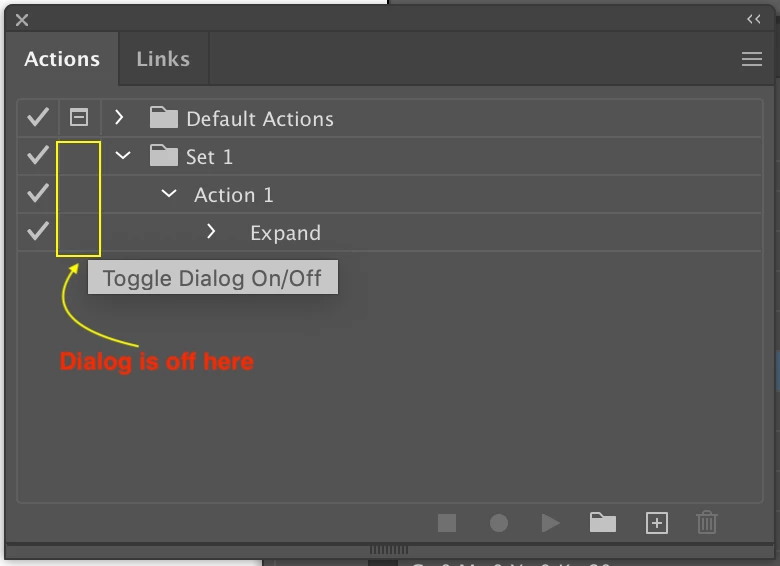
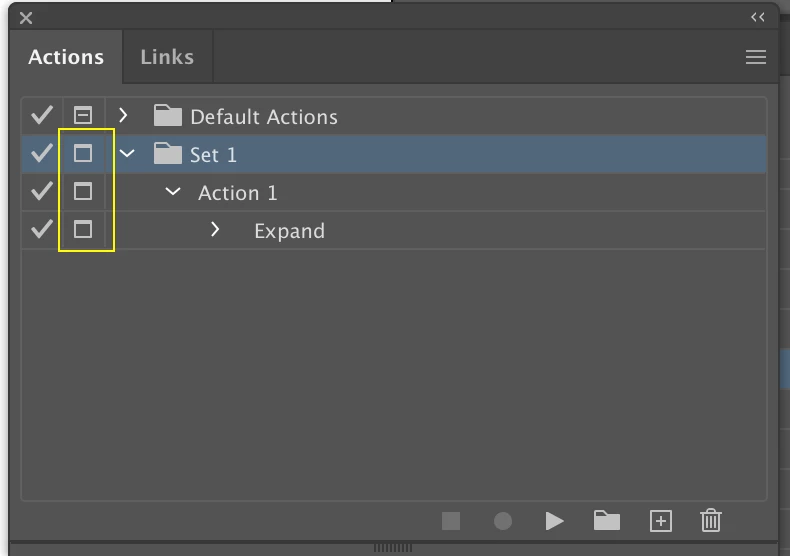
You can suppress the dialog by clicking on "Toggle Dialog On/Off" button, just left to the Action name. So, save the action by turning off the dialogb and then load via javascript as explained above. For reference, button marked in the yellow box, in screen shot. And when you off them it will look like as in another screenshot.


Let us know if this works for you.


2 replies

CarlosCanto
Community Expert
Community Expert
May 29, 2020

can you describe the process of what you're trying to expand? 

Inspiring
June 1, 2020

Hello CarlosCanto,

I'm trying to expand some objects where fill or srtroke uses patterns

Charu Rajput
Community Expert
Community Expert
May 29, 2020

Hi,

There is one way that you can achive this, you can record the action by surpressing the dialog and call this action from script using app.doScript method

app.doScript([Name of the action], [Name of the set where action stored]);

eg:

app.doScript('Expand', 'Set 1');


Here it means you have recored the action of expand and save the action with name "Expand" in "Set 1"


Let us know if this works for you.


Best regards
Inspiring
June 1, 2020

Hello Charu Rajput, thank you for the response.

But actually I've already tried to use the method you described.

Even in action the dialog appears


Charu Rajput
Community Expert
Charu RajputCommunity ExpertCorrect answer
Community Expert
June 1, 2020

Hi,

You can suppress the dialog by clicking on "Toggle Dialog On/Off" button, just left to the Action name. So, save the action by turning off the dialogb and then load via javascript as explained above. For reference, button marked in the yellow box, in screen shot. And when you off them it will look like as in another screenshot.


Let us know if this works for you.


Best regards