Inspiring
October 27, 2021
Answered

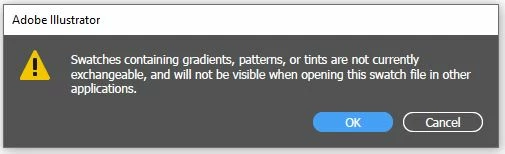
Is it possible to save gradient to Swatches Exchange File (.ase) or Swatches File (.ai)?

  • October 27, 2021
  • 2 replies
  • 2578 views

i have created amazing gradient and save it on swatches panel.

this gradient can not accessed by new document file, so i have to save the swatches to .ase or .ai, then open this 'user defined' swatches on new document to get access of swatches.

BUT, unfortunately, there is no gradient on loaded swatches. Why? Gradient can not be saved?

thanks
This topic has been closed for replies.
Correct answer Met1

Not ASE...


2 replies

Met1
Legend
October 27, 2021

You can open any .ai file as a swatch library.

Srishti Bali
Legend
October 27, 2021

Hi there,


Sorry to hear about this trouble. If you have saved swatches as .ase and .ai, then opening it the same group in a new document should show saved gradient swatches like this:


Could you please share a small video showing your workflow?


Regards,

Srishti


Met1
Met1Correct answer
Legend
October 27, 2021

Not ASE...


Inspiring
October 28, 2021

Hi met1, thanks, for now, i save my swatches to .ai, not .ase.

######Raizen 7, 40Gb Ram, RTX 3060, Win 11 -- All of Software in the world are just tools. Buy it if it works for you :)