
Participating Frequently
December 24, 2020
Question

Is mapping colours on a colour wheel incorrect?

  • December 24, 2020
  • 4 replies
  • 443 views

Hello,

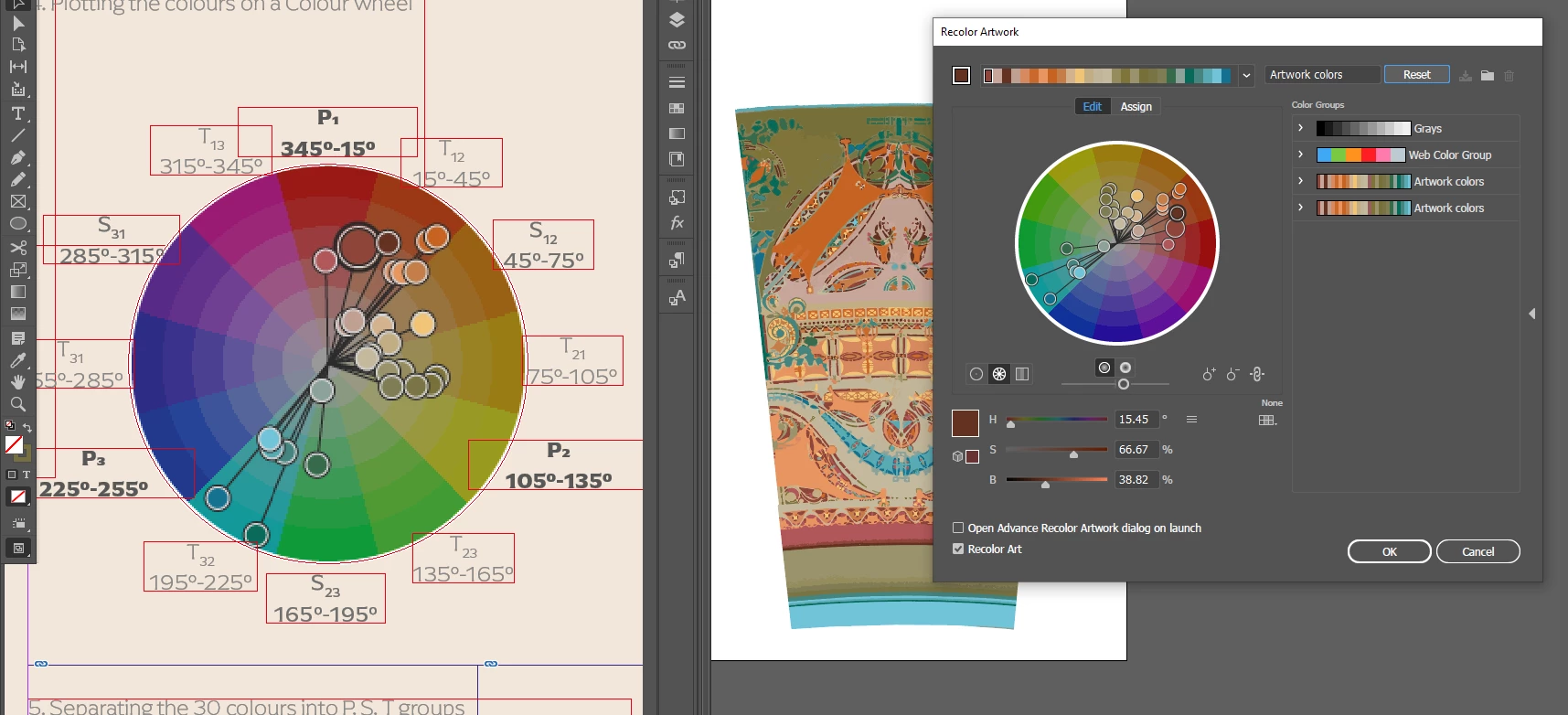
I use Illustrator 'edit colour' to analyse colours of artwork for the purpose of an essay for my uni. I encountered some problems. Unless I misunderstand something obvious, the mapping of colours from the artwork onto the colour wheel from the 'edit colour' dialogue is incorrect.

For example, this brown colour has 15.45 degrees for Hue. (Right side of the image below) .This puts it in the tertiary colour group right at the edge of Primary colour group of Red. (Left side of the image) However, Illustrator displays it as being in the centre of the tertiary colour group, or I'd say around 30 degrees. 

Why is it so?
 

This topic has been closed for replies.

4 replies

Participating Frequently
December 26, 2020

I think I have found what my problem was. I assumed that the distribution of hues on the colour wheel graphic is linear (left colour wheel) and it looks like it is not (right colour wheel)

Participating Frequently
December 26, 2020

What do you guys think? I tested it and it isn't linear it seems, or I'm missing something again?

Monika Gause
Community Expert
Community Expert
December 25, 2020

For Illustrator color is not pure mathematics.

Color management plays its role there as well and might throw your calculations off.


You might try if it works as you want it to when you turn off color management (Emulate Illustrator 6) and then work in an RGB file.

Participating Frequently
December 25, 2020

Thanks for your suggestion. Unfortunately, it is the same with color management off and working in RGB document color mode.

Plotting 0-360 equally on a circle and assigning color graphics to it should not be difficult. And I don't see why they would design the interface so it does not much 0-360 colour background on the colour wheel.

I think I gave up on using these automatically generated colour wheel previews for my essay and will manually adjust ('by eye') the locations of these circles to match the HSB numbers.

Participating Frequently
December 24, 2020

One more example. Colour at 30 degrees displays correctly whilst colour at 60 degrees


not.


Participating Frequently
December 24, 2020

Mistake. I meant 30 is incorrect. It should be in the center of the pie-slice.

Participating Frequently
December 24, 2020

I should add that for some reason in Illustrator the direction of 0-360 degrees of hues in the colour wheel in 'edit colour' dialogue is counterclockwise. So Pink is on the right side of red. For clarity sake in my essay (left side), I mirror it.