
Question
Is the active layer the selected layer in the layers palette or not necessarily?
In extend script, is the active layer the selected layer in the layers palette or not necessarily?
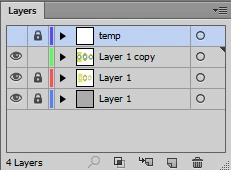
In the document there was an active layer on the reference newLayer (with name Layer 1 copy).
Then a temp layer was created on top. After working with the temp layer, it is shown in the layers palette as highlighted in blue - it is the active layer.
Now we need to activate the previous layer newLayer again. To do this, I lock and hide the temp layer, and do: doc.activeLayer = newLayer;
But even with the subsequent app.redraw();, the layer palette looks like newLayer is an inactive layer.


 AdChoices