


Is there a faster alternative to Shape Builder for removing parts of a line?
I create a lot of files that ultimately go to our plotter to be cut out of vinyl. I've found that adding some additional lines can help me weed out the negative space from the vinyl more quickly. In order for the files to cut properly, there can be no fill color, only the lines I want cut. See below:
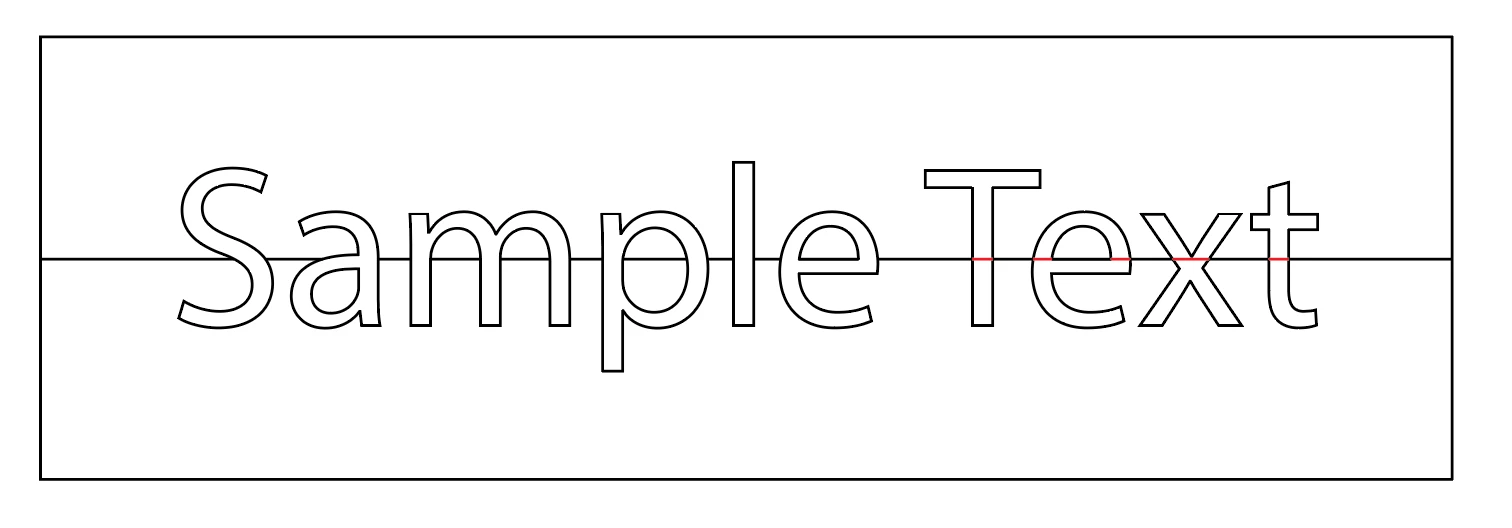
Currently, I draw a line through my text and use the shape builder tool to manually remove the lines I don't want. They are all removed in the word "Sample" but I made them red in the word "Text". Is there a way to use the Pathfinder tool to more quickly achieve this look? Again, I can't simply fill the letters with white and put them above the line as the plotter will still read the line and cut it. I need to remove the line from the file in the indicated spaces.
While this is an easy solution for something like "Sample Text" I often have to do this for paragraphs of text and it can make for several tedious hours of work.


 AdChoices