Participant
December 11, 2019
Question

Is there a way to generate a pattern like this one?

  • December 11, 2019
  • 3 replies
  • 472 views

Is there a way to generate a pattern like this one beside of making it manualy?
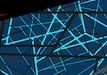


.

Thanks!

This topic has been closed for replies.

3 replies

Ton Frederiks
Community Expert
Community Expert
December 11, 2019

But maybe you do not want a pattern.

Then just distort some objects with Object > Transform > Transform each and the Random checkbox checked.

SebaVTAuthor
Participant
December 11, 2019

I'll try that

rcraighead
Legend
December 12, 2019

Maybe multiple scatter brushes with random settings.

Ton Frederiks
Community Expert
Community Expert
December 11, 2019

I just created this with the Pattern maker based on the rectangles on the left.

These were only stroked rectangles, but the result could have been  more interesting when stroked with different colors or filled with different colors and blend modes.

Just select them and choose Object > Pattern > Make and distort them with Object Transform > Transform Each... Check the Random checkbox to make it random. Direct select points and move them around.

SebaVTAuthor
Participant
December 11, 2019

that's very close to what I need, but is there any way to have at least three lines on each vertex?

Ton Frederiks
Community Expert
Community Expert
December 11, 2019

It does not look like a seamless pattern, but it should not be too difficult to create something similar directly in the patternmaker.

SebaVTAuthor
Participant
December 11, 2019

Yeah, maybe I didn't express my idea correctly, I actually want to create something like the sample but completely random, (yeah, I know, completely the opposite of a pattern)

Monika Gause
Community Expert
Community Expert
December 11, 2019

You don't have a larger sample, have you?
