

femkeblanco
Legend
July 9, 2022
Answered

Is there any easy way to align two handles when using the pen tool?

  • July 9, 2022
  • 6 replies
  • 1364 views

This is related to drawing symmetrical curves.  In the example below, I want to get the present handle to be on the same horizontal level as the handle on the opposite side.  I have always eyeballed it, which can be imperfect.  I don't think handles work with smart guides or snap to guides, but I'm happy to be corrected. 
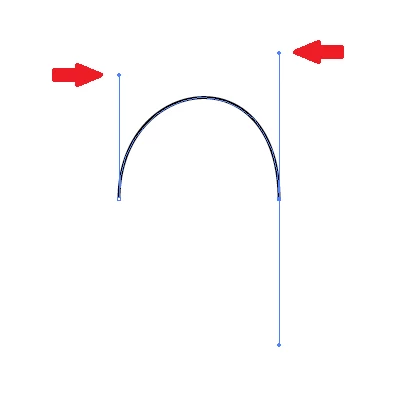
Thanks in advance. 

This topic has been closed for replies.
Correct answer Kurt Gold

Turn on "Construction Guides" and try again what I showed in my second .gif.


6 replies

Jacob Bugge
Community Expert
Community Expert
July 9, 2022

Kurt,


It was a pleasant surprise to see the GIFs appear out of nowhere, especially the second one.


Kurt Gold
Community Expert
Community Expert
July 9, 2022

Femke, can you show your settings in the Smart Guides section of the Illustrator preferences?


femkeblanco
Legend
July 9, 2022

I should mention that I'm using CS6. 

Kurt Gold
Community Expert
Kurt GoldCommunity ExpertCorrect answer
Community Expert
July 9, 2022

Turn on "Construction Guides" and try again what I showed in my second .gif.


femkeblanco
Legend
July 9, 2022

@barbara_a7746676  Thanks.  I wanted to avoid the grid since it's restrictive and defining it adds an extra step, but that may be the way I'll end up going. 


@Kurt Goldand @Jacob Bugge  Thanks.  You're correct in that I can snap one of the handles, the handle under the cursor, to a guide, but not the opposite handle.  More troubling is that I can't emulate what you showed with the smart guides.  I can get the handle under the cursor to interact with anchor points, the bounds of the curve and the centre of the curve, but not with handles. 


Jacob Bugge
Community Expert
Community Expert
July 9, 2022

Femke,


From now on you may find it hard to resist the temptation to start with an asymmetrical curve, just for the sheer joy of using the exquisite Smart Guide solution by Kurt.


Your first sentence makes me curious: This is related to drawing symmetrical curves.


If you wish symmetrical, the Anchor Points will need to be aligned (relative to the relevant direction) to begin with, or the Handle lengths will be different if the Handles are aligned. If the Handles are vertical orhorizontal, this can be done in different simple ways albeit less exquisite ways.


Kurt Gold
Community Expert
Community Expert
July 9, 2022

Direction Handles usually do snap to guides (and used to snap to them in older versions of Illustrator as well).


Also, direction handles are smart guides sensitive, but an extra step is required: You'd first have to drag one handle precisely onto the other handle to set some kind of reference point, then drag it to the desired position following the horizontal or vertical smart guide until the "Intersection" indicator appears.


barbara_a7746676
Community Expert
Community Expert
July 9, 2022

You can turn on Snap to Grid under the View menu. That makes it easier to align the handles.


barbara_a7746676
Community Expert
Community Expert
July 9, 2022

Once they are aligned, you can drag on the arc with the Direct Selection tool to increase or decrease the height of the curve while keeping the handles even.