Participant
June 1, 2018
Answered

Is there any script to check for live effects that haven't been expanded?

  • June 1, 2018
  • 1 reply
  • 514 views

I have this 1 illustration file that I want to submit to microstock website. They will reject files with live effects unexpanded. I usually expand effects as soon as I finish using them, but perhaps there are still some that I overlook. Before I spend an hour checking for them, does anyone know a script to make that process faster?
This topic has been closed for replies.
Correct answer Monika Gause

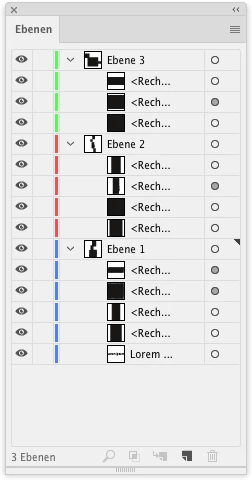
In order to find special appearances (which is everything that goes beyond a fill, a stroke, no transparency and no effects), you just need to scroll down the layers panel.

The target symbol shows you that there is *something*. You can then click on the target symbol and see what is is and also , which object.

Grey target symbol = something

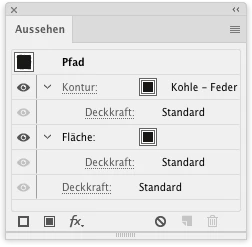
targeted object (target symbol clicked) -> Appearance panel

1 reply

Monika Gause
Community Expert
Community Expert
June 1, 2018

Try if "Select Effects" can find it.

You could try and select all, then apply "Flatten transparency", which will flatten everything, but it might create a huge mess of paths that will require some cleaning up afterwards.

Doing the process of the expanding with a script will be difficult, since many live effects or live objects require specific treatment. Many can be expanded by Object > Expand, but this doesn't cover the Effects from the effects menu and also depending on hierarchy the process might fail.

Which Microstock is it and what kind of file do they want? I'm wondering why they demand this. Most want EPS files anyway, but in an EPS there are no live effects anymore (at least not in the EPS part of the EPS file). It shouldn't matter what's in the AI part of the file, since only Illustrator will read that anyway and Illustrator can interpret the effects' settings. A file with live effects is more valuable than one without them, cause people can edit the effects.

I've tried. I mean really tried, but I don't get what Microstock services demand. I just don't get it. I can only explain it with their total lack of understanding of how files work.

Participant
June 1, 2018

Thank you for taking the time to answer. It is Shutterstock, and one of my file was rejected for containing effects. It took me a whole evening to discover that there was 1 round corner and some art brush strokes that I forgot to expand.

Monika Gause
Community Expert
Monika GauseCommunity ExpertCorrect answer
Community Expert
June 1, 2018

In order to find special appearances (which is everything that goes beyond a fill, a stroke, no transparency and no effects), you just need to scroll down the layers panel.

The target symbol shows you that there is *something*. You can then click on the target symbol and see what is is and also , which object.

Grey target symbol = something

targeted object (target symbol clicked) -> Appearance panel