j.khakase
Inspiring
March 1, 2024
Answered

is there any way to add absolute square with entering margin value, around selected objects ?

  • March 1, 2024
  • 2 replies
  • 810 views

How


Hello Friends,

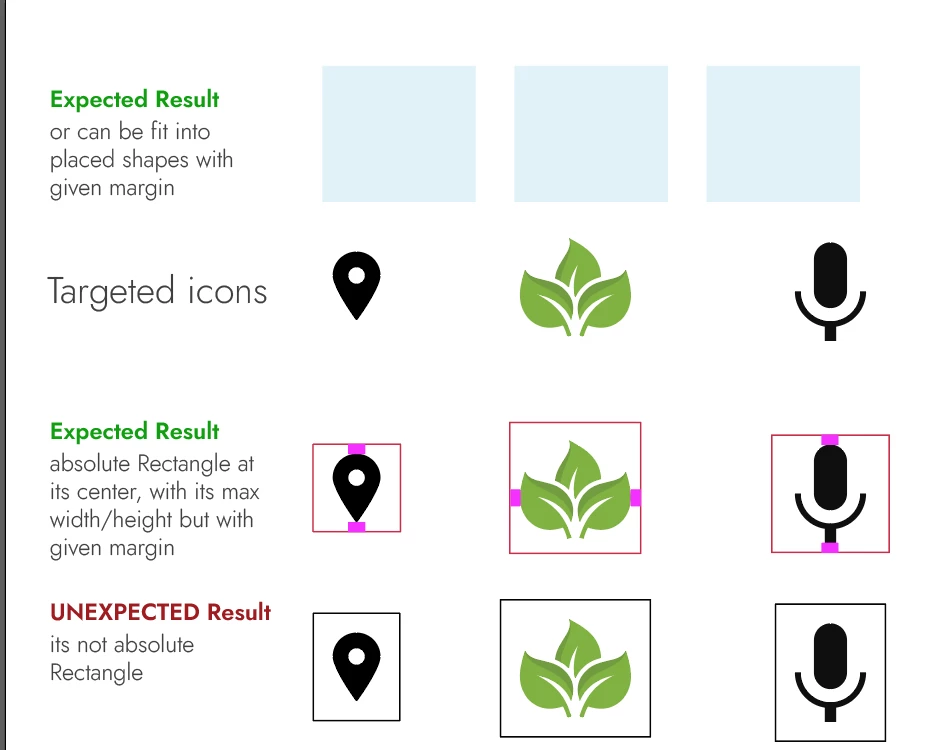
is there any way to add absolute square with entering margin value, around selected objects by Illustrator script. I know the dynamic square feature that doesn't fullfil my requirement. below is the screenshot to get more understanding


This topic has been closed for replies.
Correct answer Sergey Osokin


/*
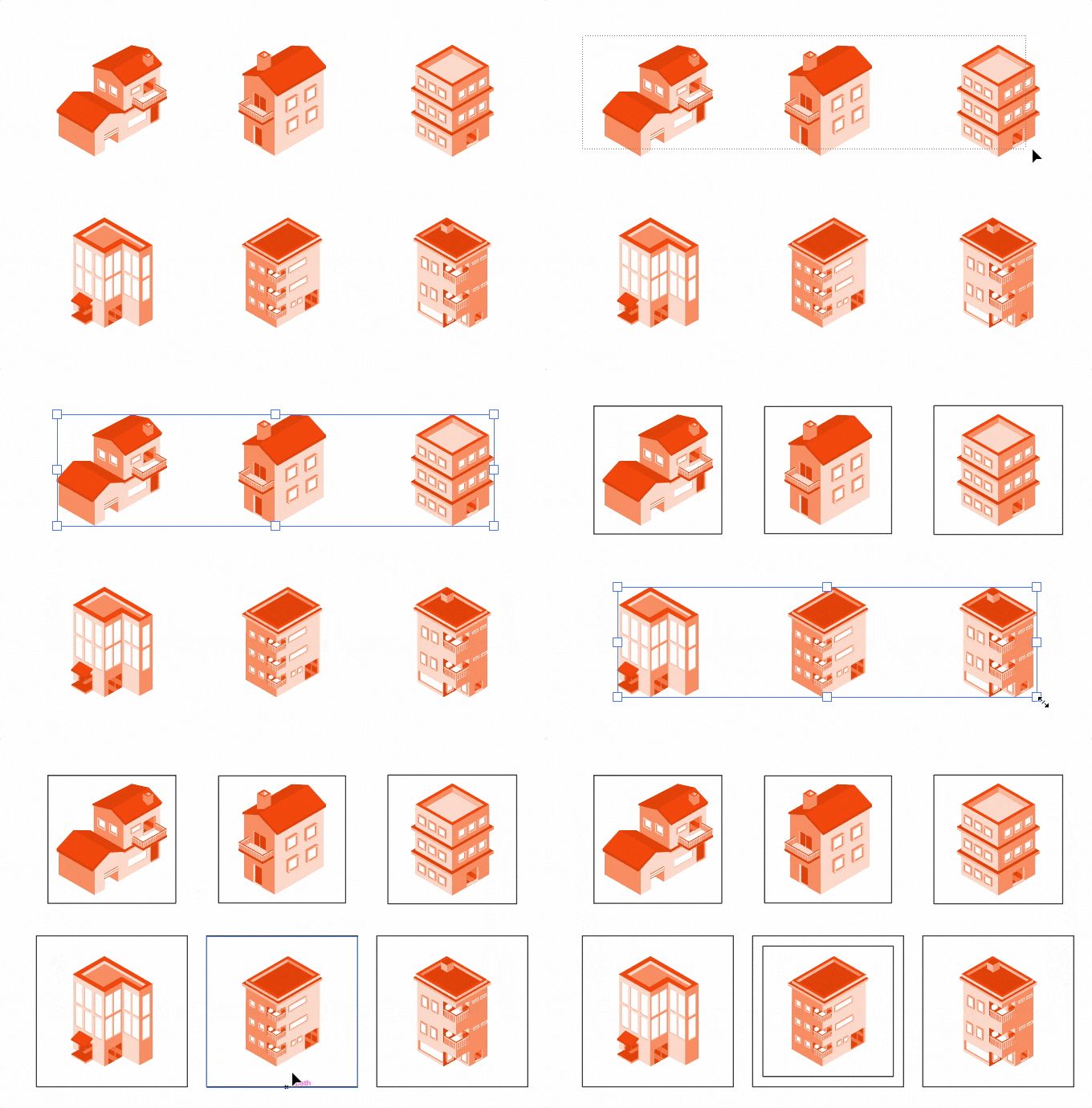
  Creates squares with specified margins on the larger side of selected objects
  Discussion: https://community.adobe.com/t5/illustrator-discussions/is-there-any-way-to-add-absolute-square-with-entering-margin-value-around-selected-objects/td-p/14459111
  Author: Sergey Osokin, email: hi@sergosokin.ru
  Based on code by Joshb Duncan @joshbduncan
*/

//@target illustrator
app.preferences.setBooleanPreference("ShowExternalJSXWarning", false); // Fix drag and drop a .jsx file

// Main function
function main() {
  if (!documents.length) return;
  if (!selection.length || selection.typename === "TextRange") return;
  
  var units = getUnits();
  var sel = app.selection;

  var margins = prompt("Enter margins for objects, " + units, 0);
  if (!margins.length || margins == null) return;
  margins = parseFloat(margins);
  if (isNaN(margins)) margins = 0;

  margins = convertUnits(margins, units, "px");

  var obj, vBnds;
  for (var i = 0, len = sel.length; i < len; i++) {
    obj = sel[i];
    vBnds = getVisibleBounds(obj);
    if (!vBnds) continue;

    var objWidth = vBnds[2] - vBnds[0];
    var objHeight = vBnds[1] - vBnds[3];
    var maxSide = Math.max(objWidth, objHeight);

    var rectWidth = maxSide + 2 * margins;
    var rectHeight = maxSide + 2 * margins;

    var top = vBnds[1] + (rectHeight - objHeight) / 2;
    var left = vBnds[0] - (rectWidth - objWidth) / 2;

    var rect = obj.layer.pathItems.rectangle(top, left, rectWidth, rectHeight);
    rect.filled = false;
    rect.stroked = true;
    rect.strokeWidth = 1;
    rect.move(sel[i], ElementPlacement.PLACEAFTER);
  }
}

// Get active document ruler units
function getUnits() {
  if (!documents.length) return "";
  var key = activeDocument.rulerUnits.toString().replace("RulerUnits.", "");
  switch (key) {
    case "Pixels": return "px";
    case "Points": return "pt";
    case "Picas": return "pc";
    case "Inches": return "in";
    case "Millimeters": return "mm";
    case "Centimeters": return "cm";
    // Added in CC 2023 v27.1.1
    case "Meters": return "m";
    case "Feet": return "ft";
    case "FeetInches": return "ft";
    case "Yards": return "yd";
    // Parse new units in CC 2020-2023 if a document is saved
    case "Unknown":
      var xmp = activeDocument.XMPString;
      if (/stDim:unit/i.test(xmp)) {
        var units = /<stDim:unit>(.*?)<\/stDim:unit>/g.exec(xmp)[1];
        if (units == "Meters") return "m";
        if (units == "Feet") return "ft";
        if (units == "FeetInches") return "ft";
        if (units == "Yards") return "yd";
        return "px";
      }
      break;
    default: return "px";
  }
}

// Get the actual "visible" bounds
// https://github.com/joshbduncan/illustrator-scripts/blob/main/jsx/DrawVisibleBounds.jsx
function getVisibleBounds(object) {
  var bounds, clippedItem, sandboxItem, sandboxLayer;
  var curItem;

  // skip guides (via william dowling @ github.com/wdjsdev)
  if (object.guides) {
    return undefined;
  }

  if (object.typename == "GroupItem") {
    // if the group has no pageItems, return undefined
    if (!object.pageItems || object.pageItems.length == 0) {
      return undefined;
    }
    // if the object is clipped
    if (object.clipped) {
      // check all sub objects to find the clipping path
      for (var i = 0; i < object.pageItems.length; i++) {
        curItem = object.pageItems[i];
        if (curItem.clipping) {
          clippedItem = curItem;
          break;
        } else if (curItem.typename == "CompoundPathItem") {
          if (!curItem.pathItems.length) {
            // catch compound path items with no pathItems (via William Dowling @ github.com/wdjsdev)
            sandboxLayer = app.activeDocument.layers.add();
            sandboxItem = curItem.duplicate(sandboxLayer);
            app.activeDocument.selection = null;
            sandboxItem.selected = true;
            app.executeMenuCommand("noCompoundPath");
            sandboxLayer.hasSelectedArtwork = true;
            app.executeMenuCommand("group");
            clippedItem = app.activeDocument.selection[0];
            break;
          } else if (curItem.pathItems[0].clipping) {
            clippedItem = curItem;
            break;
          }
        }
      }
      if (!clippedItem) {
        clippedItem = object.pageItems[0];
      }
      bounds = clippedItem.geometricBounds;
      if (sandboxLayer) {
        // eliminate the sandbox layer since it's no longer needed
        sandboxLayer.remove();
        sandboxLayer = undefined;
      }
    } else {
      // if the object is not clipped
      var subObjectBounds;
      var allBoundPoints = [[], [], [], []];
      // get the bounds of every object in the group
      for (var i = 0; i < object.pageItems.length; i++) {
        curItem = object.pageItems[i];
        subObjectBounds = getVisibleBounds(curItem);
        allBoundPoints[0].push(subObjectBounds[0]);
        allBoundPoints[1].push(subObjectBounds[1]);
        allBoundPoints[2].push(subObjectBounds[2]);
        allBoundPoints[3].push(subObjectBounds[3]);
      }
      // determine the groups bounds from it sub object bound points
      bounds = [
        Math.min.apply(Math, allBoundPoints[0]),
        Math.max.apply(Math, allBoundPoints[1]),
        Math.max.apply(Math, allBoundPoints[2]),
        Math.min.apply(Math, allBoundPoints[3]),
      ];
    }
  } else {
    bounds = object.geometricBounds;
  }
  return bounds;
}

// Convert a value from one set of units to another
function convertUnits(value, currUnits, newUnits) {
  var convertedValue = UnitValue(value, currUnits).as(newUnits);
  return convertedValue;
}

// Run script
try {
  main();
} catch (e) {}

 

2 replies

Kurt Gold
Community Expert
Community Expert
March 1, 2024

An addition to Sergey's excellent approach: It can also be done with a dynamic style. You can download a sample Illustrator file below:


Square Maker Style


Usage:


  • Download, unzip and open the file.
  • Select all
  • In the Graphic Styles palette, Alt key click the style square_maker.


If you want to modify the margin/padding, open the Appearance palette, click on the Rectangle item and change the settings for additional width and height.

Sergey Osokin
Inspiring
March 2, 2024

Interesting solution using Appearance panel, but there is a bias at clipping masks if we fantasize about complex cases. Yesterday Egor Chistyakov showed his solution to this problem, where complex objects are correctly converted to a square. If he demonstrates it here.

Kurt Gold
Community Expert
Community Expert
March 2, 2024

As a matter of course, we can make it as complex as no raven may normally do it. But the original request was rather about simple objects, right?


In case j.khakase is looking for the complex ones, he will chime in soon for sure.

Sergey Osokin
Sergey OsokinCorrect answer
Inspiring
March 1, 2024


/*
  Creates squares with specified margins on the larger side of selected objects
  Discussion: https://community.adobe.com/t5/illustrator-discussions/is-there-any-way-to-add-absolute-square-with-entering-margin-value-around-selected-objects/td-p/14459111
  Author: Sergey Osokin, email: hi@sergosokin.ru
  Based on code by Joshb Duncan @joshbduncan
*/

//@target illustrator
app.preferences.setBooleanPreference("ShowExternalJSXWarning", false); // Fix drag and drop a .jsx file

// Main function
function main() {
  if (!documents.length) return;
  if (!selection.length || selection.typename === "TextRange") return;
  
  var units = getUnits();
  var sel = app.selection;

  var margins = prompt("Enter margins for objects, " + units, 0);
  if (!margins.length || margins == null) return;
  margins = parseFloat(margins);
  if (isNaN(margins)) margins = 0;

  margins = convertUnits(margins, units, "px");

  var obj, vBnds;
  for (var i = 0, len = sel.length; i < len; i++) {
    obj = sel[i];
    vBnds = getVisibleBounds(obj);
    if (!vBnds) continue;

    var objWidth = vBnds[2] - vBnds[0];
    var objHeight = vBnds[1] - vBnds[3];
    var maxSide = Math.max(objWidth, objHeight);

    var rectWidth = maxSide + 2 * margins;
    var rectHeight = maxSide + 2 * margins;

    var top = vBnds[1] + (rectHeight - objHeight) / 2;
    var left = vBnds[0] - (rectWidth - objWidth) / 2;

    var rect = obj.layer.pathItems.rectangle(top, left, rectWidth, rectHeight);
    rect.filled = false;
    rect.stroked = true;
    rect.strokeWidth = 1;
    rect.move(sel[i], ElementPlacement.PLACEAFTER);
  }
}

// Get active document ruler units
function getUnits() {
  if (!documents.length) return "";
  var key = activeDocument.rulerUnits.toString().replace("RulerUnits.", "");
  switch (key) {
    case "Pixels": return "px";
    case "Points": return "pt";
    case "Picas": return "pc";
    case "Inches": return "in";
    case "Millimeters": return "mm";
    case "Centimeters": return "cm";
    // Added in CC 2023 v27.1.1
    case "Meters": return "m";
    case "Feet": return "ft";
    case "FeetInches": return "ft";
    case "Yards": return "yd";
    // Parse new units in CC 2020-2023 if a document is saved
    case "Unknown":
      var xmp = activeDocument.XMPString;
      if (/stDim:unit/i.test(xmp)) {
        var units = /<stDim:unit>(.*?)<\/stDim:unit>/g.exec(xmp)[1];
        if (units == "Meters") return "m";
        if (units == "Feet") return "ft";
        if (units == "FeetInches") return "ft";
        if (units == "Yards") return "yd";
        return "px";
      }
      break;
    default: return "px";
  }
}

// Get the actual "visible" bounds
// https://github.com/joshbduncan/illustrator-scripts/blob/main/jsx/DrawVisibleBounds.jsx
function getVisibleBounds(object) {
  var bounds, clippedItem, sandboxItem, sandboxLayer;
  var curItem;

  // skip guides (via william dowling @ github.com/wdjsdev)
  if (object.guides) {
    return undefined;
  }

  if (object.typename == "GroupItem") {
    // if the group has no pageItems, return undefined
    if (!object.pageItems || object.pageItems.length == 0) {
      return undefined;
    }
    // if the object is clipped
    if (object.clipped) {
      // check all sub objects to find the clipping path
      for (var i = 0; i < object.pageItems.length; i++) {
        curItem = object.pageItems[i];
        if (curItem.clipping) {
          clippedItem = curItem;
          break;
        } else if (curItem.typename == "CompoundPathItem") {
          if (!curItem.pathItems.length) {
            // catch compound path items with no pathItems (via William Dowling @ github.com/wdjsdev)
            sandboxLayer = app.activeDocument.layers.add();
            sandboxItem = curItem.duplicate(sandboxLayer);
            app.activeDocument.selection = null;
            sandboxItem.selected = true;
            app.executeMenuCommand("noCompoundPath");
            sandboxLayer.hasSelectedArtwork = true;
            app.executeMenuCommand("group");
            clippedItem = app.activeDocument.selection[0];
            break;
          } else if (curItem.pathItems[0].clipping) {
            clippedItem = curItem;
            break;
          }
        }
      }
      if (!clippedItem) {
        clippedItem = object.pageItems[0];
      }
      bounds = clippedItem.geometricBounds;
      if (sandboxLayer) {
        // eliminate the sandbox layer since it's no longer needed
        sandboxLayer.remove();
        sandboxLayer = undefined;
      }
    } else {
      // if the object is not clipped
      var subObjectBounds;
      var allBoundPoints = [[], [], [], []];
      // get the bounds of every object in the group
      for (var i = 0; i < object.pageItems.length; i++) {
        curItem = object.pageItems[i];
        subObjectBounds = getVisibleBounds(curItem);
        allBoundPoints[0].push(subObjectBounds[0]);
        allBoundPoints[1].push(subObjectBounds[1]);
        allBoundPoints[2].push(subObjectBounds[2]);
        allBoundPoints[3].push(subObjectBounds[3]);
      }
      // determine the groups bounds from it sub object bound points
      bounds = [
        Math.min.apply(Math, allBoundPoints[0]),
        Math.max.apply(Math, allBoundPoints[1]),
        Math.max.apply(Math, allBoundPoints[2]),
        Math.min.apply(Math, allBoundPoints[3]),
      ];
    }
  } else {
    bounds = object.geometricBounds;
  }
  return bounds;
}

// Convert a value from one set of units to another
function convertUnits(value, currUnits, newUnits) {
  var convertedValue = UnitValue(value, currUnits).as(newUnits);
  return convertedValue;
}

// Run script
try {
  main();
} catch (e) {}

 

j.khakase
j.khakaseAuthor
Inspiring
March 1, 2024

Perfect! , Thank you so much, you saved my many clicks

Sergey Osokin
Inspiring
March 1, 2024

Added support for document units when defining margins.