Known Participant
October 21, 2020
Answered

Is there is any tool which can equally distribute the point equally by single tool or single step:

  • October 21, 2020
  • 3 replies
  • 358 views

Hey, I would like to know is there is any tool or process by which I can distribute the vertex point equally and much more accurately. Below is the image screenshot for clarification:
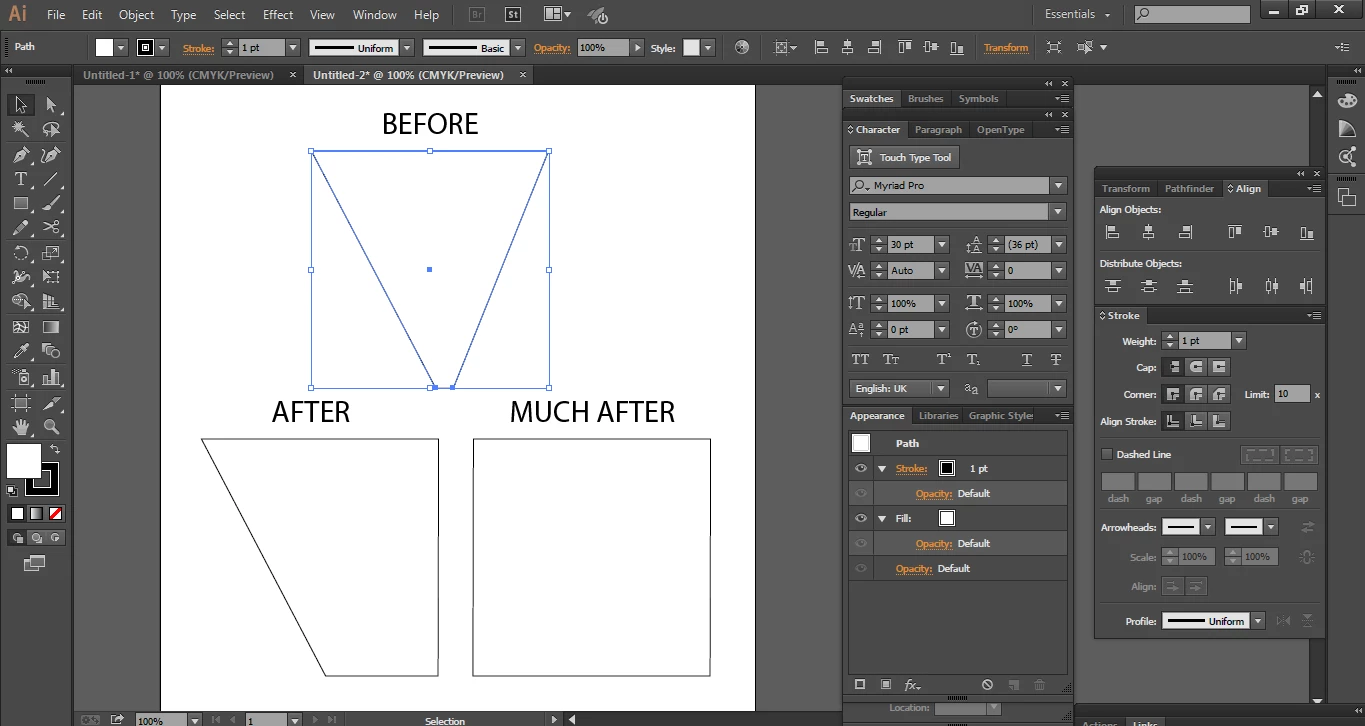
Like in this image I have triangle like shape which have anchor points on the bottom line. Now I like to make the square by these points I drag one point manually to left and right point manually. Now I would like to know is there is any way I can distribute these both point equally by single step?.

This topic has been closed for replies.
Correct answer Kurt Gold

As already mentioned, there are usually different ways.


Another one is to use the Align palette with its Align to key anchor point mode.


A similar technique as shown in your 3DS MAX video is currently not available in Illustrator.

3 replies

Kurt Gold
Community Expert
Kurt GoldCommunity ExpertCorrect answer
Community Expert
October 21, 2020

As already mentioned, there are usually different ways.


Another one is to use the Align palette with its Align to key anchor point mode.


A similar technique as shown in your 3DS MAX video is currently not available in Illustrator.

Jacob Bugge
Community Expert
Community Expert
October 21, 2020

Haziq,


I agree with Peter, of course.


There are always other ways. One of many less simple approaches, which may be relevant in cases of creating a rectangle/square out of a less cooperative shape, is be to use Effect>Convert to shape>Rectangle with Relative set to 0 and followed by Object>Expand Appearance.


tromboniator
Community Expert
Community Expert
October 21, 2020

Example A, below, is the situation in your BEFORE image. The two points at the bottom are not centered, so an equal distribution, which can be done by Direct Selection and use of the Scale Tool, would give the result at B. I could be wrong, but I doubt there is a method that is simpler to achieve a rectangle than activating Smart Guides and Shift-dragging the points individually until the Smart Guides indicate alignment with the upper points.


Peter


Haziq5DD6Author
Known Participant
October 21, 2020

That's I was not looking for but thanks for the response.
Below is the video of the another software which is 3DS MAX in which it is possible I am just sharing as an example too makes things clear.
Note: Watch from 2:12-2:30 in below video
https://www.youtube.com/watch?v=3eO6IEXGch8
Now in 3DS MAX if we select vertex (anchor point) we can use the scale tool for scaling equally in the scene. Same thing I want to perform in Adobe Illustrator but when I open scale tool in Adobe Illustrator it opens scale tool window.