
Known Participant
April 7, 2024
Question

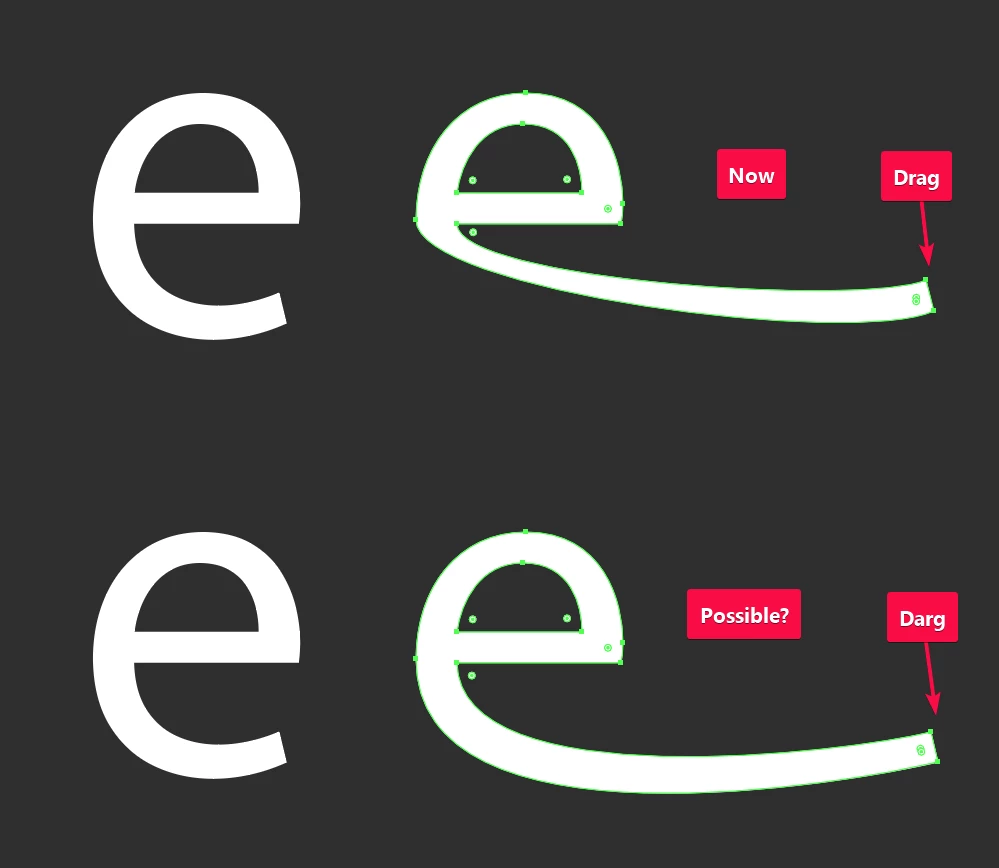
Is this possible in AI or any plugin?

  • April 7, 2024
  • 6 replies
  • 739 views

Is there an easy method to do this in Illustrator?

Right now, when I move points around, the shape gets distorted, which is expected. But I'm looking to see if there's a way for the shape to adjust itself automatically.

I know its possible in tools like "Glyphr Studio" but I want to do it in AI.


This topic is closed to new replies. Start a new post to keep the conversation going.

6 replies

Jacob Bugge
Community Expert
Community Expert
April 8, 2024

THE-KAL,


With the native tools you can try this approach (remember to deselect in between Direct Seletion Tool operations):


1) ClickDrag to stretch, as you did,

2) ClickDrag the Handles at the inner ends of the stretched path segments downwards to fit (the bottom one first), maybe also one or both of the Handles at the far end.


For more control, before 1) you can add Anchor Points in one of two ways, depending on desired appearance:


Either A) (roughly) where the segments are horizontal (some fonts have them there to start with), and also select them before a first ShiftClickDragging in 1) (using Shift to move the bottommost part horizontally and keep the height/depth of the letter), followed by a ClickDragging of the end Anchor Points to their desired end position.


Or B) (roughly) where the segment shapes are to be preserved (closer to the inner ends where they are still sloping) to lock thé inner ends, then just ClickDrag the the Anchor Points to their desired end position.


Corresponding to 2) you can adjust any relevant Handles as needed; there is a way to do that fully controlled


Egor Chistyakov
Inspiring
April 8, 2024

Not sure a clear method or a single plugin to do it in one sweep exists... In Ai, using AG’s PathScribe, it’s not that hard to eyeball it, like the GIF shows. This is three steps though.


Can you demo a short video of how Glyphr Studio handles it, please? Can’t make it do it.

THE-KALAuthor
Known Participant
April 7, 2024

I am aware of extension tools, but they don't help much in my case.


CarlosCanto
Community Expert
Community Expert
April 8, 2024

perhaps with a lot of patience you can get decent results with the Puppet Warp tool


Community Expert
April 7, 2024

Astute Graphics' VectorScribe plugin includes a path extension tool. The tool can be hit or miss at delivering desired results on curved path segments. The tool does at least display a preview line of where the path would extend. Sometimes that preview line will bend in some very odd directions.

Monika Gause
Community Expert
Community Expert
April 7, 2024

You could check out the Reshape tool https://helpx.adobe.com/illustrator/using/adjust-path-segments.html#stretch-parts-of-a-path


There is also a tool for continuing paths in the Astute Graphics plugin suite.