
Issue assigning existing paragraph style
Hi all!
I have been searching all morning, and can't find a lot of good documentation on using existing paragraph styles in AI scripting. I know you can build one live, but I specifically want to add in tabs and don't see that as an option to add to paragraph styles in any of the javascript refs.
I am making an "Export Log" that captures the version/date/time/artist name/layers affected to help our quality control team. My issue is that any new text added to the box ignores the existing paragraph styles, and I can't see to get it to apply what I have in the file.
I can trace the style, so I know it exists, and I can also trace the text box, so I think those paths are correct and working, it is just the applyTo that seems to not working. Here is my code below:
//get the textBox with the sign off content
exportLogText = docRef.textFrames.getByName("RT_Signoff");
//add the sign off text
exportLogText.contents += "v. " + versionLetter + "\t" + theDate + "\t" + timeStamp + "\tExport by: " + username + "\tLayers: " + layersExported;
exportLogText.contents += "\r"
//identify the "Export_Log" paragraph style that already exists in the AI doc
var paraStyle = docRef.paragraphStyles.getByName("Export_Log");
for (ps = 0; ps < exportLogText.paragraphs.length; ps++){
    paraStyle.applyTo(exportLogText.paragraphs[ps], true);
}
redraw();
Once it hits the applyTo line, the script stops. I have found similar posts claiming this code should work, so I am not sure what I am missing! Any help is appreciated.
I found similar code here:Applying a paragraph style to text frames in document
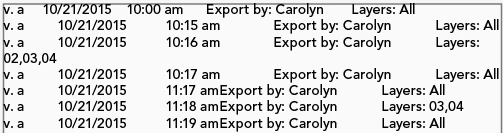
This is really an aesthetic issue, but I just can't stand the text to look like this:
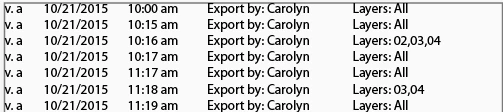
When it could look like this!
 AdChoices