
Issue found using the AIBeautifulStrokesSuite function SetCenteredWidthAtDistance.
Hello all,
I have discovered an issue using the function SetCenteredWidthAtDistance from the adobe suite AIBeautifulStrokesSuite.
I have a stroke-line with three anchor-points. One at the start of the line, one approximately in the middle of the line and one at the end:

At first, I am adding several width-points to this stroke-line by using the function sAIBeautifulStrokes->SetCenteredWidthAtDistance and adding a very small amount of width to each width-point:
AIErr err = kNoErr;
AIReal width = 0;
AIReal lWidth;
AIReal rWidth;
StrokeWidthSource wSource;
short mIndex;
WidthMarkerFlags mDetails = kNoWidthMarkerFlags;
vector<AIReal> fractionalPositions;
fractionalPositions.push_back(0);
fractionalPositions.push_back(0.00657895);
fractionalPositions.push_back(0.0131579);
fractionalPositions.push_back(0.0197368);
fractionalPositions.push_back(0.0263158);
fractionalPositions.push_back(0.0328947);
fractionalPositions.push_back(0.0394737);
fractionalPositions.push_back(0.0460526);
fractionalPositions.push_back(0.0526316);
fractionalPositions.push_back(0.0592105);
fractionalPositions.push_back(0.0657895);
fractionalPositions.push_back(0.0723684);
fractionalPositions.push_back(0.0789474);
fractionalPositions.push_back(0.0855263);
fractionalPositions.push_back(0.0921053);
fractionalPositions.push_back(0.0986842);
fractionalPositions.push_back(0.105263);
fractionalPositions.push_back(0.111842);
fractionalPositions.push_back(0.118421);
fractionalPositions.push_back(0.125);
for (int j = 0; j < fractionalPositions.size(); j++) {
	AIReal fraction = fractionalPositions.at(j);
	err = sAIBeautifulStrokes->GetWidthsAtDistance(selectedArt, fraction, 0, &width, &lWidth, &rWidth, &wSource, &mIndex, &mDetails);
	THROW_ERROR_IF(err);
	err = sAIBeautifulStrokes->SetCenteredWidthAtDistance(selectedArt, fraction, width + 0.05, kNoWidthMarkerFlags);
	THROW_ERROR_IF(err);
	sAIDocument->RedrawDocument();
}
After that I increase the width for four of these width-points, which I had added in the previous step:
vector<AIReal> increaseFractPositions;
increaseFractPositions.push_back(0);
increaseFractPositions.push_back(0.0394737);
increaseFractPositions.push_back(0.0592105);
increaseFractPositions.push_back(0.0789474);
for (int j = 0; j < increaseFractPositions.size(); j++) {
	AIReal fraction = increaseFractPositions.at(j);
	DrawFigure::drawCrossOnPath(selectedArt, fraction, Colors::blue(), selectedArt); // Debug: Mark the current fractional-position with a cross.
	for (int k = 0; k < 10; k++) {
		err = sAIBeautifulStrokes->GetWidthsAtDistance(selectedArt, fraction, 0, &width, &lWidth, &rWidth, &wSource, &mIndex, &mDetails);
		THROW_ERROR_IF(err);
		err = sAIBeautifulStrokes->SetCenteredWidthAtDistance(selectedArt, fraction, width + 1, kNoWidthMarkerFlags);
		THROW_ERROR_IF(err);
		sAIDocument->RedrawDocument();
	}
}
The following screenshot shows the result. The modulated width-point positions are marked with a blue cross:

Issue: As you can see, only the modulation for the width-points at fractional-position "0" and "0.0394737" are visible. The modulation of the other two width-points seem to have no effect.
Solution: If I now grab the handle of the anchor-point at the start of the line and move it upwards, the modulation of the other two width-points suddenly appear as well:
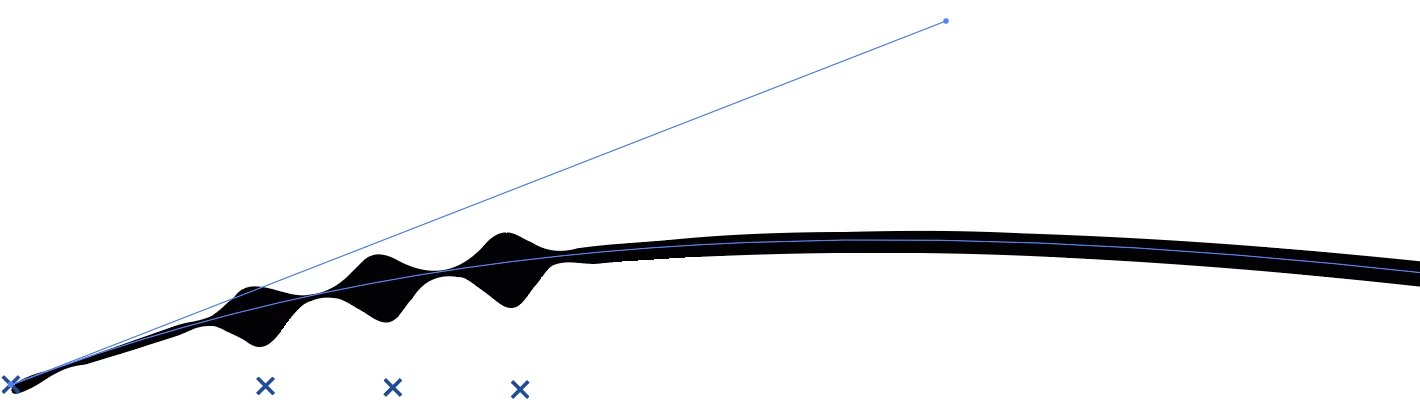
If I move the handle back to its original position, the modulation disappears again.
What happens here and how can I make the modulation of all four width-points visible, regardless of where the handle of the anchor-point is located?
Thank you very much in advance.
Best Regards
Fabian T.
 AdChoices