

Karl Fabian5F97
Inspiring
January 15, 2021
Answered

Issue grouping objects together using a script

  • January 15, 2021
  • 1 reply
  • 2213 views

Hello everyone,


After importing a PDF using my extended script for illustrator, I want to apply a warp effect to the three designs it contains. Visually, these designs are separated by a line and they occupy exactly a third of the PDF each. In the image below you can see an example of what this PDF might look like, note that I have selected the middle design and that I am hovering a star so that you can see that the design is not an image, but a composition of several SVG elements (GroupItem).
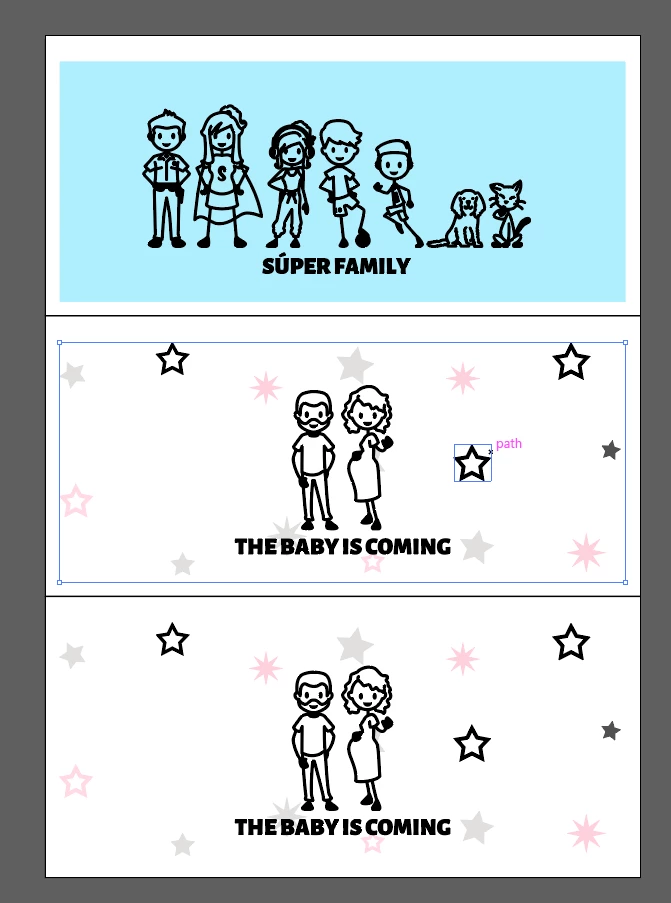
 

The issue I am having is selecting this path (I am referring to the "bounding box" of the design) in my script, if I iterate through all GroupItem or PathItem elements I cannot find any that matches this selection (looking at things like width and height). I have tried creating three GroupItem variables and storing all the PathItem elements in these depending on where they are located in the y-axis:

var fileRef = new File(myPath + "mug_canvas_3.pdf");

if (fileRef != null) {
  var docRef = open(fileRef, DocumentColorSpace.RGB, );
}

var docH = docRef.height;
var docW = docRef.width;
var ref1 = docH/3, ref2 = 2*docH/3;

var numPathItems = docRef.placedItems.length;
$.writeln('docH: ' + docH + " docW: " + docW
          + " ref1: " + ref1 + " ref2: " + ref2
          + " num path items: " + numPathItems);

var i, docPI = docRef.pathItems;
var g1 = docRef.groupItems.add(), 
    g2  = docRef.groupItems.add(), 
    g3  = docRef.groupItems.add();
for(i = 0; i < numPathItems; i++) {
  var pi = docPI[i];
  if(pi.controlBounds[3] < ref1) {
    g1.moveToEnd(pi);
  } else if(pi.controlBounds[3] < ref1) {
    g2.moveToEnd(pi);
  } else {
    g3.moveToEnd(pi);
  }
  //$.writeln('# PI ' + i + " bottomLeft: " + pi.controlBounds[3]);
}

$.writeln("G1: " + g1.pathItems.length)
$.writeln("G2: " + g2.pathItems.length)
$.writeln("G3: " + g3.pathItems.length)


However, the .moveToEnd function does not seem to work because it gives me this error:

--> "the new object cannot be created at the specified location"


If anything is not clear please let me know. I have a script that works for embedding a PDF as a groupItem and then applying the warp, but I want to apply three separate warps, one to each design. If you want to see the desired output I can of course share that too.


I would very much appreciate any help.


Thank you very much!
 

This topic has been closed for replies.
Correct answer Karl Fabian5F97

Hello again,


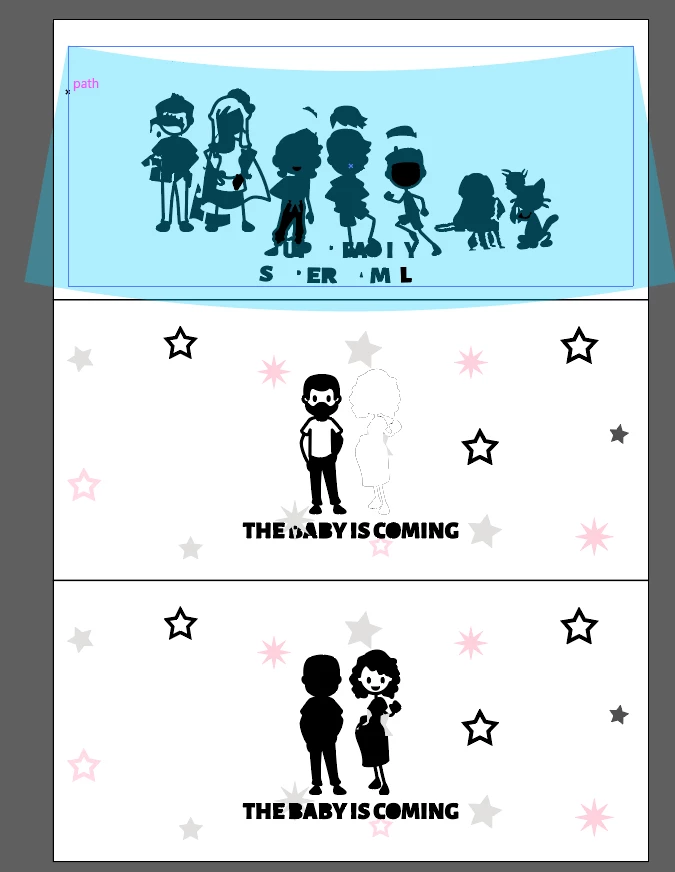
Thank you guys so much @Silly-V and @femkeblanco both of your solutions do the trick. However, unfortunately they create another problem which is that the order in which I add objects to the GroupItem will change the z-order of these. The depth order is not correct:

As you can see, I have applied the warp effect to the first GroupItem and that works perfectly. The problem, which is visually quite obvious, is that the designs have been modified due to the grouping. This occurs both when I use "pi.move(g2, ElementPlacement.INSIDE);" and "pi.moveToEnd(g2);". 


When I open the PDF in illustrator I can easily select the entire designs independetly by clicking on their bound boxes, surely there must be some way to replicate this in the code. If you guys have any idea how I might go about solving this issue I will be eternally grateful. I am going to attach this very PDF and my script in case anyone would like to use them for testing.


Thank you again for the help, it was great to get to understand how the move function works, and your suggestions technically do what I asked for.


Link to files 


Sorry for spamming this thread but I believe that I finally found a solution to my issue. I wanted to share it in case someone else has a similar problem.


I began tinking about the process when you're not scripting. You always select the items you want to apply an effect to. I therefore used the loop from before to make three selections, I then group the selections one by one and ultimately I apply the warp effect to these groupItem objects.


Here is the code:

// Open a file using these preferences
var fileRef = new File(myPath + "mug_canvas_3.pdf");

if (fileRef != null) {
  var docRef = open(fileRef, DocumentColorSpace.RGB, );
}

var docH = docRef.height;
var docW = docRef.width;
var ref1 = docH/3, ref2 = 2*docH/3;

var numGroupItems = docRef.groupItems.length;
//Print some relevant information about the document
$.writeln('docH: ' + docH + " docW: " + docW
          + " ref1: " + ref1 + " ref2: " + ref2
          + " num group items: " + numGroupItems);

var i, j, docGI = docRef.groupItems;
//Document is divided into three equally large areas which contain designs
//there might not be a design there, so this variable checks if there is
var designCheck = [];

//Loop three times for the three areas
for(j = 0; j < 3; j++) {
  designCheck[j] = false;
  docRef.selection = null;
  //Loop through all groupItem elements in the document
  for(i = 0; i < numGroupItems; i++) {
    var gi = docGI[i];
    //For the first area, check if groupItem contained within first third
    if(gi.controlBounds[3] < (ref1 - 10) && j == 0) {
      gi.selected = true;
      designCheck[0] = true;
      //For the second area, check if groupItem contained within second third
    } else if(gi.controlBounds[3] < (ref2 - 10) && gi.controlBounds[3] > (ref1 + 10) && j == 1) {
      gi.selected = true;
      designCheck[1] = true;
      //For the last area, check if groupItem contained within third third
    } else if(j == 2 && gi.controlBounds[3] > (ref2 + 10)) {
      gi.selected = true;
      designCheck[2] = true;
    }
  }
  //Group all the items selected to create one groupItem
  app.executeMenuCommand("group");  
}

app.redraw();

$.writeln('Num layers: ' + docRef.layers.length);
$.writeln('groups in layer: ' + docRef.layers[0].groupItems.length);

//Apply warp effect to all the groupItem elements in the layer
for(j = 0; j < docRef.layers[0].groupItems.length; j++) {
  if(designCheck[j] === true) {
    var placed = docRef.layers[0].groupItems[j];
    var effectStr = '<LiveEffect name="Adobe Deform"><Dict data="R DeformValue -0.115 R DeformVert 0 B Rotate 0 I DeformStyle 1 R DeformHoriz 0 "/></LiveEffect>';
    placed.applyEffect(effectStr);
    //This applies an envelope effect to the warped object
    //Useful if you want specific dimensions
    app.redraw();
    app.executeMenuCommand('expandStyle');
  }
}  

Thank you again @Silly-V and @femkeblanco for the help. If you have any insights or comments on the solution please let me know 🙂

1 reply

pixxxelschubser
Community Expert
Community Expert
January 15, 2021

Try to loop backwards.


Have fun

😉


Karl Fabian5F97
Inspiring
January 15, 2021

Hello!


Thank you for your answer. I tried looping backwards in stead but I'm afraid the same error still jumps:


To be completely honest I am not entirely sure about the "move" and "moveToEnd" functions. From the documentation it seems they're more suited for working with layers. However, I tried for adding a pathItem to a groupItem in another script of mine and it worked.


Any idea what this error is, or perhaps if you knwo any other workaround to group the objects together?


Thanks again 🙂

Silly-V
Legend
January 15, 2021

Try

pi.move(g1, ElementPlacement.INSIDE)