


Issue on Properties Panel Content Missing in Illustrator v29.3
Description of the Issue:
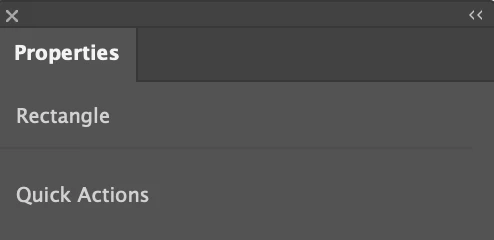
After upgrading to Illustrator v29.3, the Properties panel no longer displays its full content. For example, when selecting a rectangle, the panel only shows "Rectangle" and "Quick Actions," while other expected options are missing. This issue persists even after clearing the cache, resetting preferences, and restarting the application.
I downgraded to v29.2.1, and the Properties panel worked as expected. However, when I upgraded back to v29.3, the issue reappeared, confirming that this is specific to the v29.3 update.
Steps to Reproduce:
- Upgrade to Illustrator v29.3.
- Open an existing file or create a new one.
- Select an object (e.g., a rectangle) and check the Properties panel.
- Notice that the panel does not display the full options as it did in v29.2.1.
System Information:
- Operating System: macOS 15.3.1
- Adobe Illustrator Version: v29.3
Expected Behavior:
The Properties panel should display all relevant options for the selected object, as it did in v29.2.1.
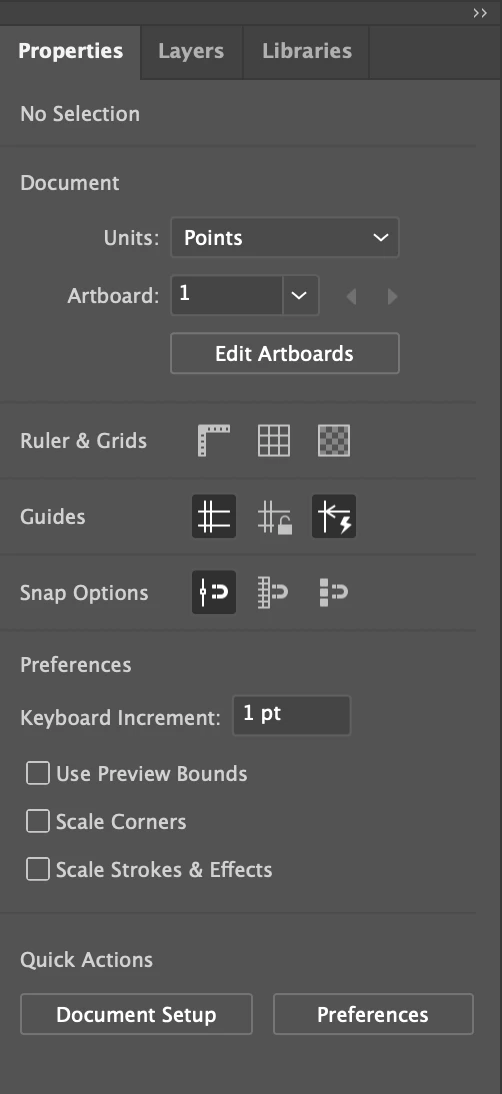
Actual Behavior:
The Properties panel only shows limited options (e.g., "Rectangle" and "Quick Actions") and does not display the full range of properties for the selected object.
Request for Assistance:
Please investigate and address this issue in a future update. If a workaround is available, I would appreciate guidance on how to resolve this while using v29.3.
Additional Note:
For now, I have downgraded to v29.2.1 to continue working without interruptions. I would like to ask if anyone else has encountered the same issue and if there are any known solutions or workarounds for this problem in v29.3?
 AdChoices