
Issue when exporting as PNG graphic from Illustrator
Hello You Guys!
Can someone who is proficient with Illustrator PLEASE HELP ME GRASP A MYSTERIOUS ISSUE that appears to have a simple solution, yet eludes me despite reading tons of comments on forums and doing research online.
Let's say I create a new document in Illustrator, set the units to Pixels, resolution to 300 ppi, and align everything to the Pixel Grid. I specify for the Artboard dimensions to be 270 pixels in width by 52 pixels in height.
Next, I draw out a basic rectangle using the Rectangle Tool that is the exact same pixel dimensions as the Artboard.
If I attempt to export this object as a PNG using the "File > Export > Save As" command, and regardless of whether I select the option to "Use Artboards", once I reach the final dialogue window that displays a preview of the exported rectangle the edges have a visible, very slight degree of empty, dead space along the edges where one would expect to see pure black, since the Artboard and Rectangle Object are the exact same size. Also, whether or not I choose the option of 'Transparent', 'Black', or 'White' for the background color should be inconsequential since the actual content area of the fully opaque Rectangle perfectly encompasses the Artboard area itself.
I've seen users mentions things to avoid such as having decimal points in the X and Y values for the Artboard, but in this case there seems to be no mistake made concerning those details.
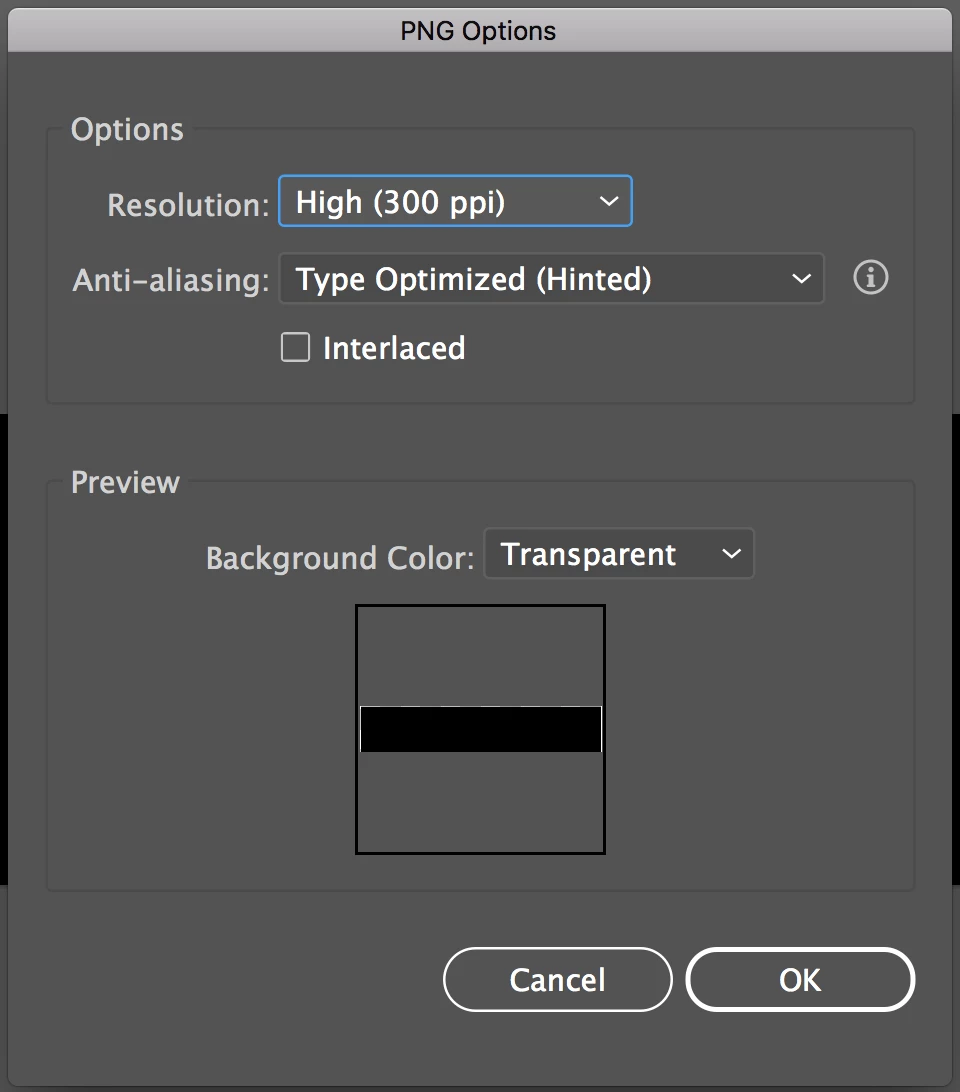
IF ANYONE would be gracious enough to impart some knowledge to me concerning this I'd be SO GRATEFUL!!! THANK YOU EVERYONE!!! 
 AdChoices