


Participant
April 3, 2019
Answered

Issues Importing CSV / Variable Data

  • April 3, 2019
  • 1 reply
  • 6042 views

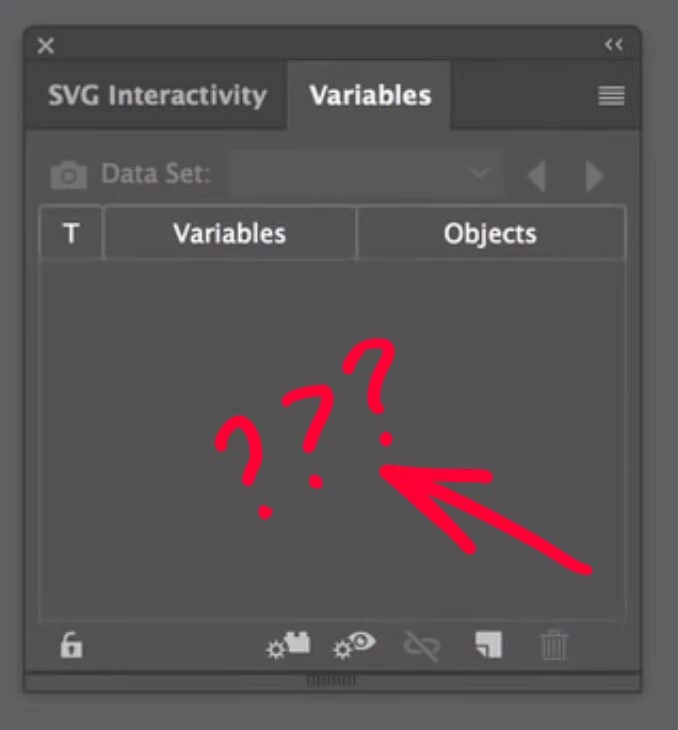
Hi! I'm trying to create an automated sequence for my artwork on Illustrator, but my Variables Panel doesn't even have the IMPORT button, so, I can't do nothing from here... Anybody facing these issues could help me? I can't start importing. Using Ai CC 2018 on iMac Mojave.

See Screenshot below:
Correct answer Silly-V

I think they stuck the feature in April or March of 2018, so maybe the version you have doesn't have it.

But don't worry - you can use my script - it took years to make and it continuously being tested by users around the world! In fact, it was so cool that Adobe put the native import button due to many users wishing this was plain built-in into Illustrator!

However due to the limitations of whatever constrains they've got to work under, the native feature ends up being too bare-bones for some users - well, ones who want to do things efficiently and in a smart way that is.

Adobe-Illustrator/VariableImporter.jsx at master · Silly-V/Adobe-Illustrator · GitHub

1 reply

Silly-V
Silly-VCorrect answer
Legend
April 3, 2019

I think they stuck the feature in April or March of 2018, so maybe the version you have doesn't have it.

But don't worry - you can use my script - it took years to make and it continuously being tested by users around the world! In fact, it was so cool that Adobe put the native import button due to many users wishing this was plain built-in into Illustrator!

However due to the limitations of whatever constrains they've got to work under, the native feature ends up being too bare-bones for some users - well, ones who want to do things efficiently and in a smart way that is.

Adobe-Illustrator/VariableImporter.jsx at master · Silly-V/Adobe-Illustrator · GitHub

rmmbastosAuthor
Participant
April 3, 2019

Thanks for that, I'll try now. Sorry about my ignorance, but where should I add this script? Just save and add to Illustrator scripts folder as a .jsx file?

Silly-V
Legend
April 3, 2019

Use the Raw button to go to the version of this page where it's only text - then copy it all and save as jsx, or do a right-click and Save-As (text) and save as jsx file.

Then you can either put it into your Illustrator scripts folder inside your Ai application like other scripts, so it shows up in your Menu > Scripts (you have to restart Illustrator to see it appear the first time)

Or you can go to File > Scripts > Other Scripts and choose this .jsx file from any other location on your computer!