Participant
July 25, 2022
Answered

Issues Linking Files in Adobe illustrator

  • July 25, 2022
  • 3 replies
  • 264 views

My adobe illustrator file won't save it says I am missing files. But once I relink all the files it still says all files are not relinked. What should I do?


 

    This topic has been closed for replies.
    Correct answer Anshul_Saini

    Hi @Carrie25387525gorm,


    Sorry to hear about the trouble you are facing. Would you mind sharing a few more details along with the ones asked by @Monika Gause:
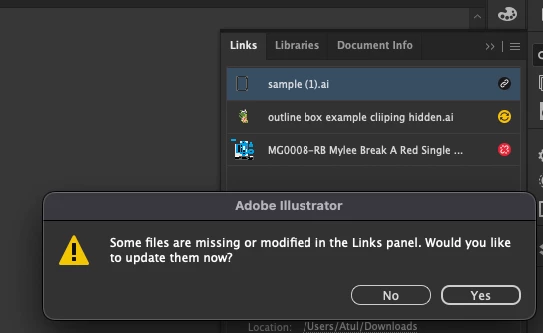
     

    • Are the links & the Ai files located in the same folder? Does putting them in the same folder helps?
    • Do you see any red & yellow icons in the link panel? If yes, then relink them and try saving.

    We are here to help. We just need more info.


    Thanks & Regards,

    Anshul Saini

    3 replies

    Anshul_Saini
    Community Manager
    Anshul_SainiCommunity ManagerCorrect answer
    Community Manager
    July 25, 2022

    Hi @Carrie25387525gorm,


    Sorry to hear about the trouble you are facing. Would you mind sharing a few more details along with the ones asked by @Monika Gause:


    • Are the links & the Ai files located in the same folder? Does putting them in the same folder helps?
    • Do you see any red & yellow icons in the link panel? If yes, then relink them and try saving.

    We are here to help. We just need more info.


    Thanks & Regards,

    Anshul Saini

    Monika Gause
    Community Expert
    Community Expert
    July 25, 2022

    Which version, which system?

    Where are the files located?


    What happens when you just click "No"?

    Nancy OShea
    Community Expert
    Community Expert
    July 25, 2022

    [Moderator moved from Using the Community (forums) to Illustrator.]


    Nancy O'Shea— Product User & Community Expert
