
Participant
August 31, 2023
Answered

Issues with transform panel

  • August 31, 2023
  • 1 reply
  • 440 views

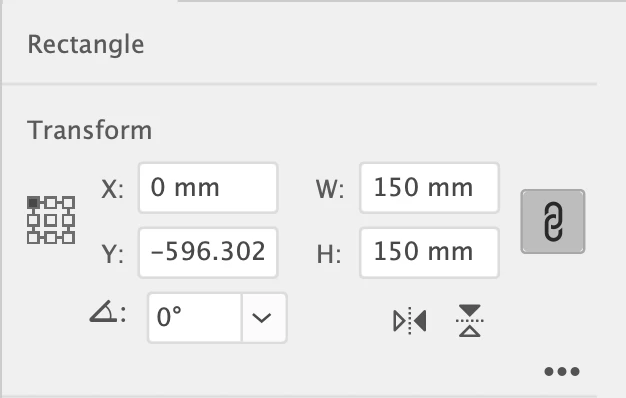
I am running Illustrator version 27.7 and I'm having issues with the transform panel. I have set the top left corner of the document to zero on both axis and I have made sure that the top left corner in the transform panel is selected so I can align items to dead zero but whenever I enter values into the X and Y axis it seems that Illustrator just picks a figure for me? Doesn't matter if it's linked or unlinked. It is incredibly annoying and I can seem to see that I have any settings wrong on this? Is anyone else having the same issue or had it and found a fix? Any help would be most appreciated!
 

This topic has been closed for replies.
Correct answer keithriches

So you have artboard rulers, not global rulers?


For me this looks like a preferences issue. They *can* get corrupted.


Removing and reinstalling the app seems to have resolved the issue, thanks for your assistance on this

1 reply

Monika Gause
Community Expert
Community Expert
August 31, 2023

Please tell us step by step what you are doing exactly - so which number do you enter and what does Illustrator do?


Also: did you reboot the computer? Reset the preferences?

Participant
August 31, 2023

Just simply trying to place items on the artboard in specific places, nothing more than that. I'm just looking to use the transform panel to place things where I need them but every time I enter specific numbers it seems to change them, with no uniformity to it whatsoever. Doesn't matter whether it's putting a direct number in each panel or nudging the numbers with the arrow keys. The computer has been rebooted a few times and to be honest, it has always been like that so I doubt its a preference issue, apart from changing the theme colour, everything else is the same as standard.

Monika Gause
Community Expert
Community Expert
August 31, 2023

Do you have snap to grid turned on?

Snap to pixels?

Use Preview bounds?

Scale strokes & effects?


And honestly: without a proper problem description, solving this will be stabbing in the dark. And if you just rule out certain things that are necessary for troubleshooting, then good luck with that.


Preferences reset can be made in a way that can be undone. Close the app and rename the preferences folder.