February 1, 2017
Answered

Jagged edges when printing from Illustrator or PDF

  • February 1, 2017
  • 2 replies
  • 7929 views

Dear Community,

I'm facing a strange problem when printing a vector file from Illustrator or exported PDF on my Epson Stylus Photo 1500W. The edges of the print look jagged / sawtoothy - as if it would be a pixel graphic with 72ppi.

I created the paths in Illustrator CS6 and selected best printing quality on my printer (max. resolution 5760 x 1440 dpi). I also tried printing the file on the same printer of a friend, but the problem is the same. I also tried to print it from a different computer to make sure it's not a driver problem.

Does anyone know the problem and could suggest a solution? Did I do something wrong?

Thank you very much.

* Here's a link to the pdf file: WeTransfer
    This topic has been closed for replies.
    Correct answer Mike_Gondek10189183

    Your PDF is CMYK, try RGB document mode.

    Support & Downloads - Epson Stylus Photo 1500W - Epson

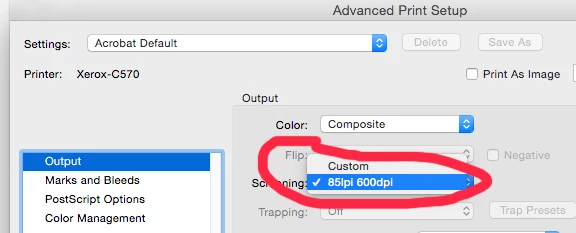
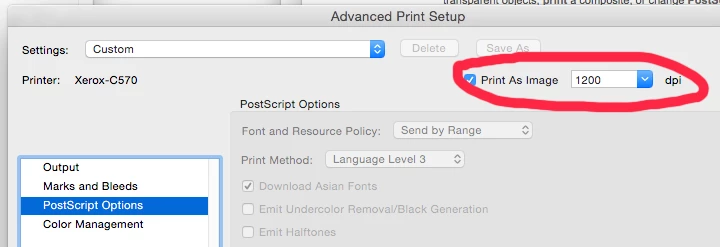
    Printing from Acrobat should work, as that printer has plenty of dpi, look over theses settings or any printer specific ones.

    Printing  as image shovel work if you are spending a lot of time on this, but will print slower.

    You also should look into updating your .ppd.

    2 replies

    February 1, 2017

    Thanks for the quick answer.

    In the forum I read that the problem could be that my printer is not a postscript printer and I should print it from Acrobat Pro, because it would act as a software RIP. When I print it from there the edges are less jagged than from Illustrator, but they are still jagged.

    Is there a solution for printing the file at full printing resolution?

    Here is a scan of the print from Illustrator:

    And here from Acrobat Pro (check thin rounded line):

    Om Nath Jha
    Legend
    February 1, 2017

    Hi Frank,

    Thanks for the information and the screenshots. I believe you are right about the printer and yes, the second one is better still not perfect. I am sure someone would come up with a workaround. I'll check myself for possibilities.

    Regards,

    Om

    Om Nath Jha
    Legend
    February 1, 2017

    Hi Frank,

    The PDF file that you shared does not look jagged at our end. I tried to print it and it was fine as well. I am sharing the screenshot of how it looks, please correct me if I get it wrong. Do share a sample print out how it looks at your end.

    Regards,

    Om