
et3d_
Known Participant
August 4, 2017
Answered

javascript's "do script" documentation for Aia no gui

  • August 4, 2017
  • 1 reply
  • 5705 views

Hi,

I'm leeching Adobe's and Stack Exchange's forums, but I can't find any recent post about this specific command:

           app.executeMenuCommand('ai_browse_for_script');

I want to run a action script on a batch of files without User Interaction, only jsx file - So this CMD needs more parameters like PATH and NODISPLAY. NB: this cmd showed up since CS6

It is not in guides CS6 nor CC2017 (we already knew that) So it's not present into Jongware's fantastic CHM reference guide; The best guide about menuExecCMD I've found so far is http://chuwa.iobb.net/tech/illustrator-cc2014-menu-comman.html

Maybe noone is using this which I highly doubt; the only documented workaround seems to doscript from VB which is something I could do, but I was focusing JSX for now.

So I will run something like this:

#target Illustrator-21

#targetengine main

var scriptID = "test-doscript v0.0";

var sourceFolder1 = null;

var fileType = null;

var files1  = null;

var sourceFolder1 = Folder ("C:/TEMPai/F1");

var fileType = "*.pdf";

var originalInteractionLevel = userInteractionLevel;
userInteractionLevel
= UserInteractionLevel.DONTDISPLAYALERTS;

     files1 = new Array();

     files1 = sourceFolder1.getFiles( fileType );

      if ( files1.length != 0 ){

          for ( i = 0; i < files1.length; i++ ){

               var sourceDoc1 = app.open(files1);

               app.executeMenuCommand('ai_browse_for_script');

          }

     }

I'm looking for the equivalent of this - NB: I don't car about errors as I debug them myself. I doing things 1 by 1, nowadays I [think to] know what I'm doing.

Thank you for your time, maybe my google-fu is stuck. Overall this is very important to have a complete control about what illustrator do, because I can manage keeping ram usage low with the For {} loop, indeed I can't save save my work until the otherwise I'll loose hours a day waiting Ai to save files

Possible workaround? Could I copy paste aia into jsx file? https://gist.github.com/moluapple/2568405

EDIT: app.executeMenuCommand('ai_browse_for_script';script1); is not syntax-correct

EDIT2 app.executeMenuCommand('ai_browse_for_script') is requesting vb or jsx file extension only

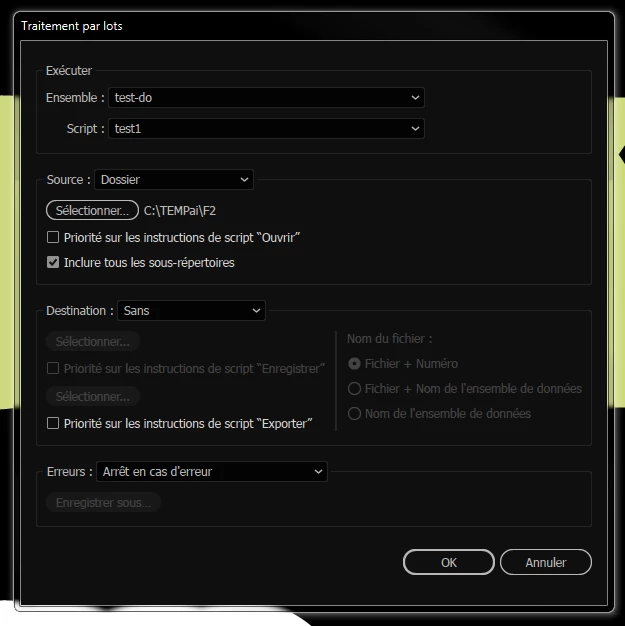
Image: This is the screen I want to get rid off keeping the same idea, instead there I will make the batch myself
Message was edited by: et3d Updated edit

This topic has been closed for replies.
Correct answer moluapple
  1. function createAction (str, set) { 
  2. var f = File(set + '.aia'); 
  3.   f.open('w'); 
  4.   f.write(str);
  5.   f.close();
  6.   app.loadAction(f);
  7. //f.remove();                                            The script doesn't add itself to the action list : / 
  8. }

=> function createAction (action, set) {

  f.write(str) => f.write(actionStr)

It seems to fail at the script creation step (it pop up briefly into the panel), because app.doscript(action, set) works if the action script is in the action panel

Thanks you're right, I've been reducing the code - At least I can manage to do more stuff with what I've learnt from your code

I'm running the code line by line with F10 in ESTK but strings and functions are not read that way

Edit: I have updated ESTK to the CC version so it's now v4.5 but issues persist


You don't need to use "try...catch" statement like what I had done,

change

try {  

  app.doScript(action, set); // first run because the action does not exist and pop-up dialog box, click Stop to create the action, do not point to continue  

} catch(e) {  

  createAction(actionStr, set);  

  app.doScript(action, set);  

}  

to

createAction(actionStr, set);  

app.doScript(action, set);

app.unloadAction (set, '');

1 reply

Silly-V
Legend
August 4, 2017

I know you want to get rid of batch dialog, but...
You can put in a script into your File / Scripts menu and then have your action play that script. Adobe says they fixed the bug now which used to happen when Actions would 'forget' the script that was recorded into them.

So now you can just do batch actions and play your custom script on each file relatively easily. Since it's a custom script and it has to be installed in your Illustrator's application presets / scripts folder, wherever that's at, and it only shows up in the File > Scripts menu after Illustrator is restarted, having many different scripts in there could be cumbersome. However since it's a customs script, you can make it generic for your purposes and run off some arguments, such as a text file on your desktop, etc, in order to play various different functions by means of the one menu script.

et3d_
et3d_Author
Known Participant
August 7, 2017

Thanks, yes I'm actively using it every day I want to go further. Is it possible to simply run Aia into Jsx?

I want to fit my Aia into Moluapple's JS script:

My Aia: https://gist.github.com/et3d/c7c08327404c39cbfeecd35ea25a46aa

Moluapple's JS to Aia script translated to EN: https://gist.github.com/moluapple/2568405

// CS6 only

var set = 'Script Action', // action set name

  action = 'PastePDF', // action name

  menuEn = 'paste', // menu English

  menuZh = '粘贴', // menu Chinese

  actionStr = ['/version 3',

  '/name [ ' + set.length,

  ascii2Hex(set),

  ']',

  '/isOpen 0',

  '/actionCount 1',

  '/action-1 {',

  '/name [ ' + action.length,

  ascii2Hex(action),

  ']',

  '/keyIndex 0',

  '/colorIndex 0',

  '/isOpen 1',

  '/eventCount 1',

  '/event-1 {',

  '/useRulersIn1stQuadrant 0',

  '/internalName (adobe_commandManager)',

  '/localizedName [ 15',

  'e8aebfe997aee88f9ce58d95e9a1b9',

  ']',

  '/isOpen 0',

  '/isOn 1',

  '/hasDialog 0',

  '/parameterCount 3',

  '/parameter-1 {',

  '/key 1769238125',

  '/showInPalette -1',

  '/type (ustring)',

  '/value [ ' + menuEn.length,

  ascii2Hex(menuEn),

  ']',

  '}',

  '/parameter-2 {',

  '/key 1818455661',

  '/showInPalette -1',

  '/type (ustring)',

  '/value [ ' + menuZh.length * 3,

  GBK2Hex(menuZh),

  ']',

  '}',

  '/parameter-3 {',

  '/key 1668114788',

  '/showInPalette -1',

  '/type (integer)',

  '/value 1885434740',

  '}',

  '}',

  '}'].join('\n');

try {

  app.doScript(action, set); // first run because the action does not exist and pop-up dialog box, click Stop to create the action, do not point to continue

} catch(e) {

  createAction(actionStr, set);

  app.doScript(action, set);

}

function createAction (str, set) {

  var f = File(set + '.aia');

  f.open('w');

  f.write(str);

  f.close();

  app.loadAction(f);

  f.remove();

}

function ascii2Hex (hex) {

  return hex.replace(/./g, function (a) {return a.charCodeAt(0).toString(16)})

}

function GBK2Hex (str/* Chinese characters*/) {

  var f = File('hex.txt'), hex;

  f.encoding = 'UTF8';

  f.open('w'), f.write(str), f.close();

  f.encoding = 'BINARY';

  f.open('r');

  hex = f.read().toSource().replace(/(?:\(new String\("|"\)\)|\\u00)/g, '');

  f.close(), f.remove();

  return hex

}

As you can see there is a hex conversion for some "command id" to understand what Aia is doing

It could be a begining of a solution what do you think?

es I f

Silly-V
Legend
August 7, 2017

Yes, that's how it's done.