
Javascript to make selection of top level group?
Does anyone know of a way to select a top level group by index?
For example, i have many files with deeply nested groups and i want to select all artwork in only the top level groups and create an artboard around the visible bounds of said group.
I've been able to loop through the groupItems of the document, but i cannot seem to differentiate between top level groups and sub groups. In other words, the loop is working properly, but it is creating an artboard around the top level group, then around each subgroup and each group within that subgroup.
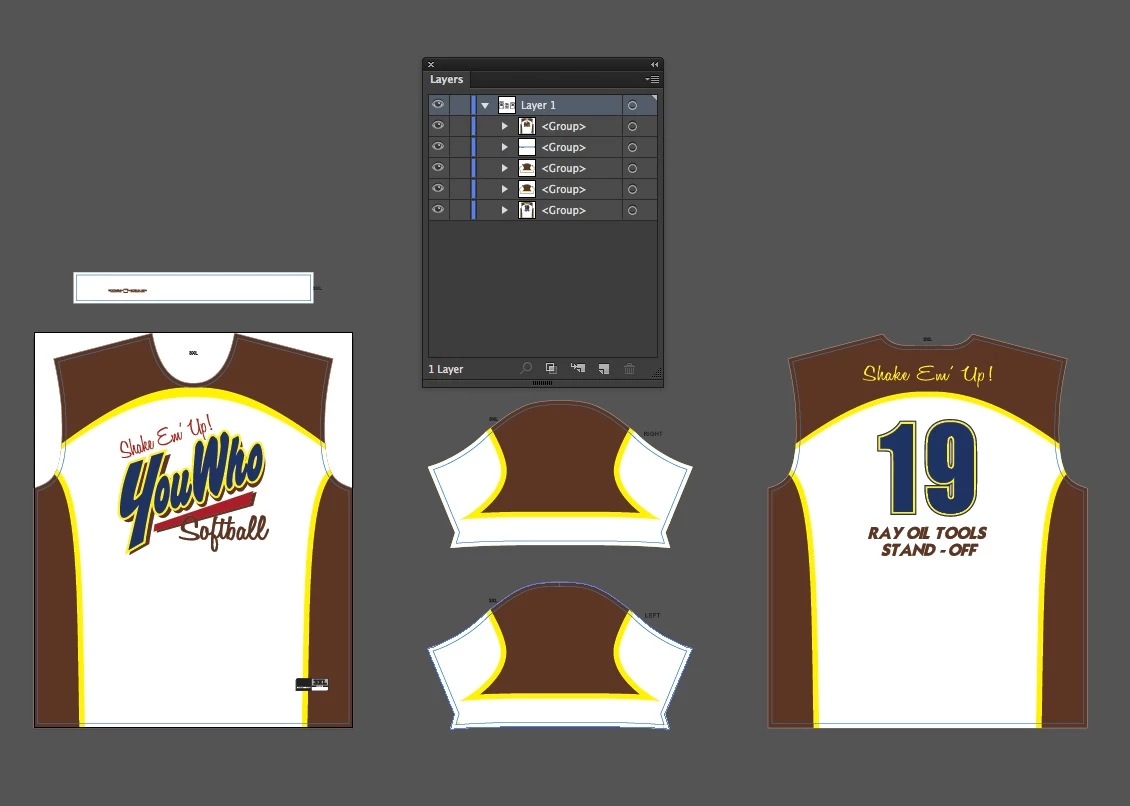
In the attached image, you can see that there are 5 top level groups in this document. However, basically everything else is grouped within those groups. for example, the "YouWho" logo is approximately 100+ path items grouped together. the information on the collar is grouped several times in a complex hierarchy as well.
The obvious solution is to ungroup everything and then regroup each shirt piece as 1 group. unfortunately, that in itself is more time consuming than manually creating the artboards and then the file is not very clean if we ever need to get back inside it to change/fix something.
i'm imagining some way to loop through the subgroups and ignore them if they are within the geometric bounds of the top level?? But i'm not really sure where to start on that code..
This is the code i have currently that is creating artboards around each groupItem, but also around each groupItem within the top level... it also throws an error because i think illustrator can't keep up with creating the artboards that fast? when i run the same script on less complicated artwork it works fine.
var docRef = app.activeDocument;
var aB = docRef.artboards;
var gI = docRef.groupItems;


for (a = 0; a< gI.length; a++){
    var currentGroup = gI;
    currentGroup.selected = true;
    var vB = currentGroup.visibleBounds;
    aB.add(vB);//an Illustrator error occurred: 1346458189 ('MRAP')
}
any ideas how to isolate that top level group and ignore the rest?? Thanks folks.
 AdChoices