King1ove
Known Participant
November 14, 2018
Answered

Joining 2 Arcs
  • November 14, 2018
  • 4 replies
  • 1643 views

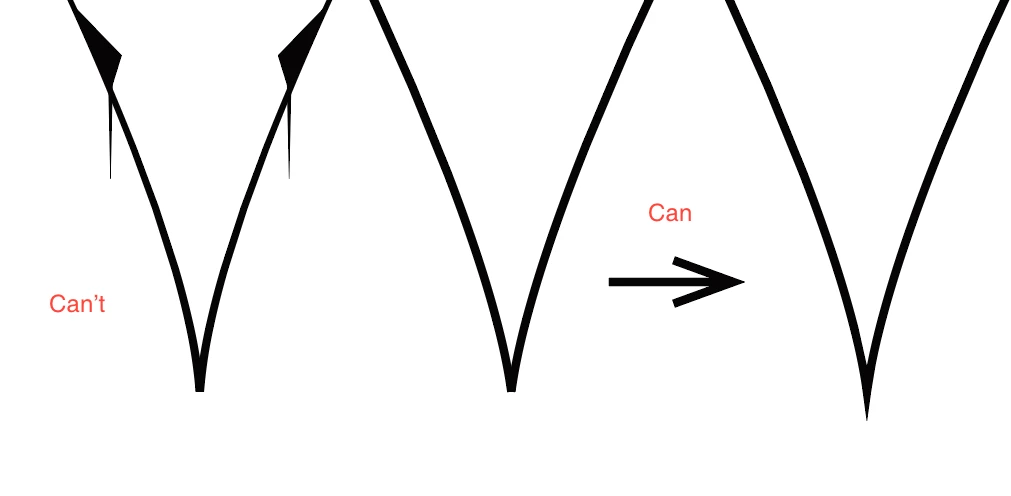
I couldn't figure out why did this happen? 

消息编辑者为:翔 迟

    This topic has been closed for replies.
    Correct answer Jacob Bugge

    King1ove,

    As I (still mis)understand it, you wish to have the join of the two segments (after joining the paths) appear like a common Butt Cap (horizontal at the bottom) rather than as a spike. The spike or sharp corner is there to create a single outer corner with its sides parallel to each of the segment ends and work that way unless the sharpness of the angle is too large for the Miter Limit, in which case it changes into the double corner like the Butt Cap, so to force a sharp corner at sharp angles you can increase the Miter Limit.

    And in your case you can force the double Butt Cap like corner by decreasing the Miter Limit, hence my suggesting your setting the Miter Limit to 1 in the Stroke palette.

    Did you try it?

    4 replies

    meganchi
    Legend
    November 15, 2018

    Why not take the left of the V shape copy and reflect it?

    Jacob Bugge
    Community Expert
    Community Expert
    November 14, 2018

    King1ove,

    As I (mis)understand it, set Stroke>Miter Limit to 1.

    Hi Kurt. Anything white in sight?

    Kurt Gold
    Community Expert
    Community Expert
    November 14, 2018

    No, Jacob. I do not sell and have never sold drugs. No white in sight.

    Kurt Gold
    Community Expert
    Community Expert
    November 14, 2018

    Can you clarify a bit?

    I'm not quite sure about what issue you are talking.

    jane-e
    Community Expert
    Community Expert
    November 16, 2018

    https://forums.adobe.com/people/Kurt+Gold  wrote

    Can you clarify a bit? I'm not quite sure about what issue you are talking.

    I agree with Jacob. If you can move the anchor point with the Direct Selection tool, and if there is now one anchor point, then the paths are joined. If you still have two separate paths, then we are wrong and you need to join them again.

    If you want that sharpness, you need to change the miter limit. You’ll find it in the Stroke panel.

    King1ove
    King1oveAuthor
    Known Participant
    January 7, 2019

    Year man, thanks for you guys. It is very helpful. I found a new “Am Cont”.

    King1ove
    King1oveAuthor
    Known Participant
    November 14, 2018

    The first picture can't be  the second one after ctrl+ J.

    Srishti_Bali
    Legend
    November 14, 2018

    Hi there,

    As per your query, you are trying to join 2 arcs and you get image 1 as result but you want the one shown in image 2. Please check out these tutorials:

    Drawing Arcs in Illustrator - YouTube

    How to Create Straight & Curved Lines | Adobe Illustrator - YouTube

    Hope it helps!

    Regards,

    Srishti