
Known Participant
March 15, 2015
Question

Joining paths chronologically (endpoint of objects with startpoint of the above insteadof automatic detection)

  • March 15, 2015
  • 1 reply
  • 740 views

Just like the topic says, is there a way (scripting?) to join paths (i think of about 100-500 of more or less detailed vector scribbles) by connecting every endpoint to the startpoint of the following object above?

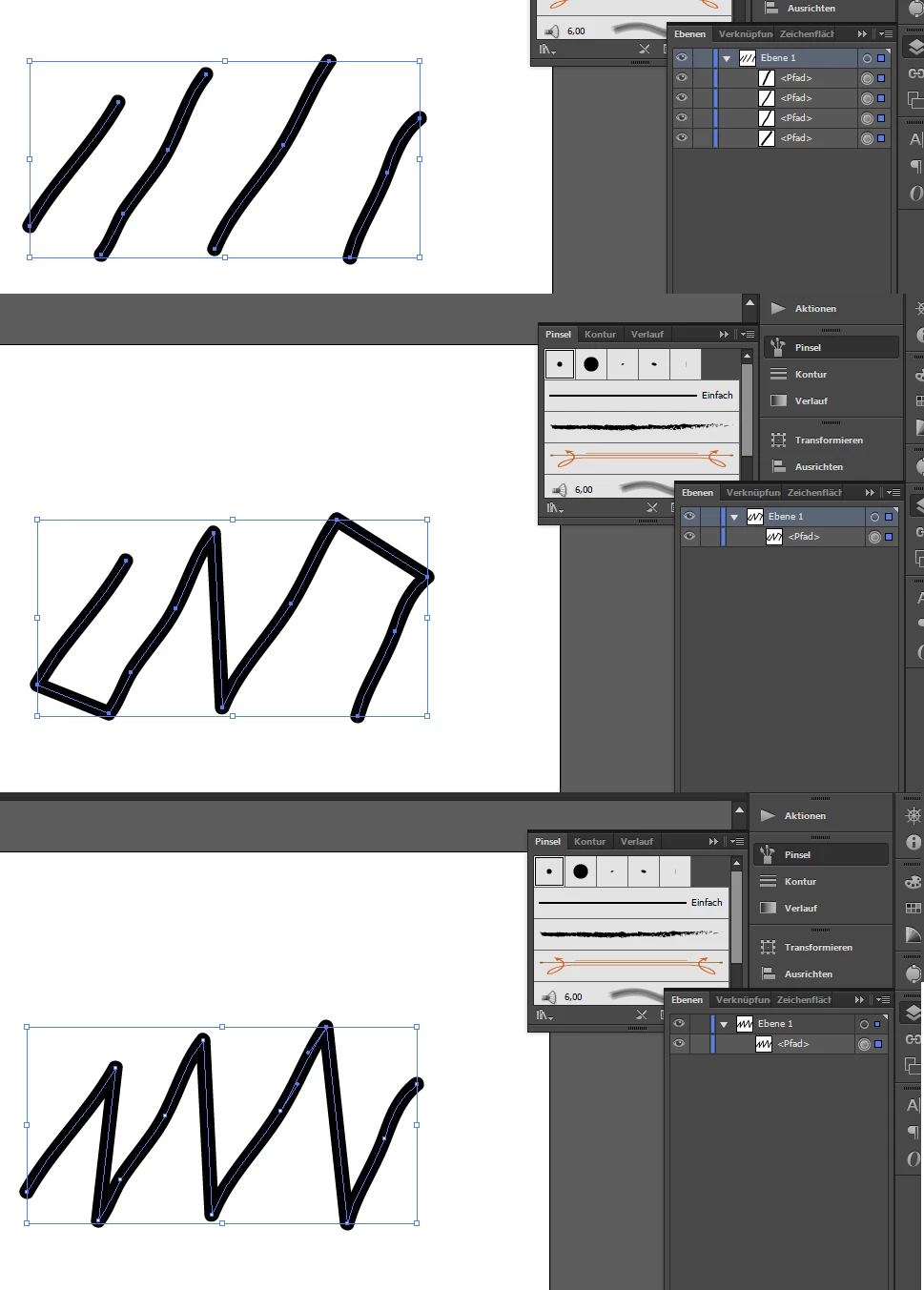
1) You see the original scribble, 4 brush strokes, every stroke beginning in the bottom and directed to top-right.

2) The result of selecting strokes > right-click > join produces automatically detected path, connecting the nearest (?) anchors.

3) What it should be: end-point of the first stroke should join with start-point of second and so on.

Would this be possible? This would save enormous amounts of time while animating paths in after effects.
This topic has been closed for replies.

1 reply

CarlosCanto
Community Expert
Community Expert
March 15, 2015

here you go, select your paths before running the script.

the paths must be drawn as you described, each path from bottom to top, all paths from left to right

// script.name = joinPathEndToNextPathStart,jsx

// script.description = custom script for this particular scenario

// script.requirement = two or more path items selected

// script.parent = CarlosCanto // 03/15/2015

// script.elegant = false;

// https://forums.adobe.com/thread/1728520

// https://forums.adobe.com/thread/1745514

#target "illustrator"

function main() {


    var idoc = app.activeDocument;


    var sel = idoc.selection;

    var pathitems = [];


    if (sel.length>1) {

        for (var a = 0; a<sel.length; a++) {

            var pgItem = sel;

            if (pgItem.typename == 'PathItem') {

                pathitems.push(pgItem);

            }

        }

        selection = null;

        joinEnds(pathitems);


    }

    else {

        alert('select two or more path items and try again');

    }

}

main ();

//---------------------------------------------------------------------------

function joinEnds(pa /*pathItems array*/) {

    var p1 = pa.shift();

    do {

        var p2=pa.shift();

        p1.pathPoints[0].selected = PathPointSelection.ANCHORPOINT;

        p2.pathPoints[p2.pathPoints.length-1].selected = PathPointSelection.ANCHORPOINT;

        app.executeMenuCommand ('join');

        p1 = selection[0];

        selection = null;

    } while (pa.length>0);

}

mschefersAuthor
Known Participant
March 15, 2015

Wow, nice to see somebody coming up with results! Unfortunately, i just used the simple lines as an example to show what i mean. In fact i would need this to join about 50 paths of a drawing, which i can show you here:

I would like to connect every single path of the guy in the middle with the followin one, so (just the grey guy) would be drawn in one-line, but still chronologic like i drew before. As i would never have taken the pen of the board... Would even this be possible?

Sorry for my bad explaination, if i got u wrong.

CarlosCanto
Community Expert
Community Expert
March 15, 2015

I don't understand what you're explaining...the paths don't actually have to be left to right, I just mentioned that so the script would yield the results exactly as you asked for.

the script actually joins the starting anchor of the top-most Path to the last anchor of the next Path and so on...the results would depend on the position of the paths and the stacking order they have.