Participant
April 27, 2024
Answered

JPEG RGB values are different when exporting from illustrator

  • April 27, 2024
  • 1 reply
  • 372 views

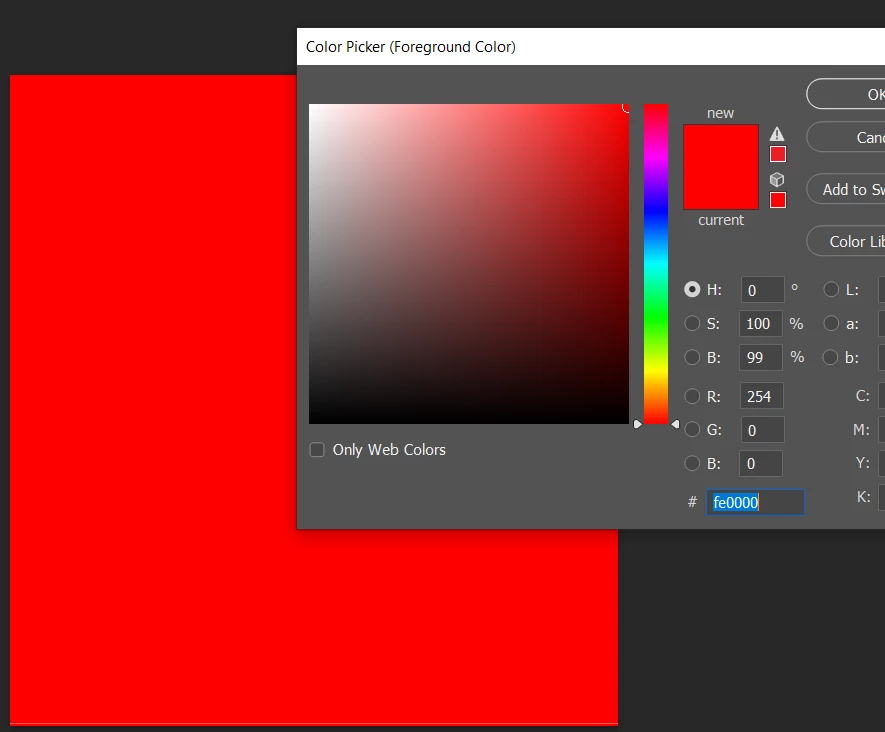
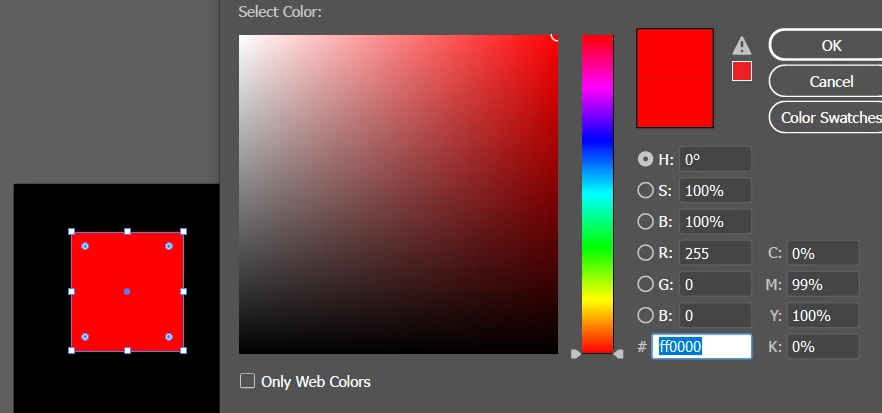
Today I noticed when I exported a JPEG image from Illustrator in an RGB file, the JPEG did not give the same RGB values. For example, the illustrator board had RGB of 255, 0, 0 value and the JPEG had 254, 0, 0 value. I tried a few methods I found on YouTube but none worked for me. Following are the example images to show the difference. Can someone expert explain this to me, please? 
This topic has been closed for replies.
Correct answer Ton Frederiks

JPEG is a lossy compression type, it will save space by deleting details and averaging colors.

That is what you are seeing, Photoshop will do the same with the same colors and compression quality.

If you want to keep the numbers, use PNG.

1 reply

Ton Frederiks
Community Expert
Ton FrederiksCommunity ExpertCorrect answer
Community Expert
April 27, 2024

JPEG is a lossy compression type, it will save space by deleting details and averaging colors.

That is what you are seeing, Photoshop will do the same with the same colors and compression quality.

If you want to keep the numbers, use PNG.

Brad @ Roaring Mouse
Community Expert
Community Expert
April 27, 2024

You will even see this happen from Photoshop. If you do as @Ton Frederiks mentions and export as a lossless format like PNG or TIFF, then open that in Photoshop and save that out as JPEG, you will see similar minor variations. This is the JPEG algorithm for ya... its method for reducing file size does myriads of calculations on all of your original colors based on brightness and chrominance and then spits out revised numbers, but still within the realm of basic human perception. In a continuous tone photo, this would never be noticed, but it can affect flat colors. Again, human perception would never see the differences.

PNG is a much better format for flat colours due the way it (losslessly) compresses files.