Participant
April 7, 2022
Question

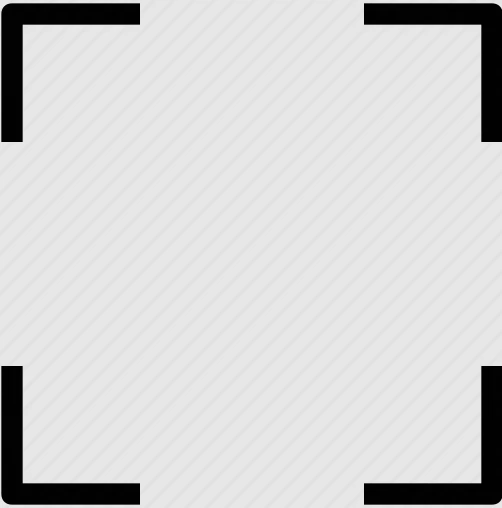
Keep corners only of a square

  • April 7, 2022
  • 4 replies
  • 1118 views

How can I create a square keeping only the cornes? I've tried clipping masks and I end up with the opposite result. 
 

This topic has been closed for replies.

4 replies

Jacob Bugge
Community Expert
Community Expert
April 7, 2022

Vikas,


Based on a stroked path with Butt Cap and Round Join you can also use Dashed line to get the desired appearance with the right values of Dash and Gap as described here,

https://helpx.adobe.com/illustrator/using/stroke-object.html


when you search the page for "Align Dashes to Corners and Path Ends, Adjusting Length to Fit"


Ton Frederiks
Community Expert
Community Expert
April 7, 2022

Another method is using a Knockout Group.

Add 2 fill to the stroked rectangle.

Use Effect > Convert to Shape > Rectangle to create 2 rectangles that cover the unwanted stroke areas.

Set the Opacity of both fills to 0%

Set the Opacity option below the Stroke and Fills to Knockout Group.

You can change everything if necessary.

Mike_Gondek10189183
Community Expert
Community Expert
April 7, 2022

If you need finer control over the exact size.


Draw  these 3 shapes, option click to enter sizes, and align center on both axis

Unite the red shapes, then subtract from the bottom shape using pathfinder. In outline mode with the hollow arrow tool draw a frame to select and delete these 4 points.


John Mensinger
Community Expert
Community Expert
April 7, 2022

There are probably several ways to go about it, here are the steps for one of them...

  1. Choose the Rectangle tool and draw out the square
  2. With the square still selected, choose Object > Expand Shape
  3. Choose Object > Path > Add Anchor Points
  4. And again, choose Object > Path > Add Anchor Points
  5. With the Direct Select tool, marquee select the center anchor points of the top and bottom sides, press Delete
  6. With the Direct Select tool, marquee select the center anchor points of the left and right sides, press Delete