agcote
Participant
May 20, 2020
Answered

Keep "More Options" visible at all times in properties window.

  • May 20, 2020
  • 3 replies
  • 2275 views

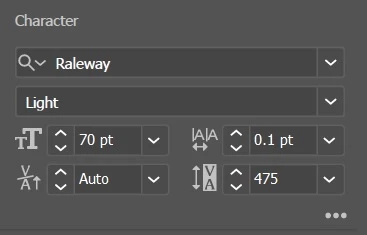
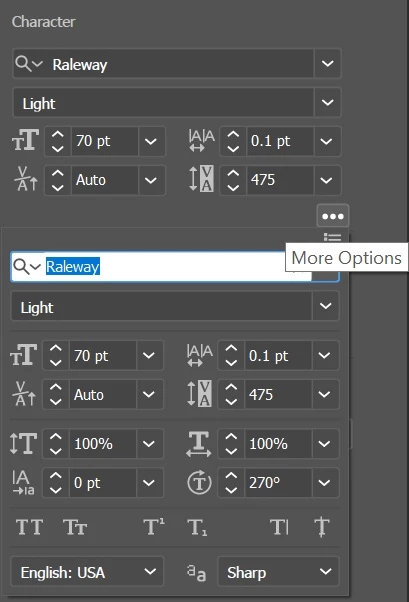
Hello, I find it extremely frustrating to keep having to press the 3 small dots to show "more options". These aren't more options, they're core functionality. There's so much wasted space anyways, so there must be a way to keep the menus expanded?


Correct answer Kurt Gold

No, unfortunately that is not possible at the moment. You may want to do a feature request.


Also, I think the UI of the Properties palette is currently just a nightmare. And in the most current Illustrator version some completely superfluous scrollbars were introduced, so that even more things are just hidden by default.

3 replies

MattStayGolden
Participant
June 26, 2023

I am *sorely* missing this feature.  It *used* to be available, but for some reason it was removed. Why?

Bring it back. There should be absolutely nothing in those menus that should not have the ability to be pinned.
Professionals in a design focused industry - might - ya know use them frequently.

Illustrator 2019 does every single thing I need it to - explain to me again why we need the 'cloud' model? 

Monika Gause
Community Expert
Community Expert
June 26, 2023

@MattStayGolden  schrieb:

I am *sorely* missing this feature.  It *used* to be available, but for some reason it was removed. Why?

Are you referring to docked panels? The Properties panel never had that.  


Illustrator 2019 does every single thing I need it to - explain to me again why we need the 'cloud' model? 


CC2019 already was a Cloud licence.

MattStayGolden
Participant
June 26, 2023

It seems I was talking about docked panels. One of the updates knocked out my layout and seems to have corrupted my saved layout. 

Regardless, there's no reason there shouldn't be the option to show all the properties if there's enough space.

I am aware CC2019 was a subscription model, I was mostly using it as a point that - 2019 and 2023 are almost identical save for a few minor features. Many of the UI changes weren't great or were IMO a step backwards. Changes for the sake of changes, that often have a side effect of knocking out plugins from the adopbe app for Vinyl cutters and the like - which require the manufacturer to be in lock step with adobe's releases to have that functionality available without having multiple copies of illustrator installed.

Jeff Witchel, ACI
Community Expert
Community Expert
May 20, 2020

I am not a big fan of the Properties panel. If Adobe's effort to make things easier for beginners, they've made it really difficults for these new users to get beyond the basics. You're far better off arranging the full featured panels into your own Workspace.

Kurt Gold
Community Expert
Kurt GoldCommunity ExpertCorrect answer
Community Expert
May 20, 2020

No, unfortunately that is not possible at the moment. You may want to do a feature request.


Also, I think the UI of the Properties palette is currently just a nightmare. And in the most current Illustrator version some completely superfluous scrollbars were introduced, so that even more things are just hidden by default.